
Sustainacity Design Document
| Project Name | Sustainacity |
| Genre | Sustainable City Simulation |
| Language | English (UK) |
| Platform | PC and Console |
Document History
| Version | Details |
| 1 | First Draft |
| 2 | Published |
Introduction
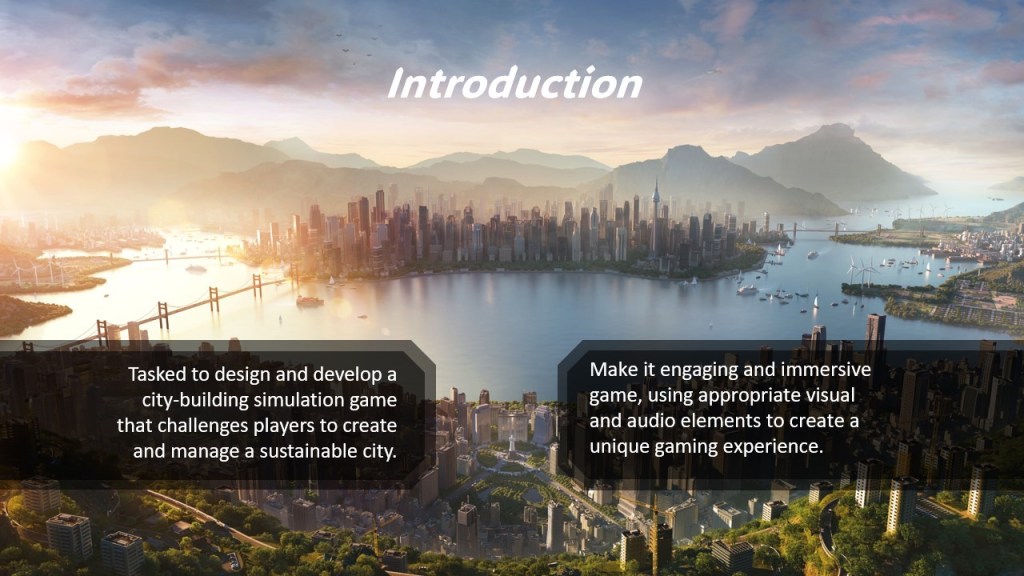
I have been tasked with designing and developing a city simulation game that challenges players to manage a sustainable city. It should be engaging and immersive and use appropriate visual and audio elements to create a unique gaming experience.
Planning
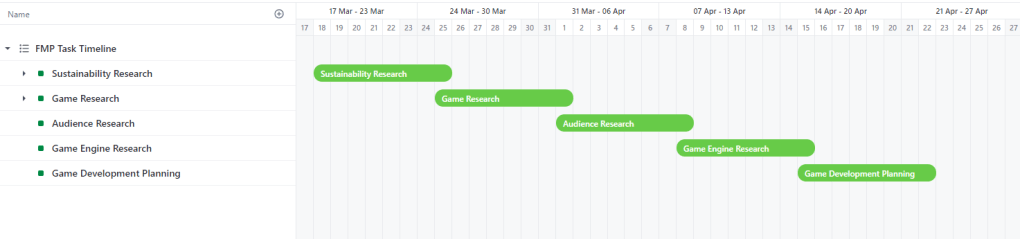
The Gantt chart outlines the project timeline for the Final Major Project (FMP), detailing the start and end dates for various research and planning tasks. It provides a visual representation of the project’s progression:
- Sustainability Research: 18th March to 25th March
- Game Research: 25th March to 1st April
- Audience Research: 1st April to 8th April
- Game Engine Research: 8th April to 15th April
- Game Development Planning: 15th April to 22nd April
This timeline ensures that each critical phase is allocated sufficient time for thorough research and planning, facilitating a structured and efficient project development process.

In this planning section, I will outline the detailed steps necessary to successfully develop the city simulation game. Each subsection will describe specific tasks and timelines for research and development. Progress will be meticulously tracked and managed using Trello, ensuring that all milestones are met efficiently and on schedule.
Sustainability Research
On 18/03/2024, I will begin comprehensive research on sustainability to inform the game’s design and mechanics. This research will encompass public concerns, perceptions about climate change, and actionable insights from global and national sources.
- 18/03/2024 – 25/03/2024: Read articles and data from the Office for National Statistics (ONS).
- 18/03/2024 – 25/03/2024: Review reports from the United Nations Development Programme (UNDP).
- 18/03/2024 – 25/03/2024: Study the People and Nature Survey from GOV.UK.
Resources needed: Online databases, ONS articles, UNDP reports, GOV.UK survey data.
Game Research
On 25/03/2024, I will start analysing existing city-building and simulation games to identify successful mechanics and elements that can be incorporated into my game.
- 25/03/2024 – 01/04/2024: Identify and play various city-building games (e.g., “SimCity,” “Cities: Skylines”).
- 25/03/2024 – 01/04/2024: Note key mechanics, user interface designs, and player engagement strategies.
- 25/03/2024 – 01/04/2024: Review academic papers and articles on game design and player psychology.
Resources needed: Access to games, academic journals, game design forums.
Audience Research
On 01/04/2024, I will define the target audience for the game, understanding their preferences and expectations through detailed research.
- 01/04/2024 – 08/04/2024: Conduct Primary Research through feedback forms
- 01/04/2024 – 08/04/2024: Develop personas and empathy maps.
- 01/04/2024 – 08/04/2024: Analyse feedback data to identify key demographics and psychographics.
Resources needed: Survey tools, access to target audience, data analysis software.
Game Engine Research
On 08/04/2024, I will evaluate Unreal Engine 5 as the primary engine for my project, focusing on its features and suitability for the game’s needs. This includes planning to use Blueprints for visual scripting and C++ for more complex functionalities.
- 08/04/2024 – 15/04/2024: Explore Unreal Engine 5 features and documentation.
- 08/04/2024 – 15/04/2024: Research and plan the use of Blueprints for rapid prototyping.
- 08/04/2024 – 15/04/2024: Investigate C++ coding practices and Unreal Engine 5 classes.
- 08/04/2024 – 15/04/2024: Evaluate performance, community support, and ease of use.
Resources needed: Unreal Engine 5 software, official documentation, community forums, coding tutorials.
Game Development Planning
On 15/04/2024, I will create a detailed roadmap for the game’s development, defining major milestones and deliverables for each phase.
- 15/04/2024 – 22/04/2024: Define major milestones and deliverables.
- 15/04/2024 – 22/04/2024: Assign tasks and deadlines in the Trello workspace.
- 15/04/2024 – 22/04/2024: Schedule regular check-ins and reviews.
Resources needed: Trello workspace, project management tools, timeline templates.
Audience Research
Research Planning
In the planning phase of my game design document, I will conduct comprehensive research to better understand my target audience.
This research will delve into various aspects, including demographics and psychographics, to gain insights into the preferences, interests, and behaviours of potential players. By exploring factors such as age, gender, location, interests, values, and gaming habits, I aim to create a game that resonates with the target audience on a personal level.
It will serve as the foundation for developing a game that not only entertains but also educates and empowers players to make a positive impact on the world.
My primary objective is to gather relevant insights into the demographics, psychographics, and preferences of my target audience to inform the development of a sustainable-themed game.
Primary Research Methods:
Feedback Forms:
- Design and distribute feedback forms to potential players.
- Include questions about demographics (age, gender, location), interests, gaming habits, and preferences related to sustainability and environmental themes.
- Collect responses and analyse the data to identify patterns and trends.
Secondary Research Methods:
Online Sources:
- Conduct online research to gather data and insights on demographics and gaming trends.
- Explore existing studies, reports, and articles related to environmental consciousness, gaming preferences, and mobile gaming habits.
- Compile relevant information to supplement the primary research findings and provide context for the target audience analysis.
To complement the primary and secondary research methods outlined, I will leverage additional opportunities to gather feedback and insights from my peers and classmates throughout various stages of the game development process. These interactions will provide valuable perspectives and help refine the game concept based on real-time feedback. Here’s how I plan to integrate feedback from my class members:
Concept Presentation Feedback:
After presenting my initial game concept to the class, I will distribute feedback forms to gather input on the overall concept, including its alignment with sustainability and environmental themes. Questions will focus on aspects such as clarity of the concept, appeal to the target audience, and potential areas for improvement. Analysing this feedback will help refine the concept and ensure it resonates with the intended audience.
Pitch Presentation Feedback:
Following the pitch presentation, where I outline the game’s key features and objectives, I will once again distribute feedback forms to gather input from classmates. These forms will include questions about the perceived marketability of the game, its potential to engage players, and any concerns or suggestions raised during the presentation. Analysing this feedback will help fine-tune the pitch and address any concerns raised by classmates.
Playtesting Session Feedback:
During the playtesting session, where classmates will have the opportunity to experience a prototype or demo of the game, I will gather feedback through direct observation and structured feedback forms. Participants will be asked to provide feedback on gameplay mechanics, user interface, overall enjoyment, and the effectiveness of sustainability-themed elements. This feedback will be crucial in identifying any usability issues, balancing gameplay mechanics, and refining the game’s overall experience.
Plan Conclusion
By following this research plan, I aim to gather valuable insights that will guide the development of a game that resonates with the target audience and effectively communicates and promotes sustainability and environmental themes.
Target Audience and Statistics
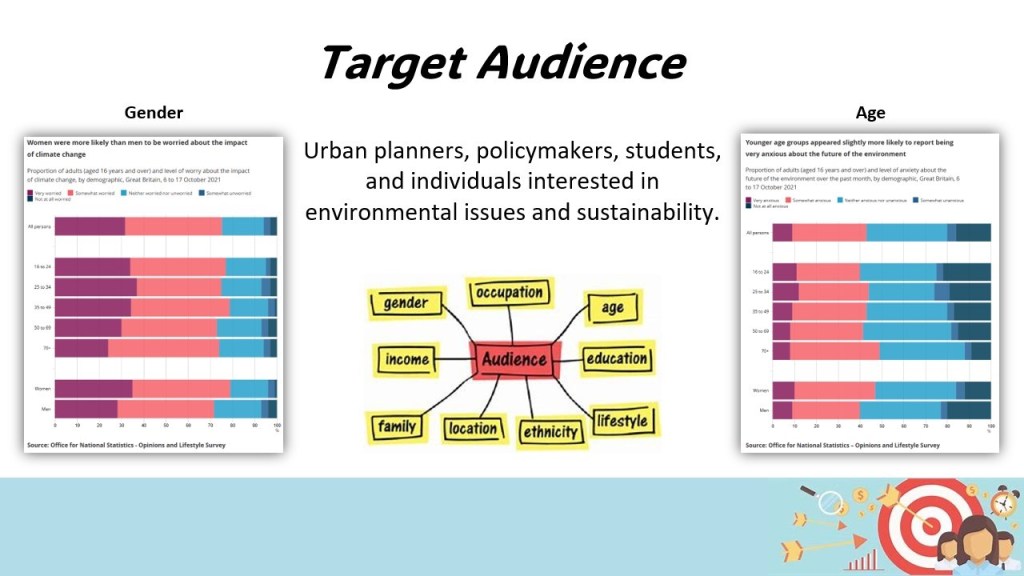
Understanding my audience’s demographics and concerns is crucial for crafting an engaging and relevant gaming experience. In this section, I will show the demographics and statistics related to sustainability, climate change, natural disasters, and wildlife concerns. By examining age-based insights on climate change worries, concerns about natural disasters, wildlife appreciation trends, and perceptions of urban green spaces, I aim to tailor the game to resonate with the diverse interests and priorities of players.
Climate Change
In October 2021, the Office for National Statistics (ONS) found that 75% of adults in Great Britain were worried about climate change. Interestingly, older adults, aged 70 and above, were less likely to express extreme worry compared to younger age groups. Only about a quarter (24%) of those aged 70 and over reported feeling very worried, whereas 37% of those aged 25 to 34 and 34% of those aged 35 to 49 expressed similar concerns.
Understanding the varying degrees of worry about climate change among different age groups can help tailor messaging and educational efforts. For instance, focusing on solutions and actions that resonate with younger generations who express higher levels of concern can be effective. Meanwhile, addressing the specific concerns or barriers that may lead older adults to feel less worried can help engage them in conversations and initiatives aimed at addressing climate change.
Natural Disasters
While specific statistics regarding age-related concerns about natural disasters are scarce, it’s crucial to recognize that these events impact millions worldwide. On average, between 40,000 to 50,000 individuals lose their lives due to natural disasters each year.
While concrete age-related statistics on natural disaster concerns may be limited, acknowledging the universal impact of such events can resonate across all age groups. Crafting educational materials and gameplay elements that highlight the importance of disaster preparedness and resilience-building can appeal to a broad audience. Additionally, emphasizing the role of community and collective action in mitigating the impact of natural disasters can be particularly impactful across generations.
Wildlife
According to the People and Nature Survey for England conducted between April 2020 and March 2021, over 40% of respondents agreed that they’ve spent more time outdoors. Additionally, nearly a third acknowledged increasing their attention to nature and wildlife since the onset of coronavirus restrictions.
Recognizing the increased interest in spending time outdoors and appreciating nature among survey respondents can inform strategies to engage my target audience. Incorporating gameplay elements that promote exploration of nature and wildlife, as well as highlighting the interconnectedness between human actions and the environment, can resonate with individuals across age groups. Moreover, showcasing the positive impacts of conservation efforts and encouraging participation in local environmental initiatives can foster a sense of stewardship among players.
Urban Nature
The same survey highlighted that urban green spaces are the most frequented natural areas, with 49% of respondents visiting them in the last month. Moreover, 40% of participants perceived an improvement in the quality of green spaces near their residences over the past five years.
The popularity of urban green spaces and perceived improvements in their quality present opportunities to connect with your target audience. Integrating game features that encourage exploration and interaction with urban nature can tap into this interest and promote a deeper appreciation for green spaces. Additionally, highlighting the benefits of urban biodiversity and green infrastructure can inspire players to advocate for and contribute to the enhancement of natural environments in their communities.
Audience Personas
An audience persona is like creating a detailed character profile for a specific group of people who might be interested in your game. It is a way to understand your players better by imagining their age, interests, preferences, and behaviours.
When making a game, audience personas help developers tailor their game to fit the needs and desires of their target players. For example, if your persona is a young adult who loves fast-paced action and competitive gameplay, you might design intense multiplayer modes or challenging levels to cater to that preference. If your persona is a casual gamer who enjoys relaxing gameplay experiences, you might focus on creating soothing visuals and simple mechanics.
Audience personas guide game developers in making decisions about gameplay mechanics, art style, story elements, and marketing strategies to ensure that their game resonates with the people they want to reach.
Persona 1
Meet Emma, a 28-year-old female residing in London, UK. With a bachelor’s degree in environmental science and a career as an Environmental Consultant, Emma is committed to sustainability, conservation, and climate change. She spends her free time hiking, bird watching, and volunteering for environmental causes, reflecting her passion for nature and wildlife.
Living by her values, Emma embraces a vegetarian lifestyle and prioritizes eco-friendly transportation options like cycling or public transit. She strives for a zero-waste lifestyle, demonstrating her dedication to minimizing environmental impact through everyday choices.
When it comes to gaming, Emma prefers mobile games for their accessibility and plays during her commute and in the evenings after work. She particularly enjoys puzzle games and simulations with themes centered around nature or city-building. Emma discovers new games through social media and recommendations from friends, indicating her reliance on trusted sources for entertainment options.
Emma’s needs and motivations in gaming are clear: she seeks a game that resonates with her values and interests while providing an opportunity to learn more about environmental issues and make a positive impact. A game that allows her to manage a sustainable city would capture her attention and engagement, aligning perfectly with her passions and aspirations.
Audience Persona 2
Introducing George, a 45-year-old nature enthusiast residing in Bristol, UK. With a high school diploma and a passion for gardening, George works as a gardener, nurturing green spaces and fostering his love for the environment. His interests span from tending to his garden and observing local wildlife to engaging in hands-on projects that promote sustainability.
Deeply rooted in his values of sustainability, conservation, and localism, George believes in the power of small, local actions to drive global change. He prefers practical, hands-on activities that allow him to actively contribute to environmental preservation and community well-being. George leads an outdoor-centric lifestyle, cultivating his own vegetables, and actively participating in recycling and composting practices.
When it comes to gaming, George gravitates towards desktop games for their immersive experiences, often unwinding with a session in the evenings after work or immersing himself in gameplay during weekends. He enjoys simulation games that simulate farming or nature, providing him with a virtual outlet to engage with his passions. Puzzle games also hold a special place in his heart, offering a mental challenge and an opportunity to unwind.
George stays connected to the gaming community through online forums and word-of-mouth recommendations from friends, always on the lookout for new experiences that resonate with his interests. He seeks a game that not only entertains but also educates, allowing him to delve deeper into various aspects of sustainability and apply them in his daily life. A game that offers simulation features, allowing him to experiment with different environmental scenarios and observe their real-world impact, would particularly captivate his interest.
Audience Persona Conclusion
In conclusion, creating personas provides valuable guidance in shaping the development of my game centered around sustainability, climate change, and natural disasters. By understanding the diverse needs, motivations, and preferences of your target audience, I can create a game that resonates deeply with players who share similar interests and values.
Emma’s persona highlights the importance of educational content and interactive experiences that empower players to make a positive impact on the environment, while George’s persona underscores the significance of immersive simulations and practical applications of sustainability principles.
Incorporating insights from these personas into my game design and marketing strategies ensures that my game not only entertains but also inspires and educates, fostering a deeper connection with players and driving engagement towards promotion of real-world sustainable efforts.
Empathy Maps
What will players think and feel?
Players will often worry about the impact of climate change and natural disasters. They feel a strong sense of responsibility for making a difference in the world and are motivated by a desire to learn more about sustainability and wildlife conservation. This sense of urgency and responsibility will drive them to seek out experiences that both educate and empower them to take action in their real lives.
What will players hear?
Players will hear frequent news updates about climate change and natural disasters, reinforcing their concerns and awareness. Discussions about sustainability are common in their social and professional circles, providing a constant stream of information and perspectives. Friends and acquaintances often recommend games and apps that align with their interests in sustainability, guiding them towards new and engaging content.
What will players see?
In their daily lives, players will notice environmental changes in their city, such as new green initiatives or the impacts of pollution. Their social media feeds are filled with posts about sustainability and conservation, keeping these topics at the forefront of their minds. Additionally, they will encounter advertisements for games and apps related to their interests, sparking curiosity and engagement.
What will players say and do?
Players are vocal advocates for sustainability and conservation, often discussing these topics and encouraging others to take action. They actively participate in environmental causes, whether through volunteering, donations, or lifestyle changes. When it comes to gaming, they seek out titles that align with their values, preferring games that offer educational content and opportunities to make a positive impact.
What are the players’ pain points?
One major pain point for players is the difficulty in finding games that truly align with their values and interests. Many games fail to provide actionable information about climate change, leaving players feeling unsatisfied and disconnected from their goals. They crave more depth and relevance in the content they engage with.
What gains do players seek?
Players seek games that are not only entertaining but also educational, offering meaningful insights into sustainability, wildlife, and climate change. They want to feel that their gameplay is making a difference, both in the game world and in reality. A game that effectively combines these elements will provide a sense of accomplishment and ongoing motivation to continue their efforts in promoting sustainability.
Audience Frameworks
OCEAN Personality Test
The OCEAN personality test, also known as the Big Five personality traits, is a widely accepted psychological model that describes five key dimensions of human personality: Openness, Conscientiousness, Extraversion, Agreeableness, and Neuroticism. This framework can guide my understanding of the target audience for Sustainacity and help tailor the game design to meet their preferences and needs.
Openness refers to how open-minded a person is. Individuals with high scores in openness are usually creative, adventurous, and interested in new experiences. Sustainacity, with its innovative blend of high-octane superhero action and environmental themes, will appeal to these users by offering creative problem-solving scenarios and novel gameplay mechanics.
Conscientiousness indicates how organized and dependable a person is. Individuals scoring high in conscientiousness are typically hard-working, detail-oriented, and like to plan ahead. Sustainacity’s complex city management and strategic planning elements will attract these users, providing them with opportunities to meticulously organize and optimize their sustainable city.
Extraversion measures how outgoing or social a person is. Highly extroverted individuals enjoy being talkative, assertive, and social. If Sustainacity incorporates strong social components, such as multiplayer or cooperative modes, it will appeal to these users by allowing them to interact and collaborate with others.
Agreeableness assesses how friendly and compassionate a person is. Those with high agreeableness are cooperative, helpful, and empathetic. Sustainacity’s themes of cooperation, community building, and helping the environment will resonate with these users, encouraging them to engage in and promote cooperative gameplay.
Neuroticism indicates emotional stability. Individuals with high neuroticism are sensitive, nervous, and prone to stress. To appeal to these users, Sustainacity can include relaxing and stress-free gameplay elements, such as peaceful city-building activities, nature exploration, and calming environmental sounds.
By understanding these traits in I target audience, I can design a game that aligns with their personality profiles, enhancing engagement and satisfaction. For instance, emphasizing creative problem-solving and cooperative gameplay will cater to those high in openness and agreeableness, while detailed strategic planning will attract conscientious players.
Bartle Test
The Bartle Test is another useful framework for understanding player types in gaming. It categorizes players into four types: Achievers, Explorers, Socializers, and Killers, based on their motivations and behaviours in a game. This can further guide the design and marketing strategies for Sustainacity.
Achievers are motivated by the desire to reach goals and complete tasks. They enjoy earning rewards, collecting achievements, and showcasing their progress. Sustainacity can appeal to Achievers by incorporating a robust system of achievements, badges, and milestones related to city management and sustainability goals.
Explorers thrive on discovering new areas, learning about the game world, and uncovering hidden secrets. Sustainacity can cater to Explorers by offering a rich and detailed game world with numerous opportunities for exploration, environmental learning, and discovery of unique sustainable practices.
Socializers are driven by interactions with other players. They enjoy forming connections, working together, and sharing experiences. Sustainacity can engage Socializers by integrating strong social features, such as cooperative city-building missions, in-game chat, and community events focused on environmental initiatives.
Killers seek competition and enjoy the thrill of defeating others. They thrive on challenges and asserting dominance. While Sustainacity primarily focuses on cooperation and sustainability, competitive elements can still be introduced through leaderboards, timed challenges, and city-building contests to attract competitive players.
By leveraging the insights from both the OCEAN personality test and the Bartle Test, I can create a well-rounded and engaging game that appeals to a diverse audience. Understanding these psychological and behavioural profiles allows us to design gameplay mechanics, narratives, and marketing strategies that resonate deeply with I players, ensuring a compelling and successful gaming experience.
Marketing
Identify My Audience
My game, Sustainacity, focuses on sustainability, climate change, and natural disasters. My target audience is individuals who are deeply interested in these topics and passionate about making a positive impact on the environment. The audience persona ‘Emma’, the environmentally conscious young professional, and ‘George’, the dedicated nature enthusiast—serves as a guide for my marketing efforts. These personas help us understand the values, interests, and behaviours of my potential players, ensuring that my marketing strategy resonates with them.
Craft a Compelling Message
Sustainacity is more than just a game; it’s an educational experience. my marketing message will highlight this unique combination of fun and learning. I will emphasize how players can immerse themselves in managing a sustainable city while gaining valuable knowledge about sustainability and climate change. By showcasing the game’s educational benefits alongside its entertaining gameplay, I can attract and engage my target audience effectively.
Using Social Media Platforms
YouTube:
Create engaging video content that showcases gameplay, unique features, and educational aspects of Sustainacity.
Collaborate with influencers who share a passion for environmental issues and sustainability.
Consider producing behind-the-scenes videos, developer diaries, and tutorials to deepen engagement.
Facebook:
Use targeted ads to reach people interested in similar games or topics related to sustainability and environmental conservation.
Regularly post updates, behind-the-scenes content, and engage with the audience through comments and direct messages.
Twitter:
Share real-time updates, news, and engage in conversations about Sustainacity.
Use a unique hashtag for the game, such as #SustainacityGame, to build a community and track conversations.
Engage with players, influencers, and industry figures through retweets, replies, and likes.
Reddit:
Participate in relevant subreddits, such as r/gaming and r/sustainability.
Share updates, engage in discussions, and seek feedback from the community.
Reddit users value transparency and direct engagement from developers, so maintain an open and honest dialogue.
Influencer Marketing
Collaborate with influencers who have an audience aligned with my target market. This could involve:
- Sponsored posts that highlight the educational and entertaining aspects of Sustainacity.
- Reviews and let’s play videos that showcase the gameplay and its unique features.
- Participation in environmental and gaming events hosted by influencers to reach a broader audience.
Community Building
Foster a strong community around Sustainacity through:
- Social media groups on platforms like Facebook and Discord, where players can share their experiences, provide feedback, and stay updated.
- Forums on my official website where players can discuss strategies, report bugs, and suggest improvements.
- In-game features that encourage community interaction, such as leaderboards, cooperative missions, and community challenges.
Track and Optimize
Utilize analytics tools to monitor the performance of my marketing efforts. Focus on:
- Tracking metrics such as engagement rates, click-through rates, and conversion rates across different platforms.
- Analysing which types of content and platforms yield the best results, allowing us to refine my strategy accordingly.
- Continuously optimizing my marketing campaigns based on data-driven insights to ensure maximum effectiveness and reach.
Marketing Conclusion
Effective marketing is about reaching the right people with the right message at the right time. By understanding my audience, creating a compelling message, using various social media platforms, collaborating with influencers, building a community, and continuously tracking and optimizing my efforts, I can successfully promote Sustainacity and inspire players to engage deeply with my game’s mission of sustainability.
Game Concept
Description
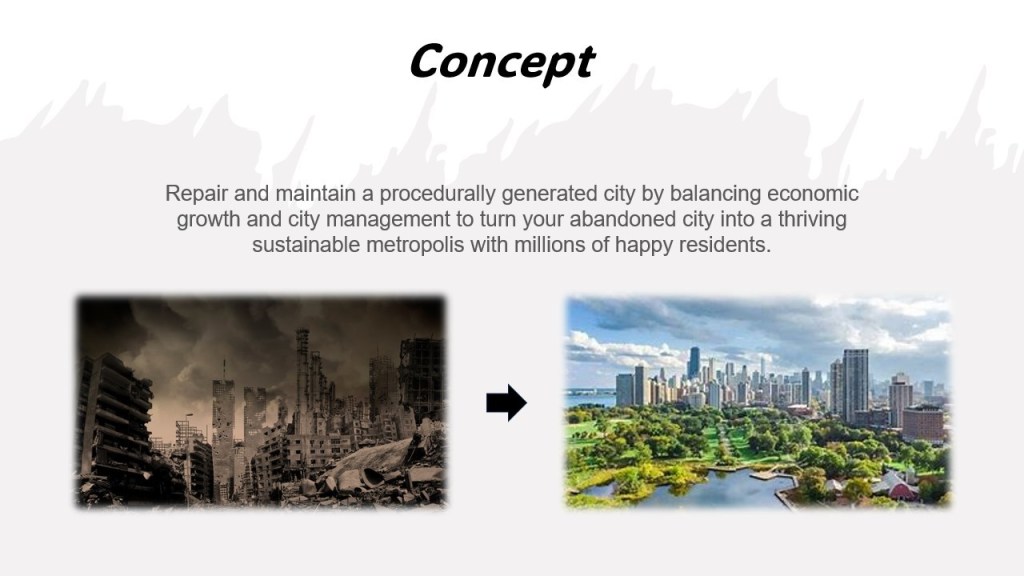
I have been assigned to create and develop a city simulation game that encourages players to construct and oversee a sustainable city. My goal is to craft an immersive and captivating gaming experience, utilizing suitable visual and audio components to deliver a distinctive gameplay encounter.
Initial Planning and Stimulus
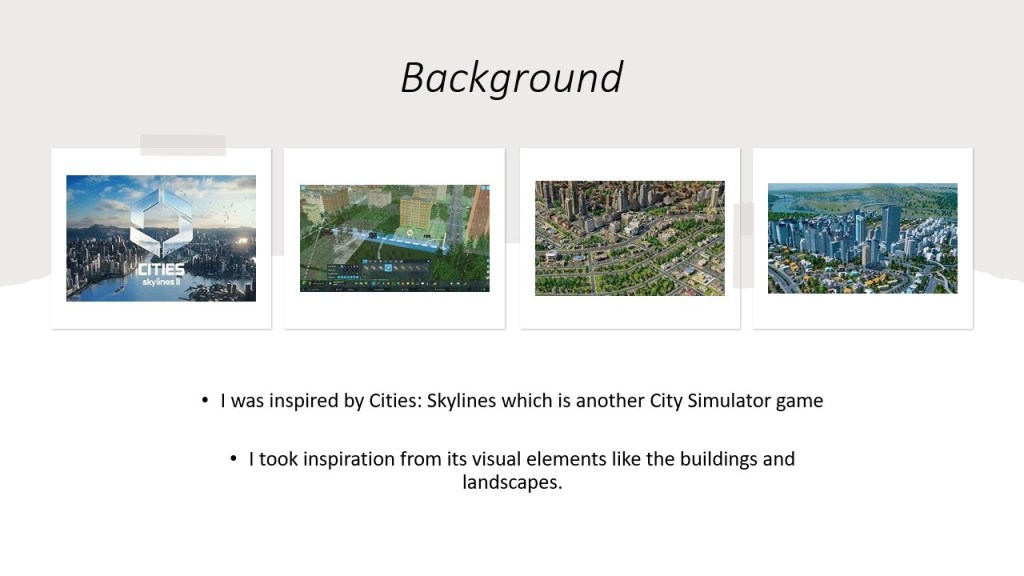
Upon receiving the brief, my attention was immediately captured by my past experiences with games such as City Skylines, SimCity, and Satisfactory. These gaming encounters have profoundly influenced the conceptualization of my design. In City Skylines, I observed intricate city planning and management mechanics that sparked my interest in urban development. SimCity’s simulation of urban life and its challenges further enriched my understanding of city dynamics. Additionally, Satisfactory’s focus on resource management and efficient infrastructure design resonated with my creative vision.
Concept
I have chosen to name my game “Sustainacity” because it perfectly captures the core idea and mission of the gameplay. The word “Sustainacity” combines “sustain” and “city,” highlighting the game’s focus on building and managing a city while promoting sustainability. It emphasizes the importance of making environmentally conscious decisions to ensure the long-term health and prosperity of the planet. By choosing this name, players immediately understand the game’s central theme and the type of experience they can expect, making it an ideal fit for my vision of creating an engaging and educational gameplay experience centered around sustainable urban development.
Platform
Performance
Choosing to develop Sustainacity for PCs and consoles allows us to leverage their superior processing power and graphics capabilities. This enables us to create more complex gameplay mechanics, deliver higher resolution graphics, and ensure smoother overall performance. By tapping into these strengths, I can provide a richer, more detailed gaming experience that fully immerses players in the intricacies of managing a sustainable city.
Control Options
PCs and consoles offer diverse control options, such as keyboard and mouse or gamepad, which can significantly enhance the gaming experience. These control methods provide greater precision and immersion, crucial for a simulation game like Sustainacity where detailed management and strategic planning are key. The flexibility in control schemes also allows us to cater to a wide range of player preferences, ensuring a comfortable and engaging experience.
Audience
PC and console gamers typically represent a dedicated audience that values high-quality gaming experiences. This demographic is more likely to invest significant time and money into games they are passionate about. By targeting PCs and consoles, I align with an audience that appreciates the depth and complexity Sustainacity offers and is eager for games that provide both entertainment and education.
Monetization
Games on PCs and consoles often come with a higher upfront cost compared to mobile games, which can lead to greater revenue per user. Additionally, established marketplaces like Steam, PlayStation Store, and Xbox Store simplify the distribution and sales process. These platforms provide robust frameworks for monetization, including options for downloadable content (DLC), expansions, and in-game purchases, allowing us to maximize my revenue potential while delivering continuous value to players.
Game Length and Depth
PC and console games are known for their extended gameplay and substantial depth, factors that are essential for Sustainacity. By developing for these platforms, I can create a game that offers extensive engagement through detailed simulation, strategic decision-making, and progressive challenges. This depth not only enhances user retention but also encourages players to explore and invest more time into mastering the game.
Big Screen Experience
PCs and consoles are often connected to larger screens, providing a more immersive and visually striking gaming experience. For a game like Sustainacity, where visual detail and cityscape design play crucial roles, the big screen experience allows players to fully appreciate the beauty and complexity of their sustainable cities. This level of immersion is difficult to achieve on smaller mobile screens, making PCs and consoles the ideal platforms for my game.
Platform Conclusion
The choice of platform for Sustainacity—PCs and consoles—is driven by the type of game I am creating, my target audience, and my business model. PCs and consoles offer performance capabilities, control options, and audience engagement that align perfectly with the detailed, immersive, and educational nature of my game. By capitalizing on these strengths, I can ensure that Sustainacity not only meets but exceeds the expectations of my players, providing a compelling and impactful gaming experience.
Unique Selling Point
Sustainacity stands out in the crowded superhero genre by uniquely combining high-octane action with a powerful environmental message. Unlike traditional superhero games, where the focus is solely on battling villains, Sustainacity tasks players with a dual-threat heroism that involves both protecting the city from catastrophic events and actively combating environmental issues.
Key Features
Eco-Friendly Protagonist
Sustainacity offers a unique twist on the traditional superhero genre by focusing on environmental sustainability. Players don’t just save the city from immediate threats like meteors but also tackle long-term threats such as pollution. This innovative approach not only sets the game apart but also emphasizes the importance of environmental stewardship in an engaging and interactive way.
Dynamic Gameplay
The game masterfully combines fast-paced action with strategic decision-making. Players must constantly balance their efforts between addressing immediate threats, such as meteor showers, and implementing long-term solutions to reduce pollution. This dynamic gameplay ensures that players remain engaged and challenged, requiring them to think on their feet and plan ahead.
Educational
While Sustainacity is undeniably fun and exciting, it also serves an educational purpose. Players learn about the importance of sustainability and the detrimental effects of pollution on urban environments. By integrating educational content seamlessly into the gameplay, the game promotes awareness and understanding of critical environmental issues, making learning an enjoyable experience.
Immersive Experience
Sustainacity offers a deeply immersive experience, allowing players to soar through a fully realized 3D cityscape as an eco-friendly superhero. The game features detailed environments with day and night cycles, changing weather conditions, and responsive NPC characters. This level of immersion helps players feel truly connected to the game world, enhancing their overall experience.
Reward System
The game features a robust dual reward system that recognizes players for both their heroism in saving the city from immediate threats and their efforts to reduce pollution. This system keeps the gameplay engaging and reinforces the game’s core themes by rewarding players for making sustainable choices. Players are motivated to continue playing as they see tangible rewards for their actions.
Customizable Character
Players can customize their superhero’s appearance and abilities, allowing them to tailor the game to their personal style and strategy. This customization option adds a layer of personalization and replay ability, as players can experiment with different looks and powers to find the combination that best suits their approach to saving and sustaining the city.
Concept Pitch Presentation

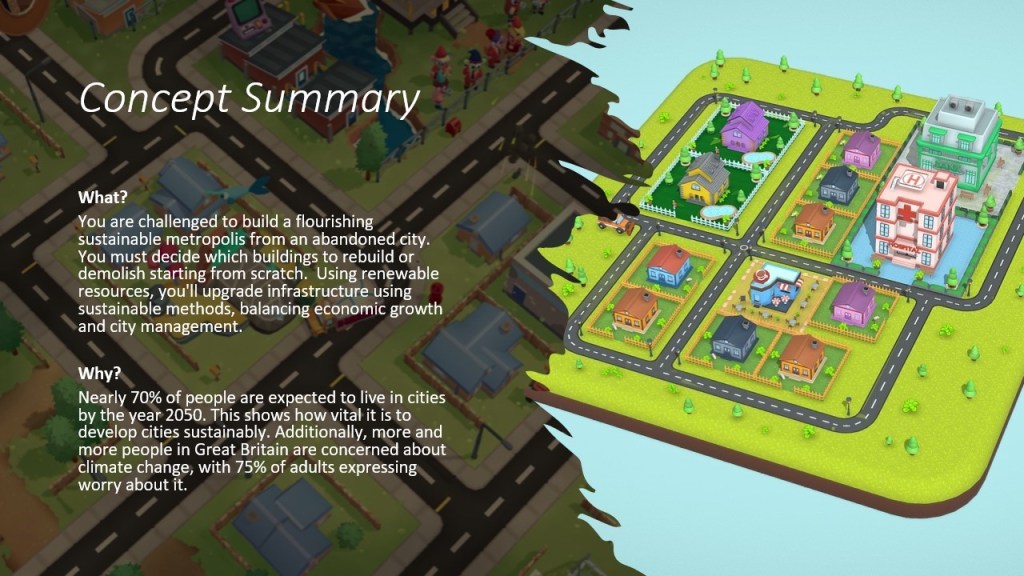

Concept Feedback and Data Analysis


Ideas for multiplayer functionality, customization options, and reward systems add layers of engagement and replay value, enriching the overall player experience. However, suggestions involving combat mechanics, such as adding guns and introducing rival cities, may significantly alter the game’s intended focus on sustainability and city-building. Careful consideration is needed to ensure that any additional features align with the game’s core themes and maintain coherence with the overall vision. Overall, the feedback provides valuable insights into potential avenues for further enhancing the gameplay experience.

Conversely, suggestions for higher ratings like PEGI 12 and PEGI 16 may stem from considerations of complexity, thematic elements, or potential challenges within the game. However, it’s essential to carefully assess the content of the game to ensure that the chosen rating aligns with its intended audience and does not include any inappropriate or mature content.
Overall, the varied responses highlight the importance of evaluating the game’s content, mechanics, and themes comprehensively to determine the most appropriate PEGI rating that ensures both enjoyment and safety for players within the designated age range.

However, a minority of respondents rated the procedural generation aspect as less crucial, suggesting that they may prioritize other elements of the game concept or gameplay mechanics over procedural generation in terms of enjoyment and replay ability. It’s essential to consider these differing viewpoints when designing the game, ensuring that procedural generation contributes meaningfully to the overall player experience without overshadowing other aspects of gameplay.
Overall, the feedback highlights the importance of carefully balancing various game elements to maximize replay ability and enjoyment for players.

Furthermore, some respondents pointed out the opportunity for the economy system to raise awareness about environmental issues and encourage sustainable practices in the game world. However, they also expressed concerns about balancing the economy system to prevent it from frustrating players or diminishing their enjoyment. They stressed the need for careful design and testing to ensure the system strikes the right balance and delivers a satisfying gameplay experience.
In summary, the feedback underscores the significance of the economy system in engaging players and immersing them in the game. It highlights its potential to positively contribute to the overall experience while emphasizing the importance of careful design and testing to maintain balance and player enjoyment.

Environmental hurdles like natural disasters and climate change were identified as engaging obstacles for players. Integrating these challenges not only adds depth to the gameplay but also raises awareness about real-world issues such as sustainability and disaster readiness.
Moreover, recommendations to incorporate educational elements, like comparing how different countries tackle environmental problems, can enhance the game’s authenticity and provide valuable learning experiences for players.
In summary, the feedback offers valuable insights into potential challenges and strategies to ensure they contribute to a realistic, engaging, and educational gaming experience.

On the other hand, titles such as “Sustainacity,” “A New Utopia,” and “Horizon Cities” highlight themes of sustainability, transformation, and envisioning a brighter future for the city. These names evoke feelings of hope and progress, which may resonate with players intrigued by environmental themes and social change.
While some respondents offered multiple suggestions or expressed uncertainty about naming the game, each idea contributes to the brainstorming process and provides potential inspiration for finding the perfect name.
In summary, the responses offer valuable insights and imaginative suggestions for naming the game, illustrating the diversity of ideas and perspectives among respondents.
I have chosen to name my game “Sustainacity” because it perfectly captures the core idea and mission of the gameplay. The word “Sustainacity” combines “sustain” and “city,” highlighting the game’s focus on building and managing a city while promoting sustainability. It emphasizes the importance of making environmentally conscious decisions to ensure the long-term health and prosperity of the city. By choosing this name, players immediately understand the game’s central theme and the type of experience they can expect, making it an ideal fit for my vision of creating an engaging and educational gameplay experience centred around sustainable urban development.
Game Research
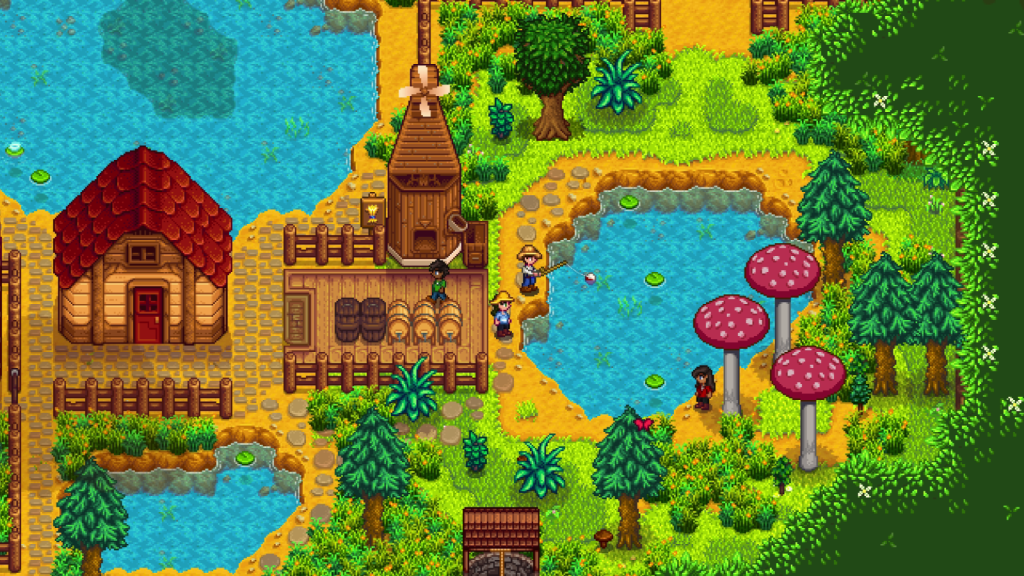
Stardew Valley
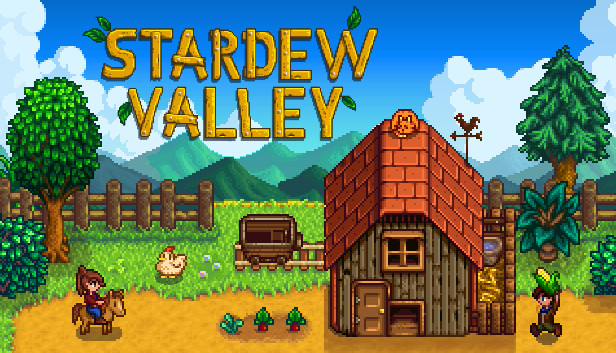
Developed by ConcernedApe
Gameplay:
Stardew Valley is an open-ended country-life RPG where players begin with a small farm plot inherited from their grandfather and a handful of coins. The game offers a rich variety of activities:
Farming: Grow a diverse range of crops and raise livestock.
Fishing and Foraging: Catch fish, gather wild produce, and collect valuable resources.
Cooking and Crafting: Learn new recipes and craft items to aid in farming and exploration.
Mining: Explore caves, mine for valuable ores, and combat dangerous creatures.
Socializing: Build relationships with over 30 unique characters, each with their own schedules, mini-cutscenes, and storylines.
Festivals: Participate in seasonal events like the luau, haunted maze, and the feast of the winter star.
Players can level up in five key areas: farming, mining, combat, fishing, and foraging. As they progress, they unlock new areas, recipes, and can customize their skills by choosing different professions. The game also features a vast cave system with dangerous monsters, powerful weapons, and valuable resources to discover.
Reviews on Steam:
Stardew Valley has received overwhelmingly positive reviews on Steam, boasting a player score of 98/100. Players have praised its delightful blend of gameplay elements from Harvest Moon, Animal Crossing, and Rune Factory. The game’s relaxing yet engaging mechanics have made it a beloved title among fans.
Aesthetic:
The game features an endearing and nostalgic pixel art style with a bright, saturated color palette. This aesthetic charm is enhanced by a vibrant modding community that offers various modifications, such as altering the map’s colors, buildings, and character sprites.
Features:
Farm Customization: Transform an overgrown field into a thriving farm, complete with animals, crops, and useful machines.
Community Integration: Engage with the local community, make friends, and even marry and have children.
Multiplayer Mode: Play online with up to eight players, expanding the fun and collaborative aspects of the game.
Mod Support: Extensive modding capabilities allow for new NPCs, expanded storylines, additional locations, and more.
By examining the successful elements of Stardew Valley, we can draw inspiration for Sustainacity in terms of community engagement, diverse activities, and an endearing art style. The game’s balance of relaxing gameplay with engaging mechanics provides a valuable model for creating an immersive and enjoyable player experience in our city simulation game.
Animal Crossing

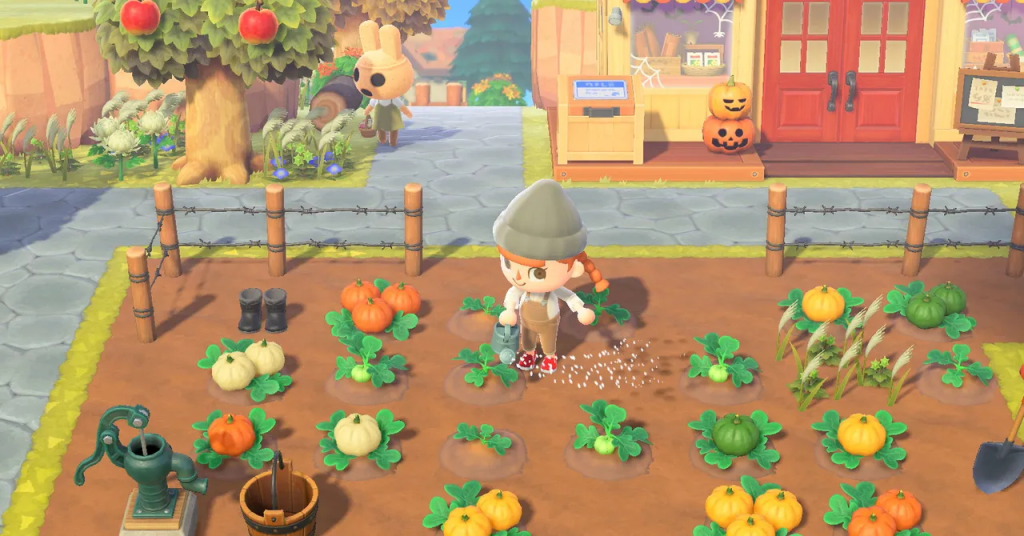
Developed by Nintendo
Gameplay:
Animal Crossing is a popular social simulation video game series where players are encouraged to spend their time in a non-linear fashion within a village of anthropomorphic animals. Key gameplay elements include:
Non-linear Play: There are no defined objectives, allowing players to engage in various activities at their own pace.
Activities: Collecting items, planting plants, insect catching, fishing, and socializing with village residents.
Role: Players assume the role of a human living in a village of animals.
Non-violent: The game is rated ‘E’ for Everyone by the ESRB (3+ by PEGI), making it suitable for all ages.
Aesthetic:
The game is renowned for its cute and charming aesthetic, which players can customize to their liking. The aesthetic is also influenced by the changing seasons and time of day, mirroring the real world. Popular themes chosen by players include Cottagecore and Beach Vibes, enhancing the personalized experience.
Features:
Customization: Players can personalize their character and home, as well as decorate their village.
Special Characters and Events: The game features various special characters and villagers, along with activities like fishing tournaments, bug-catching contests, and holiday events.
Multiplayer Mode: Players can visit each other’s islands, fostering a sense of community and shared experiences.
Reviews:
While Animal Crossing is not available on Steam, it has received positive reviews on other platforms. Critics and players alike have praised the game for its relaxing gameplay, charming aesthetic, and the freedom it offers. The game’s ability to create a peaceful and engaging environment has made it a favourite among fans.
By analysing Animal Crossing, we can integrate similar elements into Sustainacity, such as a strong focus on community building, customization options, and non-linear gameplay that encourages players to engage with the game world at their own pace. This approach can help create a welcoming and immersive experience for players.
Cities: Skylines

Developed by Colossal Order
Gameplay:
Cities: Skylines is a city-building simulation game that allows players to design, build, and manage a city from the ground up. The game offers a comprehensive and detailed approach to urban planning, providing players with the tools to create sprawling metropolises or small towns. Key gameplay elements include:
Urban Planning: Players can zone residential, commercial, and industrial areas, manage transportation networks, and provide essential services like healthcare, education, and law enforcement.
Infrastructure Management: Detailed control over road placement, traffic management, and public transportation systems, including buses, trains, subways, and airports.
Resource Management: Players must balance the city’s budget, manage resources, and ensure that citizens’ needs are met to keep the city running smoothly.
Environmental Concerns: The game includes realistic environmental factors such as pollution, water management, and natural disasters, requiring players to incorporate sustainability into their planning.
Aesthetic:
Cities: Skylines boasts a realistic and visually appealing aesthetic with detailed graphics that bring the city to life. The game’s design allows for extensive customization, with various mods available to enhance visuals, add new building styles, and introduce unique cityscapes. The dynamic day-night cycle and weather conditions add to the immersive experience.
Features:
Complex Simulations: The game offers deep and complex simulations that account for various aspects of city management, including economic fluctuations, traffic patterns, and citizen satisfaction.
Mod Support: Extensive modding community support, allowing players to download and create mods that add new features, buildings, and gameplay mechanics. This includes everything from cosmetic changes to new functionality.
Expansion Packs: Multiple expansion packs and DLCs add new content and gameplay mechanics, such as natural disasters, mass transit systems, and green cities, keeping the game fresh and engaging.
Detailed Metrics: Players have access to a wide range of metrics and data to help them manage their city effectively, from traffic flow and pollution levels to citizen happiness and economic performance.
Reviews:
Cities: Skylines has received highly positive reviews from both players and critics. It is praised for its depth, flexibility, and the sheer amount of control it gives players over their cities. The game’s ability to simulate the complexities of urban planning while remaining accessible to newcomers has made it a standout title in the city-building genre.
Educational and Practical Value:
Cities: Skylines not only provides entertainment but also serves as an educational tool for understanding urban planning and management. The realistic simulation of city dynamics, environmental impact, and resource management makes it a valuable experience for players interested in these fields.
By examining the successful elements of Cities: Skylines, Sustainacity can incorporate similar features, such as detailed urban planning tools, realistic environmental factors, and extensive customization options. This approach will help create a robust and engaging city simulation experience that challenges players to think critically about sustainability and effective city management.
Idea Generation and Pre-Production
Game Mechanics and Goals
Game Mechanics
In Sustainacity, players assume the role of a superhero whose unique powers are pivotal to the gameplay. These abilities are designed to combat various natural disasters that threaten the city, such as meteor showers. The use of these powers is both strategic and action-packed, providing a dynamic and engaging experience for players. The superhero theme not only adds excitement but also integrates seamlessly with the environmental missions, making the gameplay both thrilling and meaningful.
Players are tasked with saving the city and its inhabitants by undertaking missions that focus on reducing the city’s carbon footprint and promoting sustainability. These missions include actions like planting trees, cleaning up polluted areas, and implementing green energy solutions. By completing these missions, players contribute to making the city more eco-friendly, which is reflected in the game’s dynamic environment.
Sustainacity features special interactive events that keep the gameplay lively and challenging. For example, players might engage in events where they must destroy polluting vehicles or prevent meteor impacts. These events are designed to test the player’s reflexes and decision-making skills, ensuring that the game remains engaging and varied. Each event contributes to the overall goal of making the city safer and more sustainable.
Goals
One of the primary goals of Sustainacity is to educate players about sustainability and eco-friendly practices through interactive and fun gameplay. The game is designed to blend entertainment with educational content, ensuring that players learn valuable lessons about environmental conservation while enjoying the game.
By integrating real-world environmental challenges into the gameplay, Sustainacity aims to promote sustainability and eco-friendly practices. Players are encouraged to think critically about the impact of their actions on the environment, both within the game and in real life. The game’s missions and events are designed to highlight the importance of sustainable living and inspire players to adopt similar practices.
Sustainacity is designed to be engaging and enjoyable, with mechanics that keep players interested and invested in the game’s objectives. The combination of superhero action and environmental missions creates a unique gameplay experience that appeals to a wide audience. The game’s vibrant visuals, dynamic environments, and immersive mechanics ensure that players are entertained while working towards making the city a better place.
In summary, the game mechanics of Sustainacity are carefully crafted to provide a balance of action, strategy, and education. The goals of the game are to entertain players while promoting awareness and understanding of sustainability issues, making it a unique and impactful addition to the gaming landscape.
Production
Asset Design
Buildings
In the game, these will ’house’ the residents of the city, the more maintained these are, the happier the residents will be. These assets will have extended functionality, such as adding solar panels, planting trees, installing electric car chargers, etc…
Residential vehicles
These vehicles will be found parked in driveways and along the curbs of streets. Some vehicles will have more of an impact on the environment because of carbon emissions. For example, sedans will have the least impact, sports cars will have a higher impact, and the super cars will have the highest impact. I am basing this factor on the ’top speed’ of each vehicle, of course these cars will not have movement in the game, but the added realism and functionality adds more depth to the sustainability principle of the game and allows another direction for the player to pivot towards.
Vans and pickup trucks
These vehicles, much like the residential vehicles, will spawn on driveways and along the curbs of streets. However, these will most commonly spawn nearby local business or service tiles. This made sense because usually larger vehicles are required to transport goods from place to place.
Services vehicles
These vehicles will spawn most commonly near service tiles, such as fire stations, police stations, taxi stands, bus stations, etc…
Props
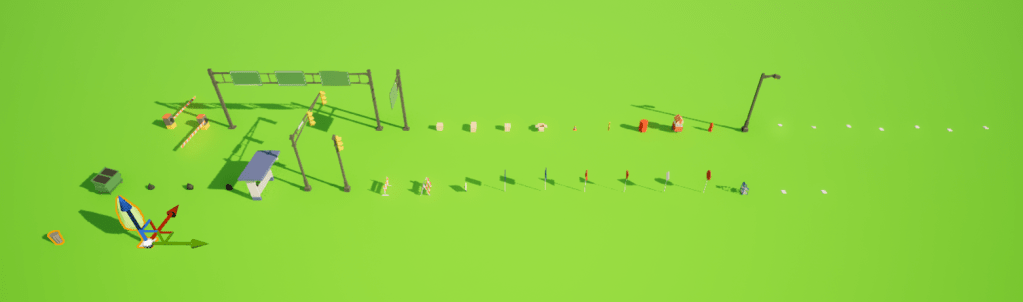
These include road signs, foliage, trash bags and containers, boxes and papers, streetlamps and traffic lights, and bus stops.
Those are all the meshes, sorted by category, and tested in different lighting conditions.
Level Design
Road Crosswalk
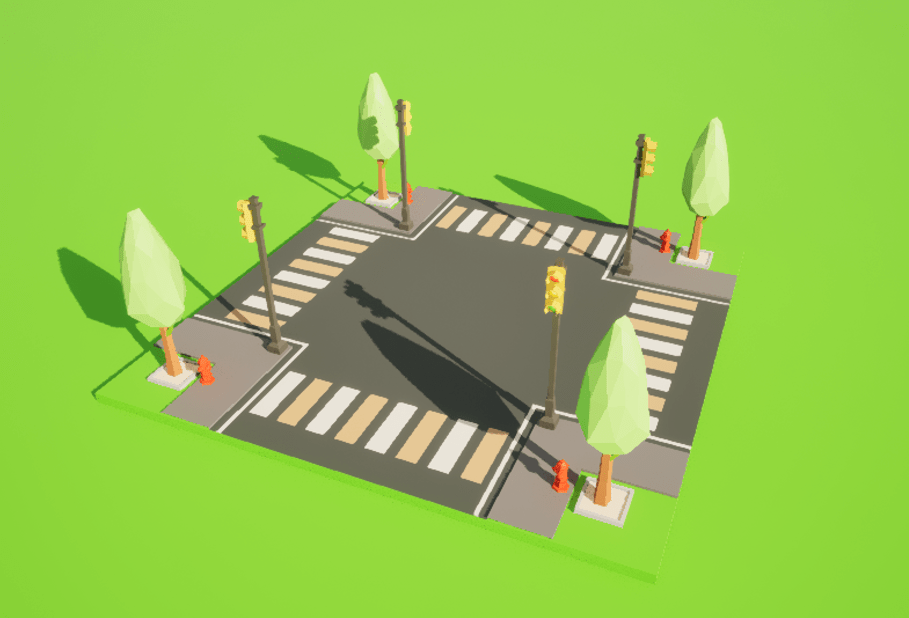
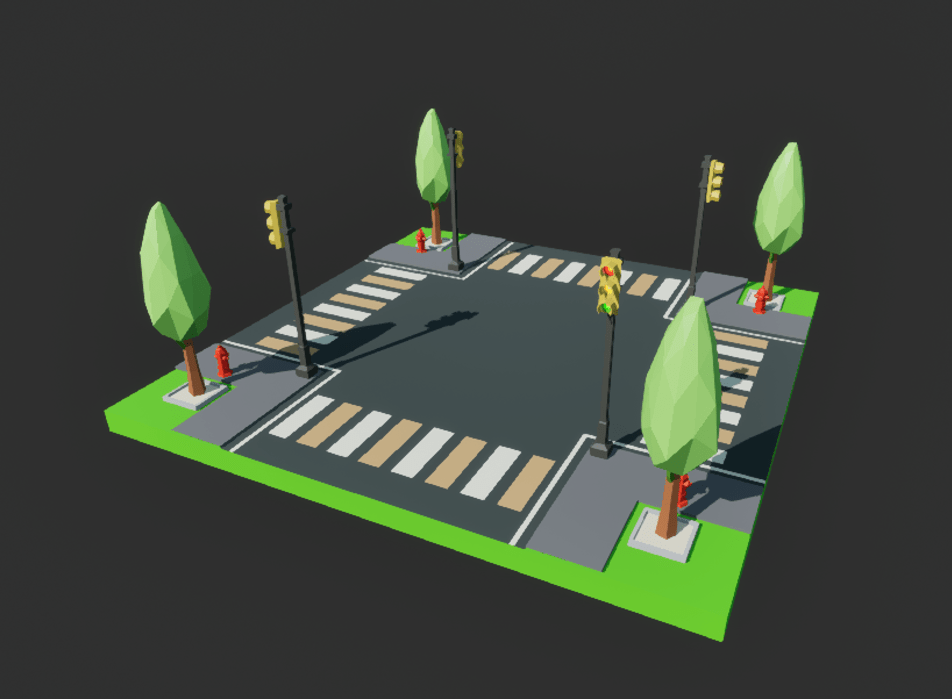
The BP_RoadCrosswalk blueprint, shown above, sets up a road crosswalk section in the city. It’s kept simple without any procedural elements due to its specific role. The crosswalk includes traffic lights that light up during the night, adding a realistic touch to the game. This was designed with a potential day-night cycle in mind, making the environment feel more dynamic.
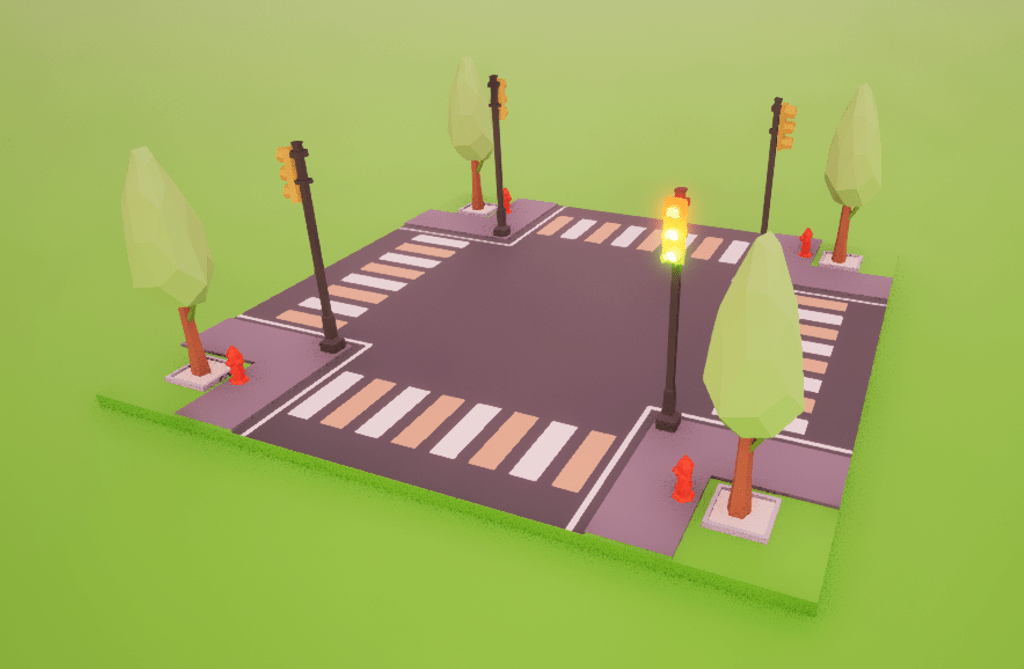
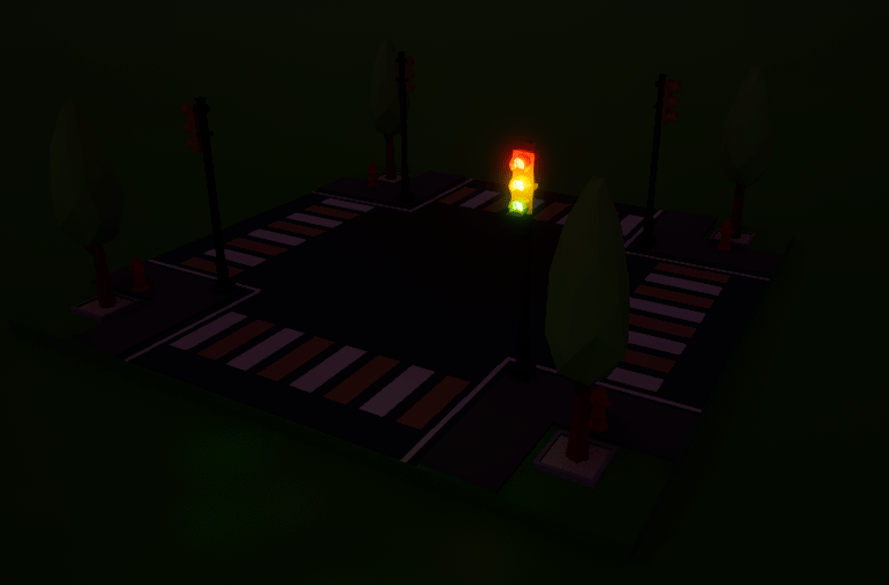
While not implemented yet, there’s room to make these lights cycle through red, orange, and green to simulate real intersections.
Road Tile
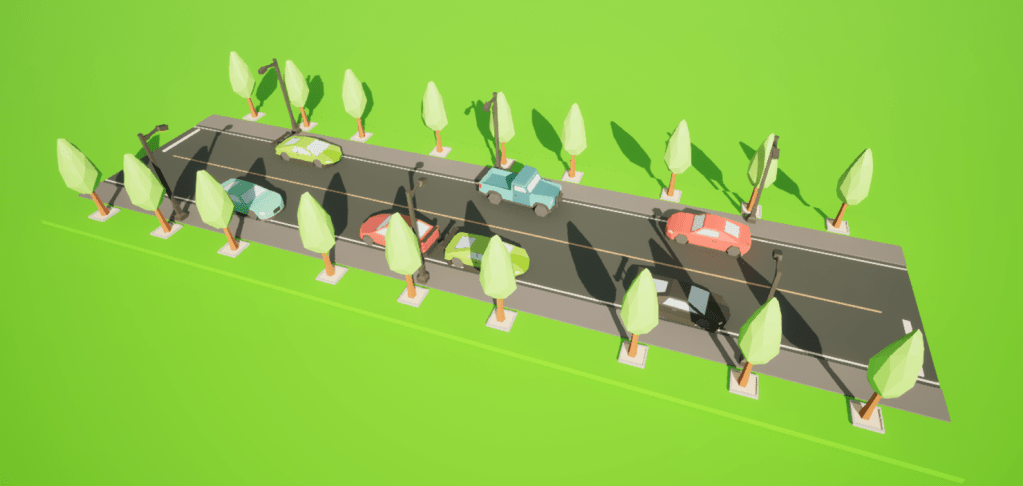
In the image above, the BP_RoadTile blueprint includes two types of road tiles: one for connecting to crosswalks and another for extending the road.
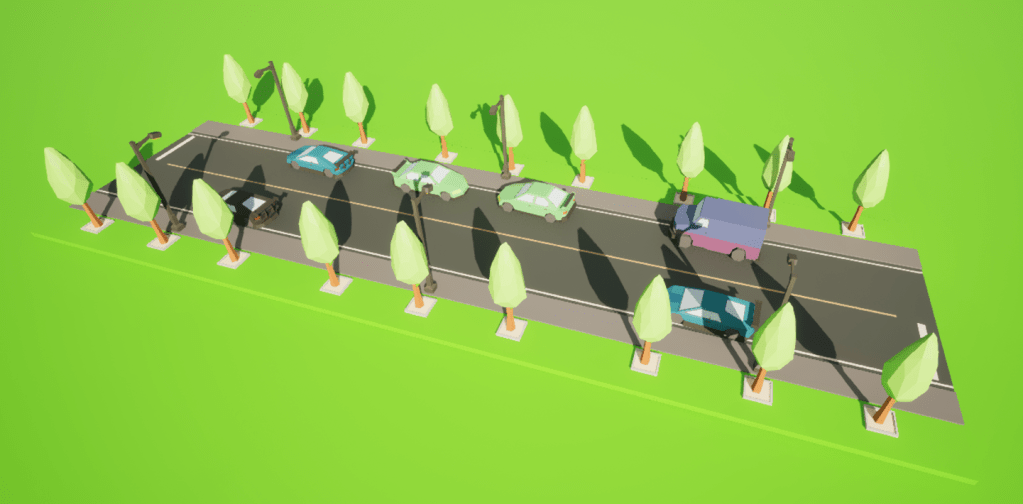
These tiles are procedurally generated, meaning each instance has different car placements and tree positions, avoiding repetitive patterns and adding to the city’s lively feel.
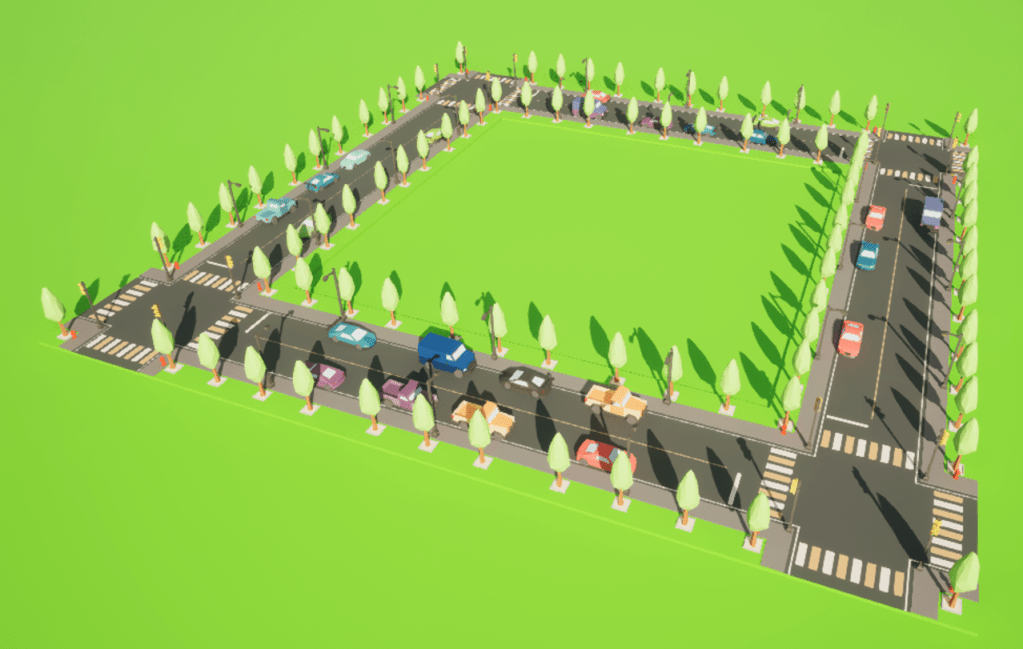
The cars are placed thoughtfully to avoid blocking intersections, mimicking real-life traffic rules and enhancing realism.
House Tile
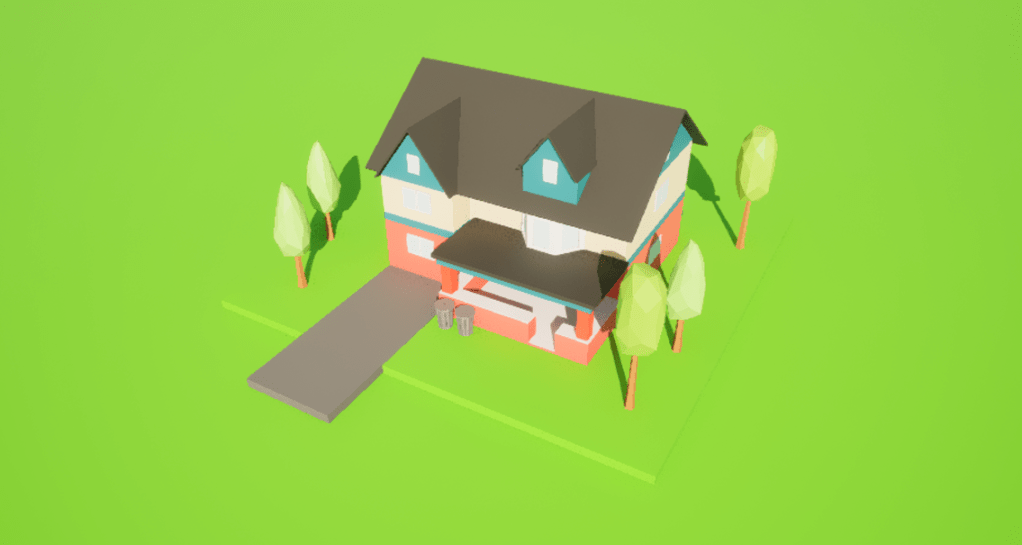
The blueprint for BP_HouseTile, as seen above, represents residential houses in the city. Each house can accommodate about five residents and features procedural elements to ensure a unique mix of parked cars and trees each time it spawns.
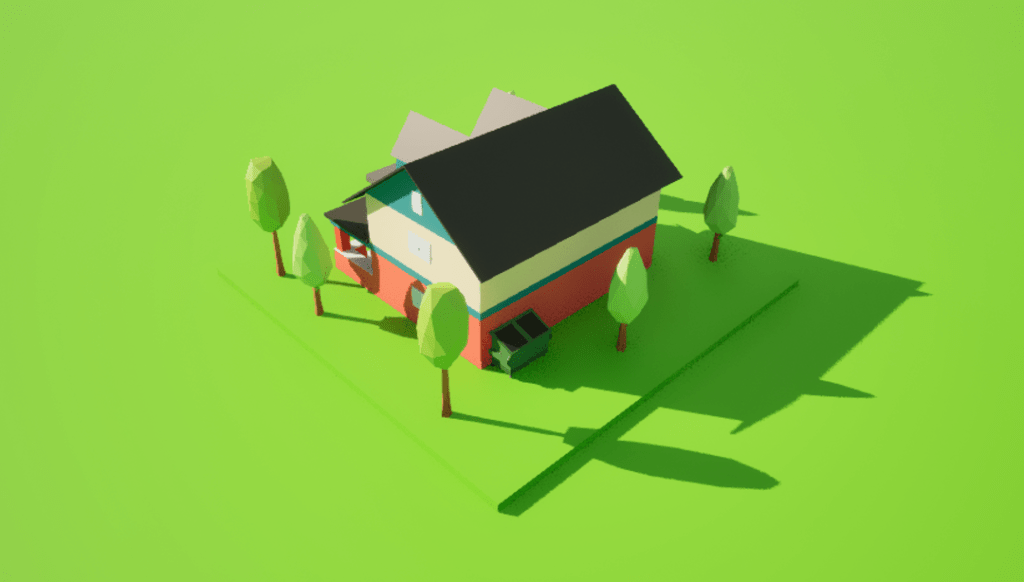
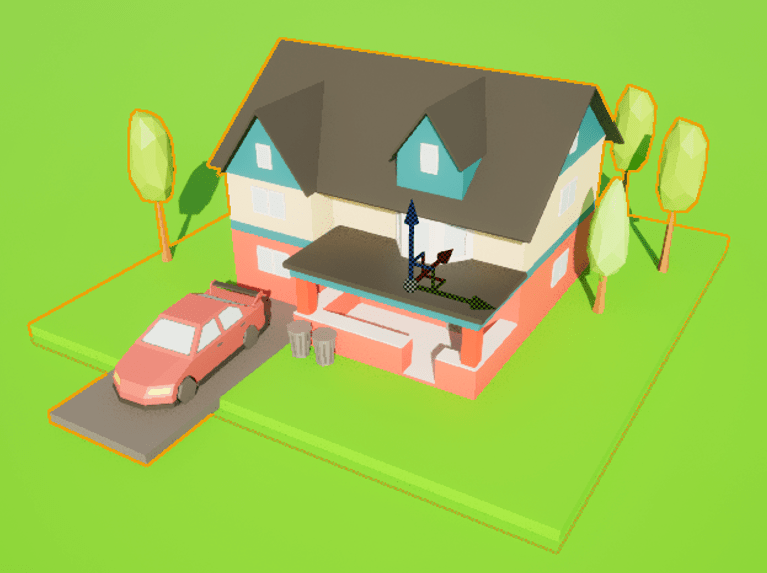
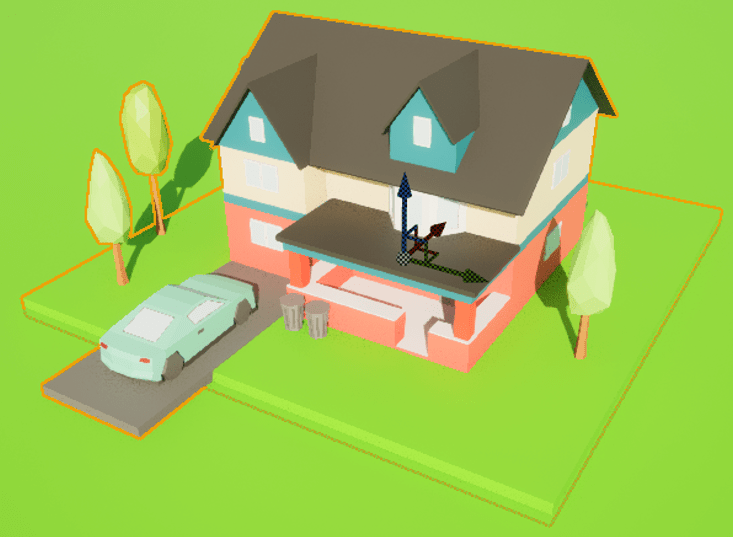
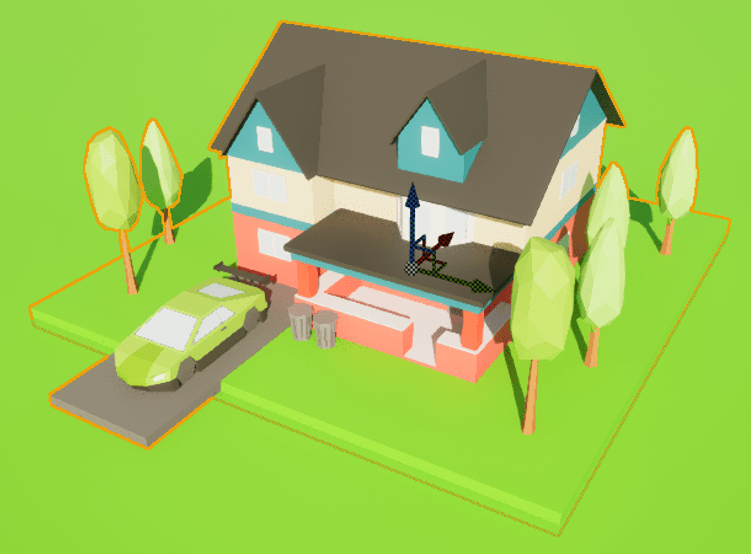
This keeps the environment diverse and supports the game’s sustainability theme by showing various vehicle types with different environmental impacts. There’s also a recycling bin included to promote eco-friendly behaviours among the city’s residents.
Commercial Building
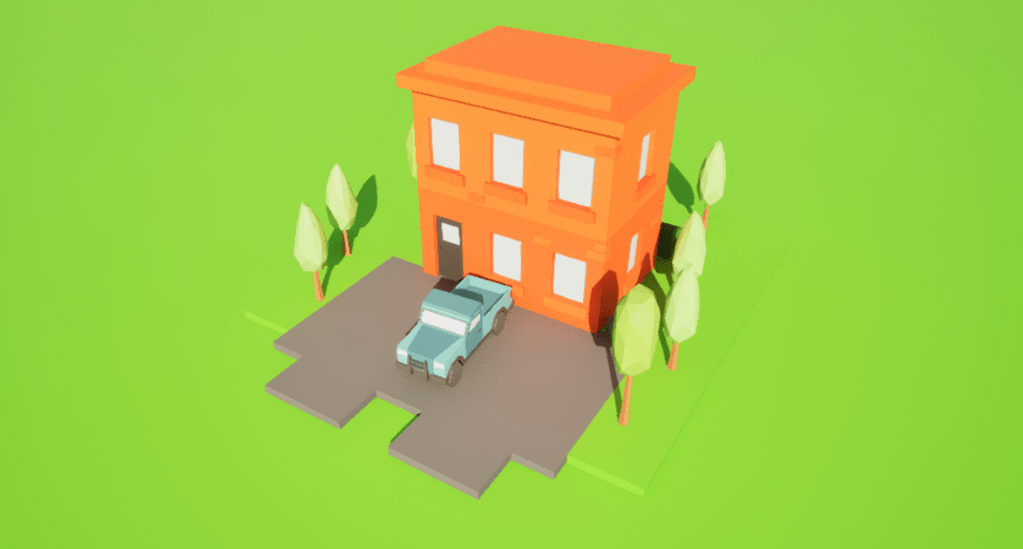
Shown in the image above, the BP_CommercialBuilding blueprint is for local business structures and includes parking spaces for larger vehicles like vans and trucks. These vehicles are necessary for business operations, transporting goods and services.
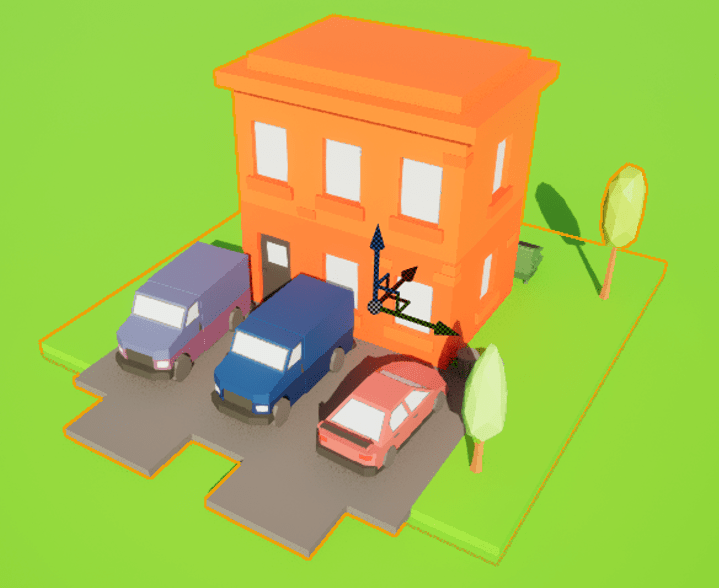
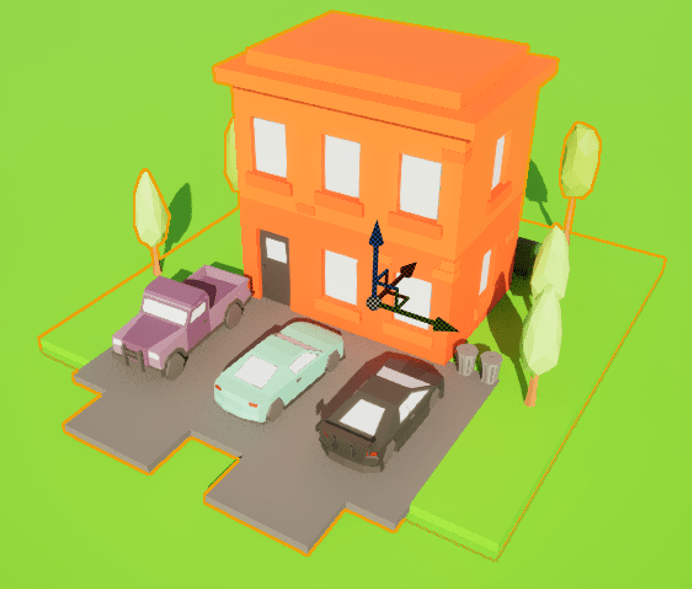
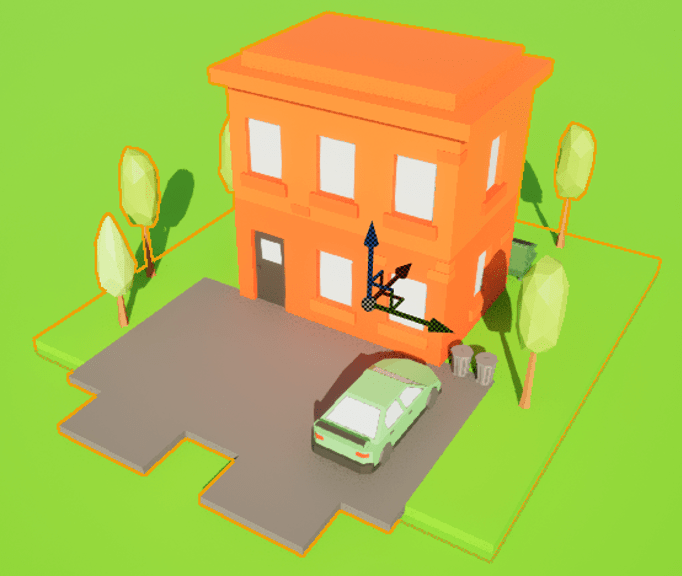
The blueprint provides three parking spots per building, reflecting the higher parking demand in commercial areas. This tile adds to the bustling commercial district of the city, enhancing the procedural generation with practical details.
Service Building
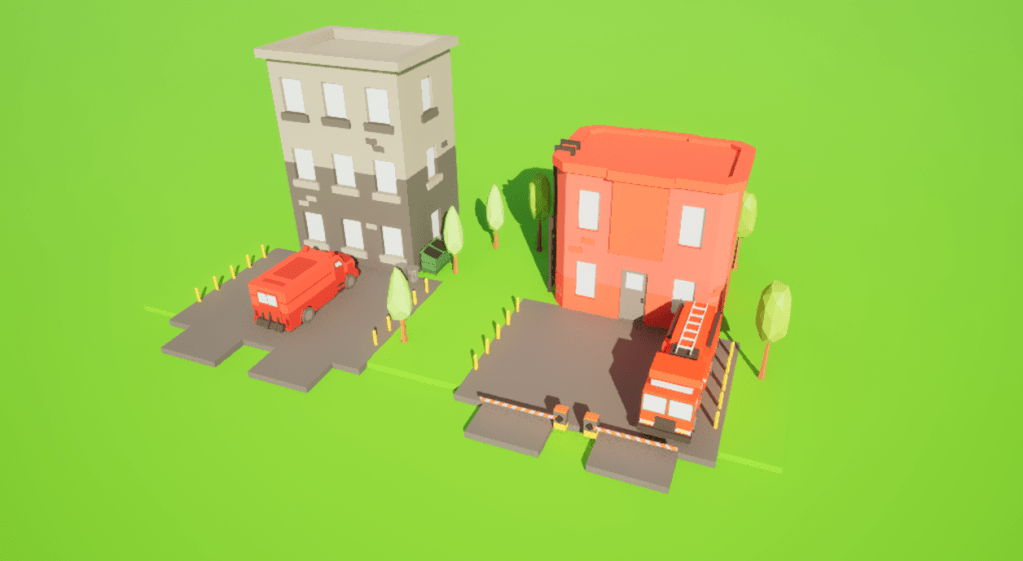
In the image above, the BP_ServiceBuilding blueprint covers essential services like police and fire stations. These buildings are crucial for city safety and feature configurations to spawn service vehicles such as police cars, armored vehicles, and fire trucks.
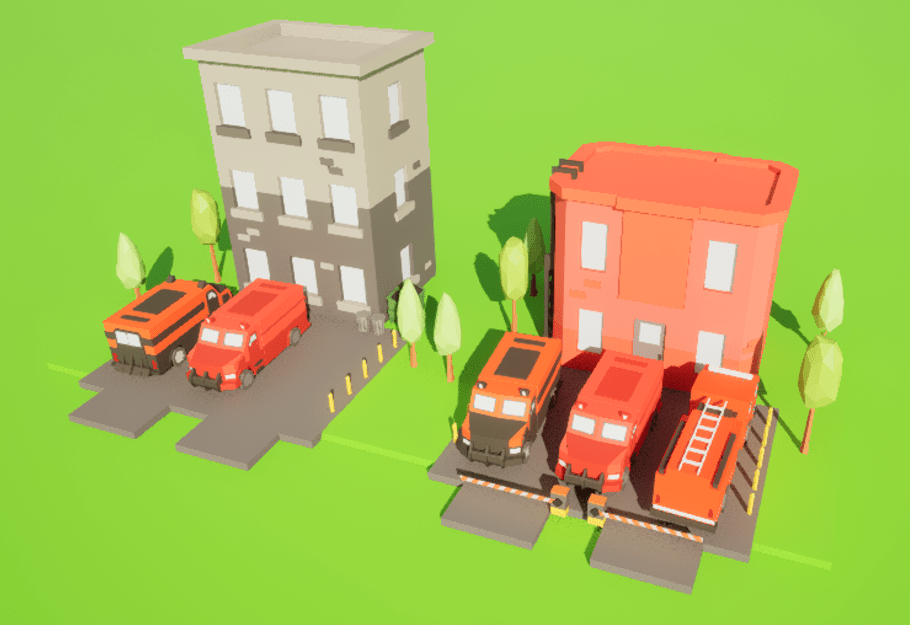
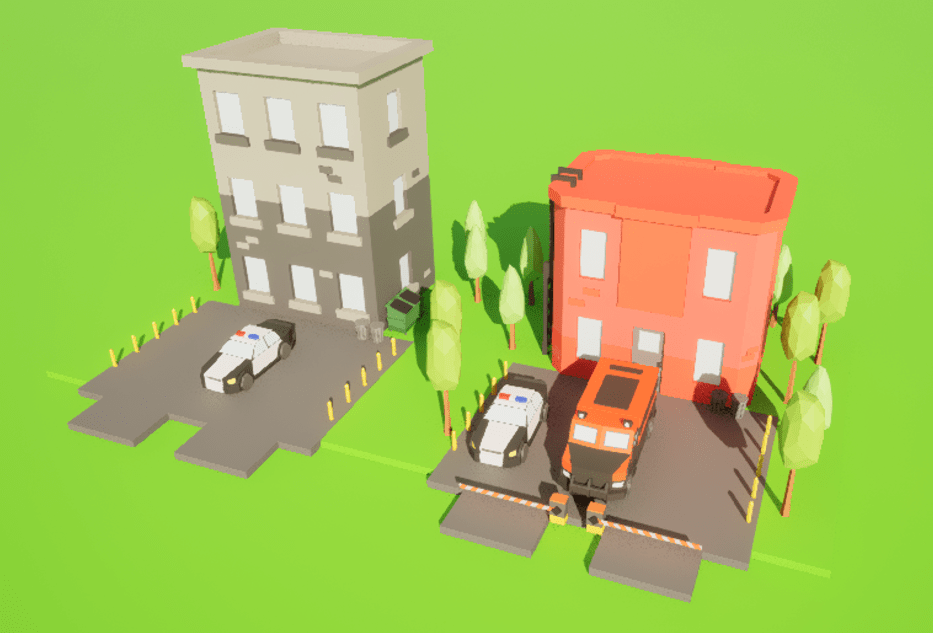
The vehicles are placed near their respective buildings, making the city operations feel realistic. The procedural generation ensures each service building tile is unique, adding variety and authenticity to the urban landscape.
Level Design Conclusion
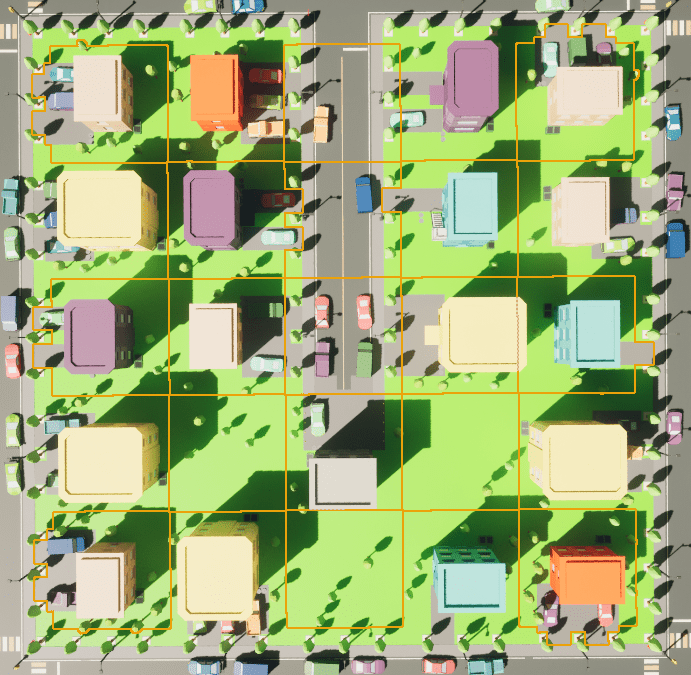
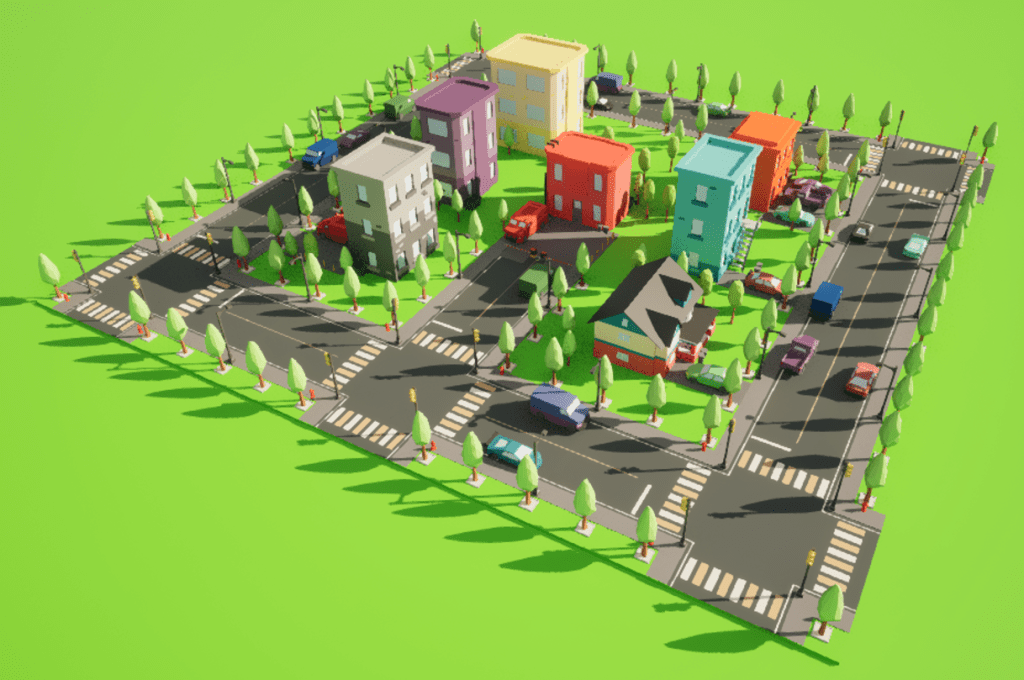
Based on my reflective journal, these blueprints are part of a systematic effort to ensure each city tile is unique and procedurally generated. Using construction scripts to randomize elements like cars and trees eliminates repetitive patterns, creating a dynamic and lively city environment. This approach not only enhances the visual appeal but also aligns with the game’s sustainability theme by incorporating eco-friendly features and promoting environmental awareness through in-game mechanics.
Blueprints and Algorithms
Flight Control

In this blueprint, several good practices are followed, enhancing maintainability and clarity. Using clear and descriptive variable names like “Player Character,” “AC_Flight,” and “Controller” helps in understanding the code flow without needing additional comments. The use of the “Is Valid” node before proceeding with operations on the component ensures that the code does not attempt to access a null reference, which would otherwise result in runtime errors. Additionally, separating the logic into clear steps—such as setting variables, validating components, and handling different execution paths—improves readability and makes debugging easier. Utilizing debug strings, even conditionally, provides immediate feedback during development, helping to quickly identify and resolve issues related to missing components.
Error handling in this blueprint is primarily achieved through the “Is Valid” node and the use of a debug print string. When the “Get Component by Class” node fails to find the “AC_Flight” component, the “Is Valid” node detects this, and instead of the code proceeding with invalid data, it triggers an alternate execution path. This path includes a “Print String” node that outputs an error message to the developer, indicating that the possessed pawn does not have the necessary component. This proactive error reporting is crucial during development and testing phases, as it alerts the developer to configuration or setup issues that might otherwise go unnoticed until they cause more significant problems. However, for production builds, it’s advisable to replace or complement these debug prints with more robust logging or error handling mechanisms that can gracefully manage such issues without affecting the end-user experience.
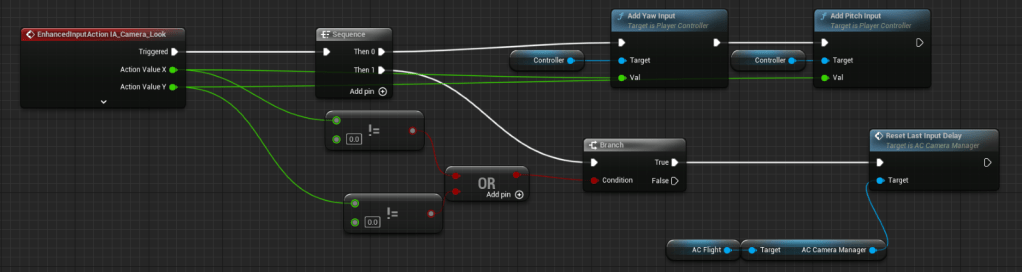
This blueprint is designed to handle enhanced input actions related to camera control, specifically for looking around using the “IA_Camera_Look” action. When this action is triggered, it receives two action values (X and Y) corresponding to the camera’s yaw and pitch inputs. These values are processed in sequence by the “Sequence” node, which ensures that each input is handled in an orderly manner. The X value (yaw) and Y value (pitch) are checked against zero to determine if there has been any input. If either value is not zero, indicating user input, the “Add Yaw Input” and “Add Pitch Input” nodes are activated, respectively, to adjust the camera’s orientation. Additionally, the input values are used to reset the last input delay on an “AC Camera Manager” component to ensure smooth and responsive camera control.
This blueprint follows several good practices to ensure efficient and maintainable code. The use of the “Sequence” node to handle the input values in a step-by-step manner enhances clarity and control over the execution flow. This approach ensures that each input is processed sequentially, preventing potential conflicts or race conditions. Additionally, checking the input values against zero before applying them prevents unnecessary updates and computations when there is no actual input, optimizing performance. The clear separation of functionality, such as handling yaw and pitch inputs separately, also improves readability and maintainability. Naming conventions are consistently applied, making it easy to understand the purpose of each node and variable at a glance.
Error handling in this blueprint is primarily preventive, focusing on validating input values before using them. By checking whether the action values are not equal to zero, the blueprint ensures that only valid inputs are processed, thereby reducing the risk of unexpected behaviour or errors. However, it would be beneficial to incorporate additional error handling mechanisms, such as verifying the existence and validity of the “AC Camera Manager” component before attempting to reset the input delay. This could be done using “Is Valid” checks or similar validation nodes to ensure that the blueprint does not attempt to interact with null or invalid references, which could lead to runtime errors. Moreover, incorporating debug messages or logging at critical points, such as when inputs are received or when components are accessed, could provide valuable insights during development and debugging.
The “IA_Emote” action is triggered when an emote input is received. When the input is started, it directs to the “Play Emote” function on the “AC Flight” component, which executes the emote action associated with the input.
The second part of the blueprint deals with the “IA_Fly” action, which is triggered when flight control inputs are received. The blueprint captures the action values for both the X and Y axes, which correspond to the vertical movement inputs.
These values are then passed to the “Add Vertical Movement” function on the “AC Flight” component, adjusting the character’s vertical position according to the input received.

Detailed Description
Input Action and Conditional Branching:
- Enhanced Input Action (IA_Move): This node captures the player’s input, specifically the X and Y values which represent directional movement.
- Branch Node: This node checks the condition of whether the character is in flight mode or not. The condition is determined by the “AC Flight” node, which likely holds a Boolean value indicating the character’s flight state.
Flight Mode Handling:
- Get Forward Vector and Get Right Vector: These nodes fetch the forward and right vectors of the character, which are necessary for determining movement direction relative to the character’s orientation.
- Select Vector Node: Depending on whether the character is strafing, the node selects the appropriate vector to use for movement. The strafing status is likely determined by the “In Strafe Active” node.
- Vector Math: The forward and right vectors are scaled by the input values and then summed to create a final movement vector. This involves simple vector addition and scaling operations:
- Final Vector = (Forward Vector × Input X) + (Right Vector × Input Y)
- Add Input Vector: This node takes the calculated movement vector and applies it to the character’s movement component, effectively moving the character in the specified direction.
Ground Movement Handling:
- Similar Vector Calculation: For ground movement, similar vector calculations are performed using the forward and right vectors.
- Conditional Application: Depending on whether the character is in flight or not, the movement vector is applied differently, ensuring that the character behaves appropriately in both states.

This blueprint handles two main functionalities: firing lasers and focused aiming. It uses enhanced input actions to determine when the player wants to fire lasers or enter/exit focused aiming mode. The blueprint utilizes conditional checks to ensure these actions are correctly applied depending on whether the character is in flight mode.
Detailed Description
Laser Firing Mechanism:
- Enhanced Input Action (IA_LaserFire): This node captures the input for firing lasers. It has two main states: Triggered and Completed.
- Triggered: When the input is activated (e.g., button pressed), this signal is sent.
- Completed: When the input is deactivated (e.g., button released), this signal is sent.
- Fire Lasers and Stop Lasers Nodes: These nodes execute the actions to start and stop firing lasers. They are linked to the “AC Flight” target, which ensures that the laser firing logic is correctly tied to the character’s flight state.
The execution flow for firing lasers is straightforward:
- When IA_LaserFire is Triggered, the “Fire Lasers” node is activated.
- When IA_LaserFire is Completed, the “Stop Lasers” node is activated.
This setup ensures that the lasers fire continuously while the input is held down and stops when the input is released.
Focused Aiming Mechanism:
- Enhanced Input Action (IA_FocusAim): This node captures the input for toggling focused aiming. It has three states: Triggered, Started, and Completed.
- Started: When the input is first activated.
- Completed: When the input is deactivated.
- Set Nodes: These nodes toggle the “Is Focused Aiming” Boolean variable, which controls whether the character is in focused aiming mode. The setting is contingent on the “AC Flight” state to ensure proper functionality depending on whether the character is flying or not.
The execution flow for focused aiming is as follows:
- When IA_FocusAim is Started, the “Is Focused Aiming” variable is set to true.
- When IA_FocusAim is Completed, the “Is Focused Aiming” variable is set to false.
This allows the player to enter focused aiming mode when the input is engaged and exit the mode when the input is released.

I designed this blueprint to handle the strafing movement for a flying character in Unreal Engine 5 (UE5). The blueprint uses enhanced input actions to capture player inputs for strafing and processes these inputs to control the character’s movement direction while in flight mode.
This blueprint focuses on enabling and managing strafing movements when the player character is flying. It interprets the player’s input to initiate strafing and adjusts the character’s movement accordingly. The blueprint uses logical checks, vector calculations, and input vector applications to ensure accurate and responsive strafing behaviour.
Detailed Description
Input Action and Conditional Check:
- Enhanced Input Action (IA_FlyStrafe): This node captures the player’s input for strafing. It provides two main states: Triggered and Completed.
- Triggered: Activates when the strafing input is initiated (e.g., button pressed).
- Completed: Activates when the strafing input is released.
- Action Value: Represents the intensity or direction of the input.
- Branch Node: This node checks a condition to determine whether the character is in flight mode and if strafing is currently active.
- Condition: Combines two checks using an AND node:
- The character must be in the “Flying” movement mode.
- The “Is Strafe Active” Boolean must be true.
Vector Calculation and Application:
- Get Right Vector: This node retrieves the right vector of the character, which is necessary to determine the direction for strafing.
- Add Flight Strafe Input: This node takes the calculated strafing vector and applies it to the character’s movement component in flight mode. The vector is adjusted based on the action value provided by the input.
The execution flow for strafing movement is as follows:
- Condition Check: The branch node checks if the character is in flight mode and if strafing is active. If both conditions are true, the execution proceeds.
- Vector Calculation: The right vector of the character is retrieved, representing the direction perpendicular to the character’s forward movement.
- Input Vector Application: The calculated strafing vector, scaled by the input action value, is applied to the character’s movement component using the “Add Flight Strafe Input” node.

I created this blueprint to manage boosting and braking actions for a flying character in Unreal Engine 5 (UE5). The blueprint captures player input to trigger boost and brake maneuvers, ensuring the character’s flight dynamics are responsive and intuitive.
This blueprint handles the boost and brake functionalities for a flying character. It uses enhanced input actions to capture the player’s intention to boost or brake and processes these inputs to control the character’s speed and movement state. The blueprint employs conditional checks, state management, and input-triggered events to achieve the desired effects.
Detailed Description
Boost Mechanism:
- Enhanced Input Action (IA_Boost): This node captures the input for boosting. It provides two states: Triggered and Started.
- Triggered: Activates when the boost input is initiated.
- Started: Activates when the boost input begins.
- Action Value: Represents the intensity or state of the boost input.
- Request Boost: This node is responsible for initiating the boost action when the input is received. It is connected to the “AC Flight” target to ensure the boost is applied correctly in-flight mode.
The execution flow for boosting is as follows:
- Input Detection: When IA_Boost is Triggered or Started, the “Request Boost” node is activated.
- Boost Application: The character receives the boost, increasing its speed or altering its flight dynamics as specified.
Brake Mechanism
- Enhanced Input Action (IA_Break): This node captures the input for braking. It has two states: Triggered and Completed.
- Triggered: Activates when the brake input is initiated.
- Completed: Activates when the brake input is released.
- Action Value: Represents the intensity or state of the brake input.
- Branch Nodes: These nodes check the character’s current movement mode to ensure braking is only applied in flight mode. The conditions are evaluated to decide whether to start or stop braking.
- Condition: Checks if the character’s movement mode is “Flying” and the state of the brake input.
- Request Brake and Stop Brake: These nodes manage the braking action. “Request Brake” starts the braking process, while “Stop Brake” ends it. Both are tied to the “AC Flight” target to ensure proper functionality in flight mode.
The execution flow for braking is as follows:
- Input Detection: When IA_Break is Triggered, the blueprint checks if the character is flying.
- Braking Activation: If the condition is met, the “Request Brake” node is activated.
- Braking Deactivation: When IA_Break is Completed, the “Stop Brake” node is activated, ceasing the braking action.

This blueprint manages the locking and unlocking of targets for a flying character. It uses enhanced input actions to capture the player’s intention to lock onto a target, and it checks the validity of the current target before performing the lock or unlock action. The blueprint ensures that the targeting system is responsive and maintains a valid target state.
Detailed Description
Target Locking Mechanism
- Enhanced Input Action (IA_LockTarget): This node captures the input for locking a target. It has two main states: Triggered and Started.
- Started: Activates when the lock target input begins (e.g., button pressed).
- Action Value: Represents the intensity or state of the lock input (though not used directly in this case).
- GET Node: This node retrieves the current target status from the “AC Flight” component.
- Is Valid: Checks if the current target is valid (i.e., there is an active target to lock onto).
- Is Not Valid: Checks if there is no valid target (i.e., the target can be unlocked).
Conditional Logic and Target Actions
- Branch Nodes: These nodes decide whether to lock or unlock the target based on the validity of the current target.
- If the target is valid, the blueprint proceeds to the “Unlock Target” action.
- If the target is not valid, the blueprint proceeds to the “Lock Target” action.
- Unlock Target: This node unlocks the current target, removing any active lock from the target.
- Lock Target: This node locks onto the current target, ensuring the character can focus on the specified target.
The execution flow for target locking is as follows:
- Input Detection: When IA_LockTarget is Started, the blueprint checks the current target status using the GET node.
- Conditional Check: The branch nodes determine whether the current target is valid or not.
- Target Action: Based on the validity of the target:
- If valid, the “Unlock Target” node is activated, releasing the current target.
- If not valid, the “Lock Target” node is activated, locking onto the target.
Flight

I created this blueprint to initialize various components and settings for a flying character in Unreal Engine 5 (UE5) when the game begins. The blueprint sets up essential variables, visual effects, and camera behaviours to ensure the character operates correctly and has the intended visual and gameplay effects from the start.
This blueprint handles the initialization process when the game begins, setting up critical components for a flying character. It initializes variables, sets up Niagara systems for visual effects, configures radial blur effects, creates dynamic material instances, and ensures the camera manager has the correct behaviour. This comprehensive initialization ensures that the game starts with all necessary components properly configured.
Detailed Description
Event Begin Play
- Event Begin Play: This node triggers the initialization process when the game starts. It ensures that all subsequent nodes are executed as soon as the gameplay begins.
Initialization Nodes
- Initialize Variables: This node initializes essential variables for the flying character. It prepares the character’s state and ensures all necessary data is set up.
- Initialize Niagara Systems: This node sets up Niagara systems, which are used for complex particle effects and visual representations associated with the character’s flight.
- Init Radial Blur: This node initializes radial blur effects, enhancing the visual immersion by adding blur effects around the character during certain actions or movements.
Visual Effects Setup
- Create Dynamic Material Instance: This node creates a dynamic material instance for visual effects, specifically for cloud visual effects (Cloud VFX). It allows for real-time changes to material properties, such as opacity.
- Target: Refers to the primitive component to which the material instance will be applied.
- Source Material: Specifies the base material to use for the dynamic instance (e.g., M_CloudVolume).
- SET Node: This node assigns the created dynamic material instance to a variable (Cloud VFXMaterial) for later use, allowing easy access and manipulation of the material properties.
- Set Scalar Parameter Value: This node sets the opacity parameter of the dynamic material instance to 0.0 initially, likely to make the effect invisible or prepare it for gradual appearance.
Camera Manager Configuration
- GET Node: This node retrieves the current camera manager component to ensure it is valid before applying any new behaviour.
- Is Valid: Checks if the camera manager is a valid reference.
- Add Behaviour: This node adds a specific behaviour (CB Walk) to the camera manager. It configures the camera to operate correctly according to the game’s requirements.
- Replace Existing Of Class: Ensures that the new behaviour replaces any existing behaviour of the same class.
- Priority: Sets the priority of the behaviour to ensure it takes precedence over other potential behaviours.
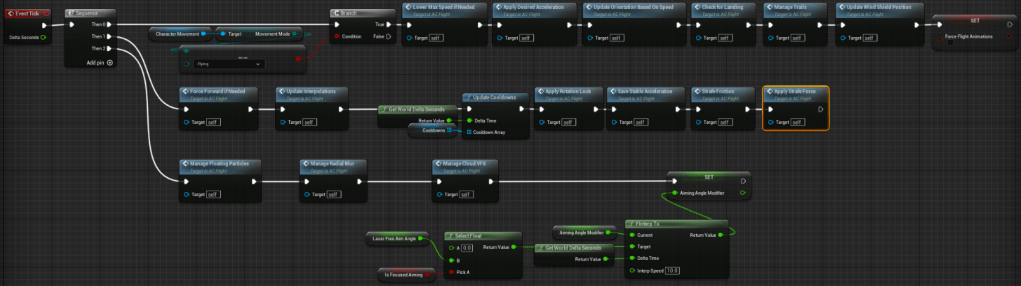
I created this blueprint to manage continuous updates and real-time adjustments for a flying character in Unreal Engine 5 (UE5). The blueprint runs on every tick of the game, ensuring dynamic and responsive flight mechanics, visual effects, and state management for the character.
This blueprint handles the per-frame updates for a flying character. It uses the Event Tick to manage various aspects of the character’s behaviour, including speed adjustments, visual effects, and flight dynamics. The blueprint ensures that all these components are continuously updated to provide a smooth and immersive gameplay experience.
Detailed Description
Event Tick and Sequence Node
- Event Tick: This node triggers the execution of the connected nodes on every frame of the game. It ensures that the following updates are performed continuously throughout gameplay.
- Sequence Node: This node allows multiple branches to be executed sequentially. It ensures that all the necessary updates are processed in order.
Branch Nodes and Conditional Checks
- Branch Node (Character Movement Mode): This node checks if the character’s movement mode is set to “Flying”. If true, it continues with the flight-specific updates.
- True: If the character is flying, the subsequent nodes for flight updates are executed.
- False: If the character is not flying, these updates are skipped.
Flight Updates
- Force Forward if Needed: Ensures the character maintains forward motion if required. It can be used to prevent the character from stopping abruptly.
- Manage Floating Particles: Updates the particle effects associated with the character’s flight, ensuring they are correctly positioned and rendered.
- Manage Radial Blur: Adjusts the radial blur effect based on the character’s speed and movement, enhancing the visual immersion.
- Manage Cloud VFX: Updates the cloud visual effects, adjusting parameters like opacity and position for a realistic flight experience.
Interpolation and Cooldown Management
- Update Interpolations: Manages the smooth transitions of various parameters, ensuring the character’s movements and effects change smoothly over time.
- Update Cooldowns: Manages the cooldowns for various abilities or actions, ensuring they are updated based on the delta time.
- Get World Delta Seconds: Retrieves the delta time for the current frame, used for time-based calculations.
Flight Dynamics
- Apply Rotation Lock: Ensures the character maintains a stable orientation during flight, preventing unwanted rotations.
- Save Stable Acceleration: Stores the character’s stable acceleration data for consistent movement behaviour.
- Strafe Friction: Manages the friction applied during strafing movements, ensuring realistic deceleration.
- Apply Strafe Force: Applies the necessary force for strafing movements, allowing the character to move sideways smoothly.
Visual Effects and Animation Updates
- Manage Trails: Updates the visual trails behind the character, ensuring they are correctly rendered and positioned.
- Update Wind Shield Position: Adjusts the position of any wind shield effects based on the character’s current position and speed.
- SET Force Flight Animations: Ensures the correct flight animations are applied to the character, based on the current flight dynamics.
Aiming Angle and Interpolation
- Select Float (Laser Free Aim Angle): Chooses the appropriate aiming angle based on whether focused aiming is active.
- FInterp To: Smoothly interpolates the aiming angle modifier to the desired value, ensuring smooth transitions.
- SET Aiming Angle Modifier: Sets the aiming angle modifier to the interpolated value, ensuring precise aiming adjustments.
Possible Alternatives and Best Practices
- Modular Functions: Splitting the update logic into smaller, modular functions can make the blueprint more manageable and easier to understand. Each function can handle specific updates like visual effects, flight dynamics, or animation adjustments.
- State Management: Implementing a state machine to manage different flight states (e.g., normal flight, boosting, braking) can simplify the logic and ensure consistent behaviour.
- Optimization: Ensuring that each update task is as efficient as possible can help reduce the performance overhead, especially in complex scenes or with many simultaneous updates.
- Documentation: Adding comments and documentation within the blueprint can help other developers understand the purpose and function of each node, facilitating collaboration and future modifications.
Overall, this blueprint effectively manages the continuous updates required for a dynamic and responsive flying character. By leveraging the Event Tick and conditional checks, it ensures that the character’s flight mechanics, visual effects, and state management are consistently updated, providing a smooth and immersive gameplay experience.
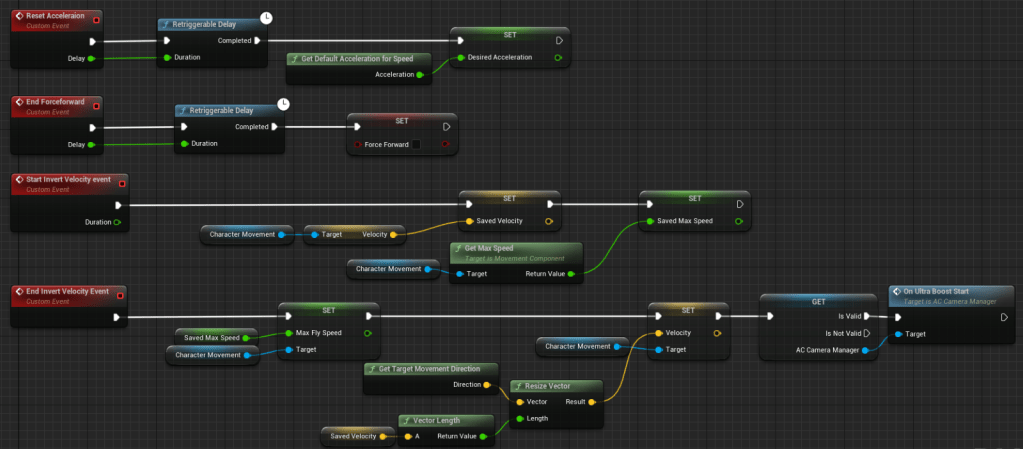
I created this blueprint to manage acceleration, force application, and velocity inversion for a flying character in Unreal Engine 5 (UE5). The blueprint uses custom events to control these dynamics, ensuring that the character’s movement is responsive and adaptable to various gameplay scenarios.
This blueprint handles acceleration reset, force application, and velocity inversion for a flying character. It utilizes custom events to trigger these actions and manages their durations using retriggerable delays. The blueprint ensures that the character’s movement parameters are correctly set and adjusted as needed, providing smooth and controlled flight dynamics.
Detailed Description
Acceleration Reset
- Reset Acceleration (Custom Event): This event is triggered to reset the character’s acceleration.
- Retriggerable Delay: This node ensures the delay is resettable, allowing the acceleration reset to be delayed for a specified duration.
- Get Default Acceleration for Speed: This function retrieves the default acceleration value based on the character’s speed.
- SET Desired Acceleration: This node sets the desired acceleration to the value retrieved, ensuring the character’s acceleration is reset to its default state.
Force Application
- End Force Forward (Custom Event): This event is triggered to stop the application of forward force.
- Retriggerable Delay: Similar to the previous delay node, this one ensures the delay is resettable for the specified duration.
- SET Force Forward: This node sets the force forward flag to false, stopping any forward force that was being applied.
Velocity Inversion
- Start Invert Velocity Event (Custom Event): This event initiates the process of inverting the character’s velocity.
- SET Saved Velocity: This node saves the current velocity of the character for later use.
- Get Max Speed: Retrieves the character’s maximum speed.
- SET Saved Max Speed: Saves the maximum speed value for later use.
- End Invert Velocity Event (Custom Event): This event completes the velocity inversion process.
- SET Max Fly Speed: Sets the character’s maximum flying speed to the saved value.
- GET Target Movement Direction: Retrieves the direction the character is moving towards.
- Vector Length: Calculates the length of the saved velocity vector.
- Resize Vector: Adjusts the saved velocity vector to the calculated length.
- SET Velocity: Sets the character’s velocity to the resized vector, completing the inversion process.
Additional Logic for Ultra Boost
- GET AC Camera Manager: Retrieves the camera manager to ensure it is valid.
- On Ultra Boost Start: If the camera manager is valid, this node triggers the start of the ultra boost effect, enhancing the visual and gameplay experience.
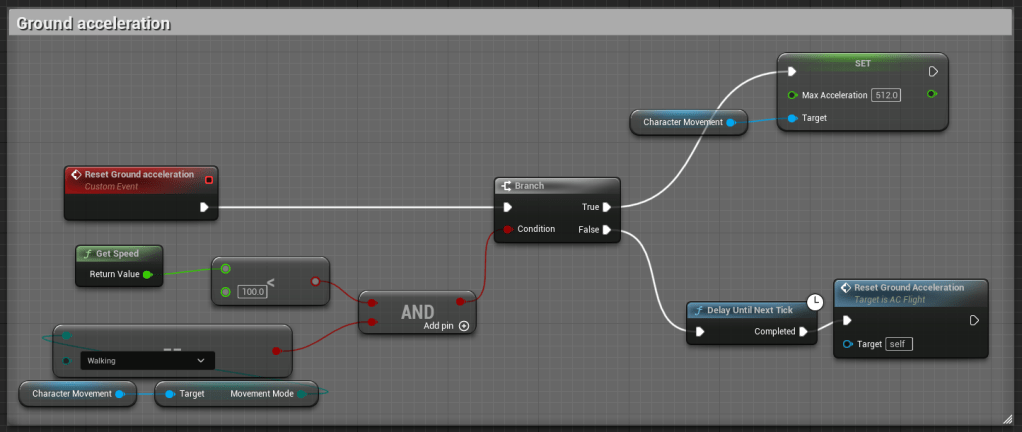
I created this blueprint to manage and reset the ground acceleration for a character in Unreal Engine 5 (UE5). This blueprint ensures that the character’s acceleration is appropriately adjusted based on their speed and movement mode, providing smooth and responsive control during walking.
This blueprint handles the resetting of ground acceleration for a character. It uses a custom event to trigger the reset process and checks the character’s speed and movement mode before applying the acceleration adjustment. The blueprint ensures that the character’s acceleration is dynamically managed, allowing for precise and consistent movement control on the ground.
Detailed Description
Custom Event for Ground Acceleration Reset
- Reset Ground Acceleration (Custom Event): This custom event initiates the process of resetting the character’s ground acceleration.
This event is triggered whenever a reset of the ground acceleration is required, ensuring that the character’s acceleration is always set correctly based on their current state.
Speed and Movement Mode Check
- Get Speed: This node retrieves the current speed of the character. The speed value is then compared to a threshold value.
The comparison checks if the character’s speed is less than 100.0 units.
- Movement Mode Check: This node checks if the character’s movement mode is set to “Walking”.
These two conditions (speed and movement mode) are combined using an AND node to ensure that both conditions must be true for the acceleration reset to proceed.
Conditional Branch
- Branch Node: This node evaluates the combined conditions from the AND node.
- True: If the character’s speed is less than 100.0 units and the movement mode is “Walking,” the execution proceeds to reset the ground acceleration.
- False: If either condition is not met, the acceleration reset is skipped.
Resetting Ground Acceleration
- Set Max Acceleration: This node sets the character’s maximum acceleration to a specified value (512.0 units in this case). This value is applied when the conditions are met, ensuring that the character’s acceleration is reset appropriately.
- Delay Until Next Tick: This node introduces a slight delay before re-triggering the acceleration reset process.
- Reset Ground Acceleration (Recursive Call): This node re-calls the Reset Ground Acceleration custom event, allowing the process to be continuously checked and applied as necessary.
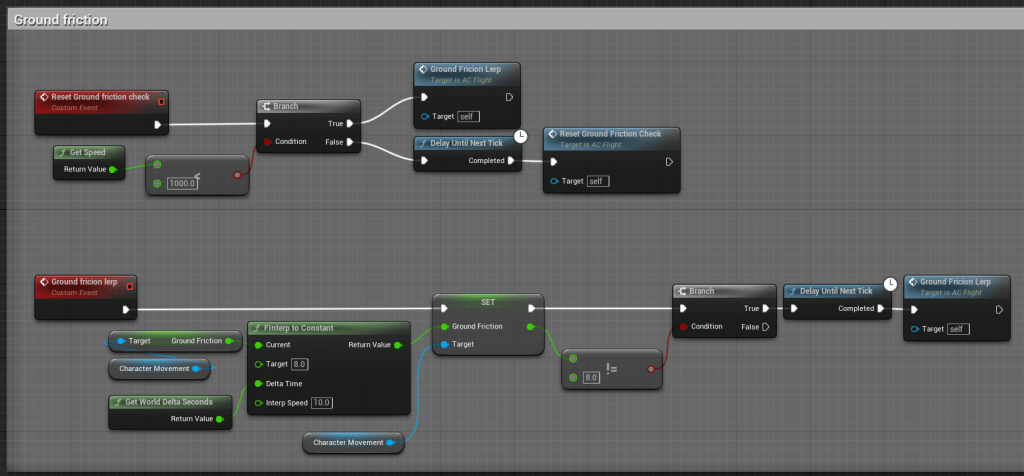
I created this blueprint to manage and adjust ground friction for a character in Unreal Engine 5 (UE5). This blueprint ensures that the character’s ground friction is dynamically updated based on their speed, providing smooth and responsive movement control when the character is on the ground.
This blueprint handles the dynamic adjustment of ground friction for a character based on their speed. It uses custom events to trigger friction checks and updates, ensuring that the character maintains the appropriate friction level during ground movement. This setup provides smooth and realistic movement behaviour.
Detailed Description
Custom Event for Ground Friction Check
- Reset Ground Friction Check (Custom Event): This custom event initiates the process of checking and updating the character’s ground friction.
- Get Speed: Retrieves the current speed of the character.
- Branch Node: Checks if the character’s speed is greater than 1000.0 units.
- True: If the speed is greater than 1000.0 units, it triggers the “Ground Friction Lerp” event.
- False: If the speed is not greater than 1000.0 units, it delays until the next tick and then re-calls the “Reset Ground Friction Check” event.
Ground Friction Lerp
- Ground Friction Lerp (Custom Event): This event handles the smooth interpolation of the ground friction value.
- Get World Delta Seconds: Retrieves the delta time for the current frame to ensure smooth interpolation.
- FInterp to Constant: Interpolates the current ground friction towards a target value (8.0) using the delta time and an interpolation speed (10.0).
- SET Ground Friction: Sets the character’s ground friction to the interpolated value.
- Branch Node: Checks if the current ground friction value is not equal to the target value (8.0).
- True: If the current ground friction is not equal to the target value, it delays until the next tick and then re-calls the “Ground Friction Lerp” event.
- False: If the current ground friction is equal to the target value, no further action is needed.
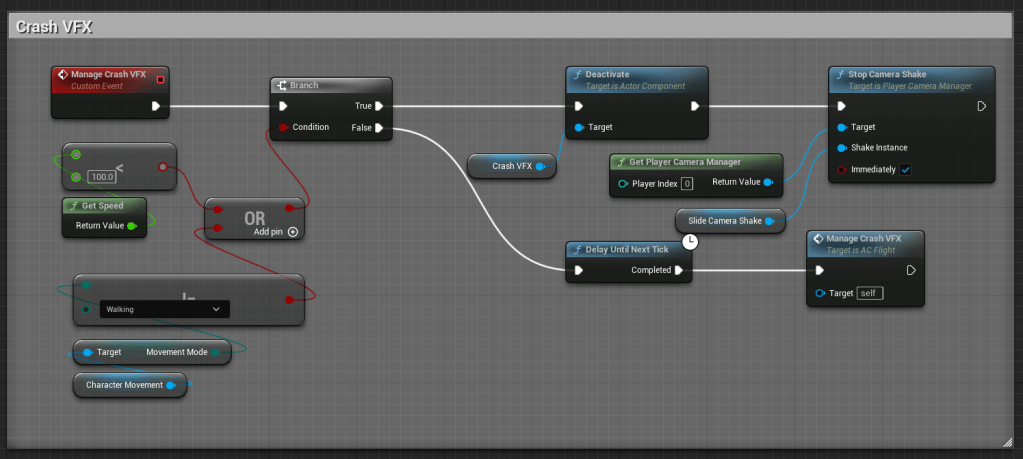
I created this blueprint to manage crash visual effects (VFX) and camera shake for a character in Unreal Engine 5 (UE5). This blueprint ensures that appropriate visual feedback is provided when the character crashes, enhancing the immersive experience for the player.
This blueprint handles the visual effects and camera shake associated with a character crash. It uses custom events to trigger these effects based on the character’s speed and movement mode. The blueprint includes conditional checks and VFX management to ensure that crash effects are applied appropriately, providing visual and haptic feedback to the player.
Detailed Description
Custom Event for Crash VFX
- Manage Crash VFX (Custom Event): This custom event initiates the process of managing crash visual effects.
- Get Speed: Retrieves the current speed of the character.
- Movement Mode Check: Checks if the character’s movement mode is set to “Walking”.
Conditional Check and Branch
- OR Node: Combines the conditions of speed and movement mode.
- Speed Check: Checks if the character’s speed is less than 100.0 units.
- Movement Mode Check: Checks if the character’s movement mode is “Walking”.
- Branch Node: Evaluates the combined conditions.
- True: If either the speed is less than 100.0 units or the movement mode is “Walking,” the crash VFX is triggered.
- False: If neither condition is met, the crash VFX is not triggered.
VFX and Camera Shake Management
- Crash VFX: Activates the crash visual effects.
- Deactivate: Deactivates any ongoing crash VFX if the conditions are not met.
- Get Player Camera Manager: Retrieves the player camera manager to control the camera shake.
- Stop Camera Shake: Stops any ongoing camera shake effect.
- Shake Instance: Specifies the instance of the camera shaking to stop.
- Immediately: Ensures the camera shakes stop immediately.
Delay and Recursive Call
- Delay Until Next Tick: Introduces a slight delay before re-calling the “Manage Crash VFX” event, allowing the process to be continuously checked and updated as necessary.
- Manage Crash VFX (Recursive Call): Re-calls the custom event to ensure continuous management of crash VFX.
Custom Camera Manager
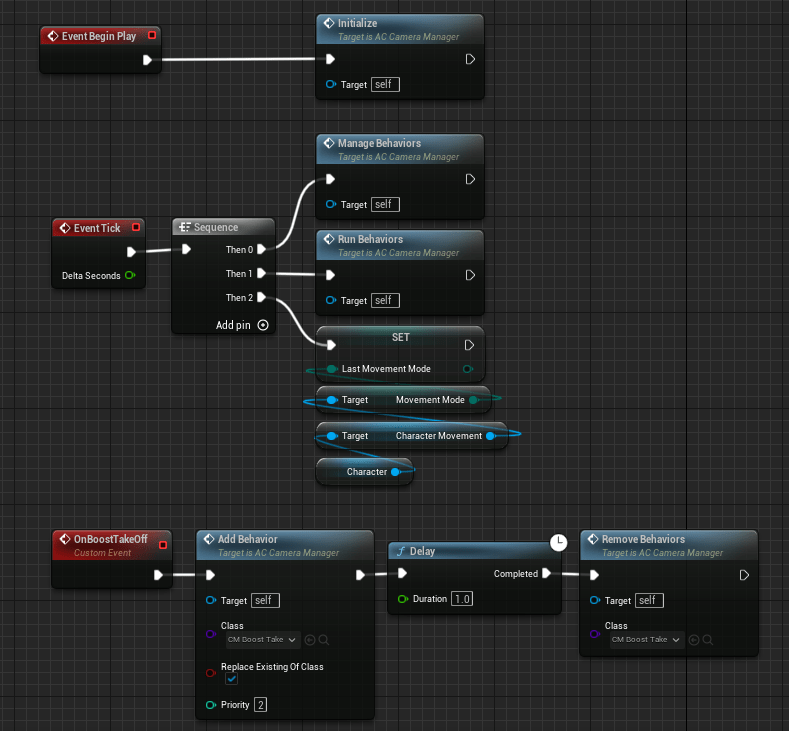
I created this blueprint to initialize and manage camera behaviours for a character in Unreal Engine 5 (UE5). This blueprint ensures that the camera adjusts dynamically to different character states, such as boosting and other movement modes, providing a responsive and immersive experience for the player.
This blueprint handles the initialization and management of camera behaviours based on the character’s movement state. It uses custom events, initialization functions, and per-tick updates to adjust camera behaviours dynamically. The blueprint ensures that camera effects such as boosting, and movement mode transitions are properly managed to enhance gameplay.
Detailed Description
Initialization and Event Begin Play
- Event Begin Play: This node triggers the initialization process when the game starts.
- Initialize: This function initializes the camera manager, setting up necessary variables and preparing it for managing camera behaviours.
- Manage Behaviours: This function manages different camera behaviours, ensuring they are correctly applied based on the character’s state.
Per-Tick Updates
- Event Tick: This node triggers updates every frame, ensuring continuous management of camera behaviours.
- Sequence Node: This node allows multiple branches to be executed sequentially. It ensures that the following updates are processed in order.
- Run Behaviours: This function runs the current camera behaviours, adjusting the camera based on the character’s state.
- SET Last Movement Mode: This node updates the last known movement mode of the character, ensuring that transitions between movement modes are tracked and managed.
Custom Event for Boost Takeoff
- OnBoostTakeOff (Custom Event): This event handles the camera behaviour specifically for a boost takeoff scenario.
- Add Behaviour: This node adds a specific camera behaviour class (CM_BoostTake) to the camera manager, setting it to replace any existing behaviour of the same class and assigning it a priority.
- Delay: Introduces a delay of 1.0 second before removing the behaviour.
- Remove Behaviours: This node removes the specified camera behaviour class (CM_BoostTake) from the camera manager after the delay.
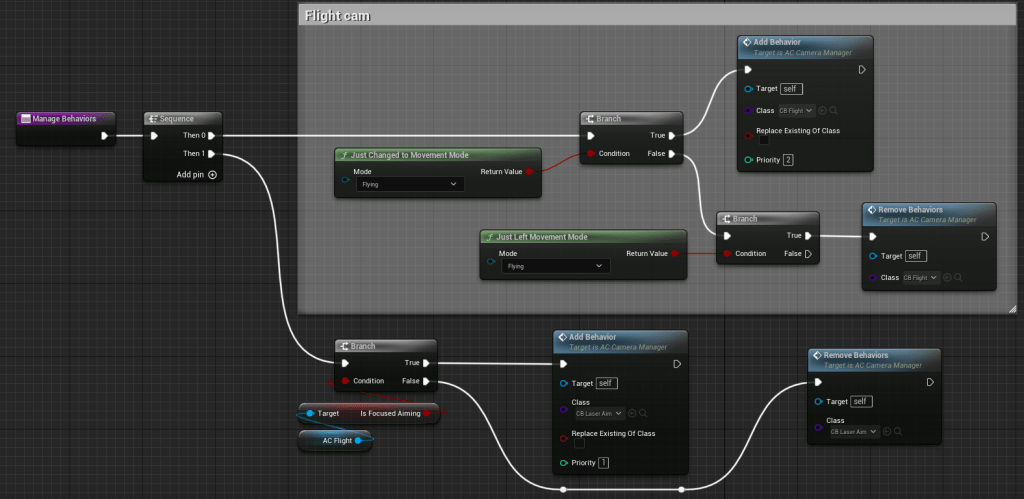
I created this blueprint to manage camera behaviours dynamically based on the character’s movement mode in Unreal Engine 5 (UE5). This blueprint ensures that the camera adjusts appropriately when the character switches between different states, such as flying or aiming, enhancing the visual experience for the player.
This blueprint handles the dynamic adjustment of camera behaviours based on the character’s movement mode and actions like focused aiming. It uses conditional checks and behaviour management functions to apply or remove specific camera effects, ensuring that the camera responds accurately to the character’s current state.
Detailed Description
Initialization and Event Begin Play
- Event Begin Play: Triggers the initialization process when the game starts.
- Manage Behaviours: This function sets up the initial state for managing camera behaviours.
Sequence Node for Continuous Checks
- Sequence Node: Allows multiple branches to be executed sequentially, ensuring continuous checks and updates.
- Branch 0: Handles the first check for movement mode.
- Branch 1: Handles the second check for focused aiming.
Movement Mode Check
- IsChanged_MovementMode: Checks if the character’s movement mode has changed to “Flying”.
- Branch Node: Evaluates the condition of the movement mode change.
- True: If the movement mode has changed to “Flying”, it proceeds to add the flying camera behaviour.
- False: If the movement mode has not changed, no action is taken.
- Add Behaviour (Flying): Adds the camera behaviour class for flying to the camera manager, replacing any existing behaviour of the same class and assigning it a priority.
Focused Aiming Check
- IsFocusedAiming: Checks if the character is in focused aiming mode.
- Branch Node: Evaluates the condition of focused aiming.
- True: If the character is in focused aiming mode, it proceeds to add the focused aiming camera behaviour.
- False: If the character is not in focused aiming mode, it proceeds to remove the focused aiming camera behaviour.
- Add Behaviour (Focused Aiming): Adds the camera behaviour class for focused aiming to the camera manager, replacing any existing behaviour of the same class and assigning it a priority.
- Remove Behaviours (Focused Aiming): Removes the focused aiming camera behaviour class from the camera manager when the character is no longer in focused aiming mode.
Continuous Update for Flight Mode
- Is_MovementMode (Flying): Continuously checks if the character’s movement mode is “Flying”.
- Branch Node: Evaluates the condition.
- True: If the movement mode is “Flying”, it ensures the flying camera behaviour is active.
- False: If the movement mode is not “Flying”, it removes the flying camera behaviour.
- Add Behaviour (Flying): Ensures the flying camera behaviour is active when the character is flying.
- Remove Behaviours (Flying): Removes the flying camera behaviour when the character is no longer flying.
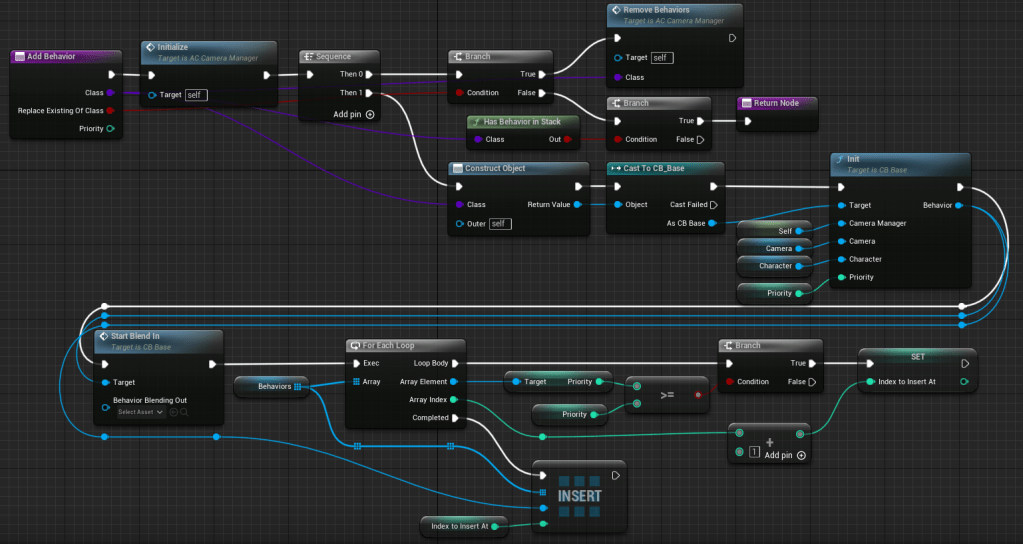
I created this blueprint to dynamically manage and update camera behaviours in Unreal Engine 5 (UE5) based on various conditions and priorities. This blueprint is designed to ensure that the appropriate camera behaviours are applied or removed based on the character’s state and gameplay context, enhancing the overall visual and gameplay experience.
This blueprint handles the dynamic addition, removal, and updating of camera behaviours based on priority and specific conditions. It uses various functions, custom events, and conditional checks to ensure that the camera behaviours are managed effectively. The blueprint ensures that the camera responds accurately to different gameplay scenarios, providing a smooth and immersive experience.
Detailed Description
Adding and Removing Behaviours
- Add Behaviour: Adds a specific camera behaviour to the camera manager, with options to replace existing behaviours of the same class and assign a priority.
- Target: Specifies the camera manager.
- Class: Defines the behaviour class to be added.
- Replace Existing Of Class: Ensures any existing behaviour of the same class is replaced.
- Priority: Sets the priority for the behaviour.
- Remove Behaviours: Removes specific camera behaviours from the camera manager.
- Target: Specifies the camera manager.
- Class: Defines the behaviour class to be removed.
Sequence Node for Multiple Operations
- Sequence Node: Allows multiple operations to be executed sequentially, ensuring a structured flow of actions.
- Then 0: Handles the first operation.
- Then 1: Handles the second operation.
- Then 2: Handles additional operations as needed.
Conditional Checks and Behaviour Management
- Condition Object and Branch Nodes: These nodes evaluate specific conditions to determine whether to add or remove camera behaviours.
- Condition Check: Checks a specific condition, such as the character’s movement state or a gameplay event.
- Branch Node: Executes different actions based on the condition’s outcome (true or false).
- Create Selection Array: Creates an array of available behaviours and selects the appropriate one based on priority and conditions.
- Array Element Selection: Ensures the correct behaviour is selected and applied based on the defined criteria.
Managing Behaviour Priority and Context
- Set Insert Index: Determines the index at which a new behaviour should be inserted into the array based on its priority.
- Priority Check: Compares the priority of the new behaviour with existing behaviours to find the correct insertion point.
- INSERT Node: Inserts the new behaviour into the array at the determined index.
- Insert at Index: Ensures the behaviour is inserted at the appropriate position in the priority order.
Ensuring Continuous Updates
- Event Tick: Ensures that the camera behaviours are continuously checked and updated every frame.
- Update Behaviour List: Continuously updates the list of active behaviours to ensure the correct ones are applied based on current conditions.
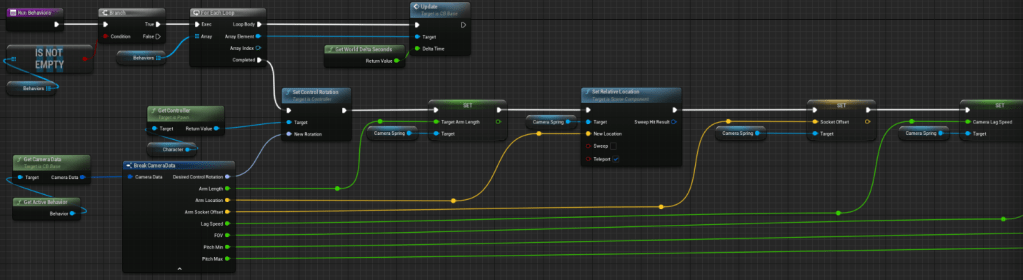
I created this blueprint to manage and update camera behaviours dynamically based on different conditions and priorities in Unreal Engine 5 (UE5). This blueprint ensures that the camera adjusts appropriately in response to the character’s actions and game state, providing a smooth and immersive experience for the player.
This blueprint handles the dynamic adjustment of camera behaviours using a sequence of checks and updates. It retrieves the necessary camera data, updates the camera’s properties such as arm length and socket offset, and ensures that these changes are reflected in real-time. The blueprint uses various functions and nodes to manage these updates effectively.
Detailed Description
Running Behaviours
- Run Behaviours: This function initiates the process of running and updating the active camera behaviours.
- Is Not Empty: Checks if the behaviours array is not empty before proceeding. This ensures that there are behaviours to run and update.
Sequence Node for Structured Execution
- Sequence Node: Allows multiple operations to be executed sequentially, ensuring a structured flow of actions for managing camera behaviours.
- Then 0: Handles the first set of operations.
- Then 1: Handles the second set of operations, typically involving more complex logic or updates.
Conditional Checks and Loop for Behaviours
- Branch Node: Evaluates the condition to determine whether to proceed with the behaviour updates.
- True: If the condition is met, it proceeds to the next steps.
- False: If the condition is not met, the process may be halted or redirected.
- For Each Loop: Iterates through the array of behaviours, allowing each behaviour to be updated in sequence.
- Exec: Executes the loop for each behaviour in the array.
- Array Element: Refers to the current behaviour being processed.
- Completed: Marks the end of the loop, ensuring all behaviours have been processed.
Updating Camera Properties
- Get Camera Data: Retrieves the necessary camera data for the current behaviour.
- Get Controller: Gets the controller for the character, ensuring that the camera updates are applied to the correct target.
- Break Camera Data: Breaks the retrieved camera data into its components for easier manipulation and updates.
- Set Control Rotation: Updates the control rotation of the camera based on the new rotation values.
- Set Target Arm Length: Updates the camera’s arm length to ensure the correct distance from the character.
- Set Relative Location: Sets the relative location of the camera spring arm to adjust the camera’s position.
- Set Socket Offset: Updates the socket offset to fine-tune the camera’s position relative to the character.
- Set Camera Lag Speed: Adjusts the camera lag speed to ensure smooth transitions and movements.
Evaluation
Play Testing Feedback

Most responses, 10 out of 15, rated the game experience as 5 stars, indicating a very high level of satisfaction among the players. This shows that a significant portion of the user base finds the game exceptional and highly enjoyable. Additionally, four more responses rated the game 4 stars, further reinforcing that the game is well-received and appreciated by its audience.
The feedback indicates that Sustainacity is highly regarded by its players, with a predominant number of high ratings. The next steps should involve addressing the specific concerns of the lower-rated responses to further enhance the overall gaming experience. This analysis highlights the game’s strengths and provides a direction for continuous improvement, ensuring that the game continues to meet and exceed player expectations.

The responses to the question reveal that most participants believe the game is effective in this regard. Specifically, the distribution of responses shows a strong tendency towards affirmative feedback, with a mix of “Yes,” “Maybe,” and a few “No” responses. This suggests that while most players recognize the game’s efforts in promoting sustainability and climate awareness, there is still room for improvement to ensure the message is universally clear and impactful.
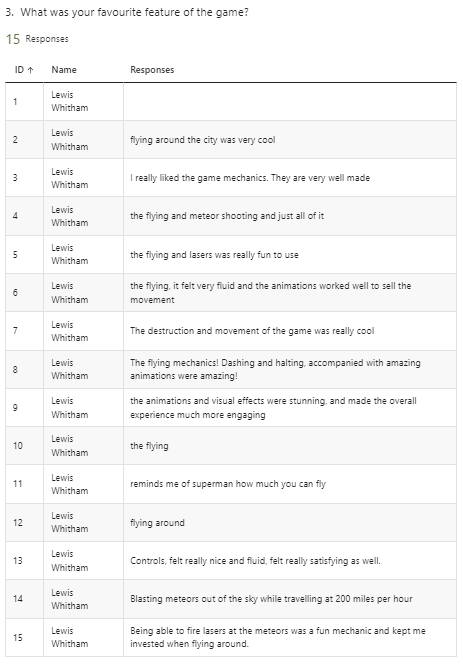
Question 3: Favourite Features
When asked about their favourite features of the game, players consistently mentioned the mechanics related to flying and combating meteors. The detailed responses highlight the fluidity of the flying mechanics, the engaging animations, and the overall excitement of using superhero abilities. This feedback indicates that the dynamic and visually appealing aspects of the game are well-received and are key elements that enhance player enjoyment.
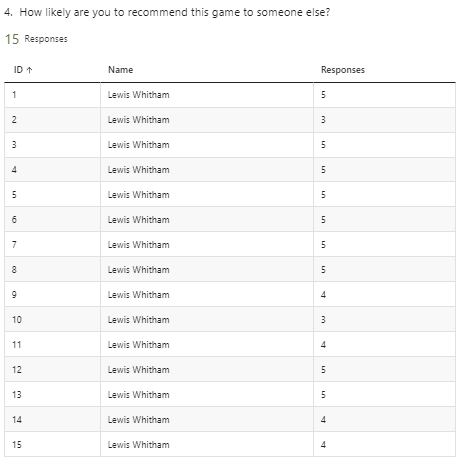
Question 4: Likelihood to Recommend
The responses regarding the likelihood of recommending the game to others show a predominantly positive trend, with many players rating their likelihood as 5 out of 5. A few responses with ratings of 3 and 4 suggest that while the game is generally well-received, there are areas that could be enhanced to make it more universally appealing. This data highlights the game’s strong potential for positive word-of-mouth promotion, contingent upon addressing minor issues.
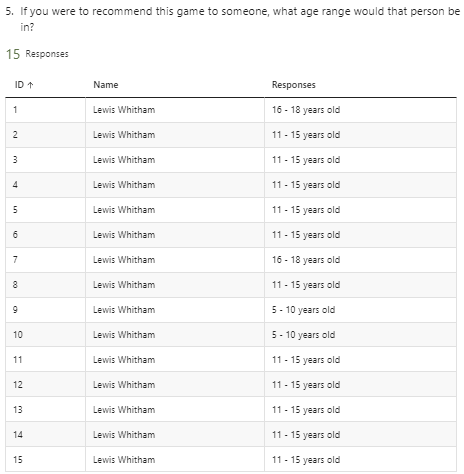
Question 5: Recommended Age Range
The question about the recommended age range for the game reveals that players believe it is suitable for a wide range of ages, primarily between 11 and 18 years old. Some responses indicate suitability for even younger players (5-10 years old), suggesting that the game’s content is perceived as appropriate and engaging for children and teenagers alike. This broad age range indicates the game’s versatility and appeal across different age groups.

Question 6: Player Satisfaction in Saving the City
The responses to whether players felt happy saving the city from the harm of climate change and natural disasters show a strong positive sentiment. Most respondents answered “Yes,” indicating that the game successfully evokes a sense of accomplishment and positive emotion through its core gameplay mechanics. The few “Maybe” responses suggest that while the majority find this aspect fulfilling, there could be enhancements to deepen the emotional impact.
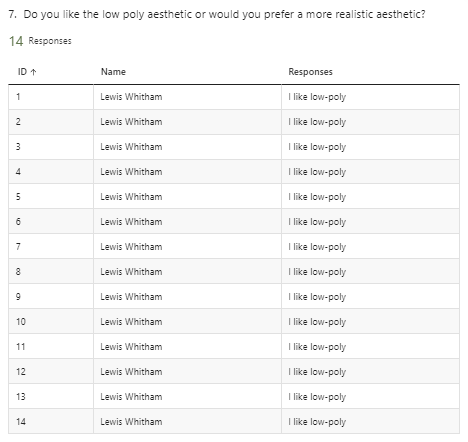
Question 7: Preference for Low-Poly Aesthetic
Responses regarding the game’s aesthetic preference show a unanimous preference for the low-poly style. All participants indicated they like the low-poly aesthetic, affirming that this visual style resonates well with the audience. This feedback supports the continuation of this art style in future updates and developments.

Question 8: Ease of Use of Controls
When asked about the ease of use of the controls, the feedback is generally positive, with most players finding the controls intuitive and easy to learn. Some responses noted specific areas for improvement, such as the aiming mechanics for lasers and the number of buttons. This suggests that while the controls are mostly user-friendly, fine-tuning certain aspects could further enhance the gameplay experience.

Question 9: Desired Future Features
Players provided a variety of suggestions for future features, indicating a desire for more customization options, additional modes, and new disaster types. Ideas like customizing superheroes, adding capes, and having different attacks show that players are interested in deeper personalization and more diverse gameplay scenarios. These suggestions can guide future development to keep the game engaging and fresh.
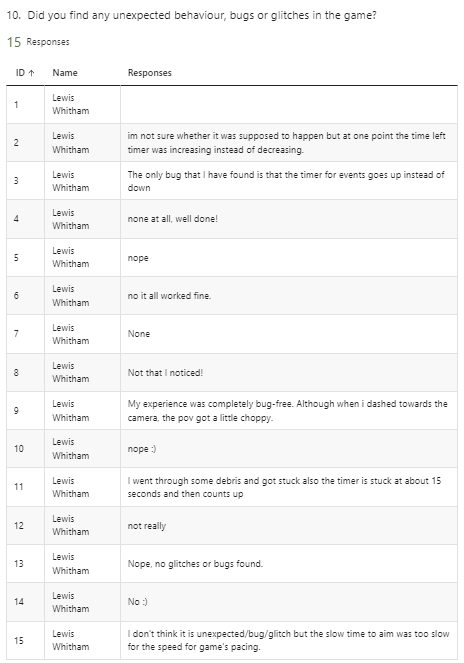
Question 10: Bugs and Glitches
The feedback on unexpected behaviours, bugs, or glitches indicates that the game is relatively stable, with few significant issues reported. Some minor bugs, such as the event timer glitching and occasional choppy camera movement, were mentioned. Addressing these minor issues will help improve the overall player experience and maintain the game’s positive reception.
Feedback Conclusion
The analysis of these feedback form responses shows that my game is well-received by players, particularly for its engaging mechanics, enjoyable aesthetic, and meaningful environmental message. By addressing the few areas of improvement highlighted in the feedback, such as enhancing control mechanics and adding new features, the game can further solidify its appeal and effectiveness.
Conclusion
Bibliography / Research Links
Office for National Statistics (ONS), 2021. Three-quarters of adults in Great Britain worry about climate change. [online] Available at: https://www.ons.gov.uk/peoplepopulationandcommunity/wellbeing/articles/threequartersofadultsingreatbritainworryaboutclimatechange/2021-11-05
Office for National Statistics (ONS), 2022. Climate change insights, UK. [online] Available at: https://www.ons.gov.uk/economy/environmentalaccounts/articles/climatechangeinsightsuk/august2022
Our World in Data, n.d. Natural Disasters. [online] Available at: https://ourworldindata.org/natural-disasters
GOV.UK, 2021. The People and Nature Survey for England: Data and publications from adults survey year 1 (April 2020 – March 2021) (Official Statistics) main findings. [online] Available at: https://www.gov.uk/government/statistics/the-people-and-nature-survey-for-england-data-and-publications-from-adults-survey-year-1-april-2020-march-2021
United Nations Development Programme (UNDP), 2021. World’s largest survey of public opinion on climate change: a majority of people call for wide-ranging action. [online] Available at: https://www.undp.org/publications/worlds-largest-survey-public-opinion-climate-change-majority-people-call-wide-ranging-action
 Lewis' Games Development Portfolio