
Design Document – Slime Slasher
Course Name: UAL Diploma in Games Development
Team Members:
Lewis Whitham – Programmer and User Interface designer.
Aiden Bijak – Art and Design.
Jude Cameron – Sound and Music.
Genre: Top-down Tower Defence RPG
Language: English (UK)
Platforms: PC
Introduction
This document includes the research, processes, pre-production, and production of Slime Slasher.
Game Description
Slime Slasher is a top-down RPG (roleplay game) game which combines tower defence and strategy elements. The player needs to guide their character through each level by killing slimes and solving puzzles to unlock gates into new areas.
My Role
As the programmer and UI/UX designer of the team, my role is to code the functions and design the user interfaces of the game, while factoring in a positive experience for users.
Theme
The theme of our project is good vs evil. To inspire ideas on how to effectively incorporate this theme, our team conducted extensive research into different antonyms and how they could be applied to our project.
Light and Dark
This metaphorical representation of the perpetual conflict between brightness and darkness is embodied by the outer edge of a shadow, referred to as the ‘penumbra.’ It symbolizes the constant struggle between the forces of good and evil. Just as the penumbra exists as a transitional space, our project explores the intricate interplay between these opposing elements, shedding light on the eternal battle to reconcile the pursuit of redemption with the insidious allure of corruption.
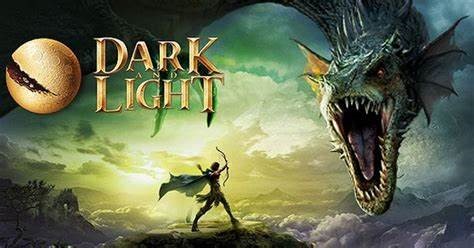
Dark and Light (PC) já tem magia, sobrevivência e RPG de primeira, com … by Unknown Author is licensed under CC BY-SA
A game I have found related to Light and Dark is called ‘Dark and Light‘, which is a Fantasy RPG / Sandbox hybrid on steam: steampowered.com/Dark_and_Light. This game features ‘elemental forces’ which represent the dark and evil while the player is the light. In this game, the broken pieces of the main planet Gaia are floating in the sky above Archos, a nearby satellite planet. This shows that there are bad forces around the world. As an explorer alone in the wild, you need to learn about the land, things in nature, and how to tame the local animals and make a home. You must use and control the magical energy on the planet, or else you might be taken over by the dark power that is everywhere.
Redemption and Corruption
This theme explores the transformative power of good overcoming evil. It highlights the journey of a character or society seeking redemption from past misdeeds or resisting the corrupting influences of evil forces. This theme fits our project as it emphasizes the struggle to maintain one’s moral compass amidst temptations or the potential for corruption.
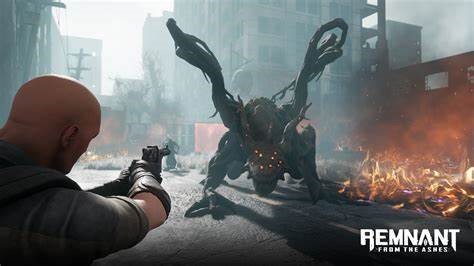
Remnant: From the Ashes Wiki by Unknown Author is licensed under CC BY-SA-NC
The game that I researched for this theme is called ‘Remnant: From the Ashes’ on steam: steampowered.com/Remnant_From_the_Ashes. It is a third-person survival action shooter set in a post-apocalyptic world overrun by monstrous creatures, which represent the corruption. In this game, the world is in chaos because of an old evil from another place. People are trying hard to survive, but they have a way to open portals to different worlds and realities. They need to go through these doors to find out where the evil came from, find things to survive, and fight to make a safe place for humans to start over.
Heroism and Villainy
The classic battle between heroes and villains embodies the essence of good vs evil. It showcases the courage, selflessness, and determination of heroes as they face off against the malevolence, cunning, and darkness embodied by villains. Incorporating this theme would add depth to our project by portraying the eternal struggle between righteousness and wickedness.
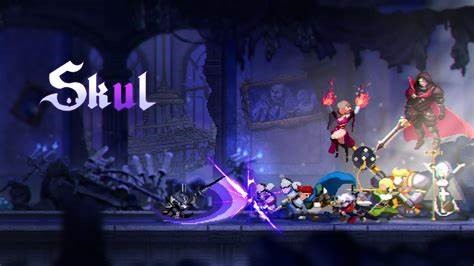
Skul: The Hero Slayer (Multi) será lançado para PC em 21 de janeiro de … by Unknown Author is licensed under CC BY-SA
The last game I researched related to the Heroism and Villainy theme is ‘Skul: The Hero Slayer’ on steam: steampowered.com/Skul_The_Hero_Slayer. In this game, the Imperial Army and the ‘Hero of Caerleon,’ joined forces to launch a massive attack. Their goal was to eliminate the Demons once and for all. They overwhelmed the Demon stronghold with a large army and managed to destroy it completely. All the demons in the castle were captured, except for a single skeleton named ‘Skul.’
Theme Implementation
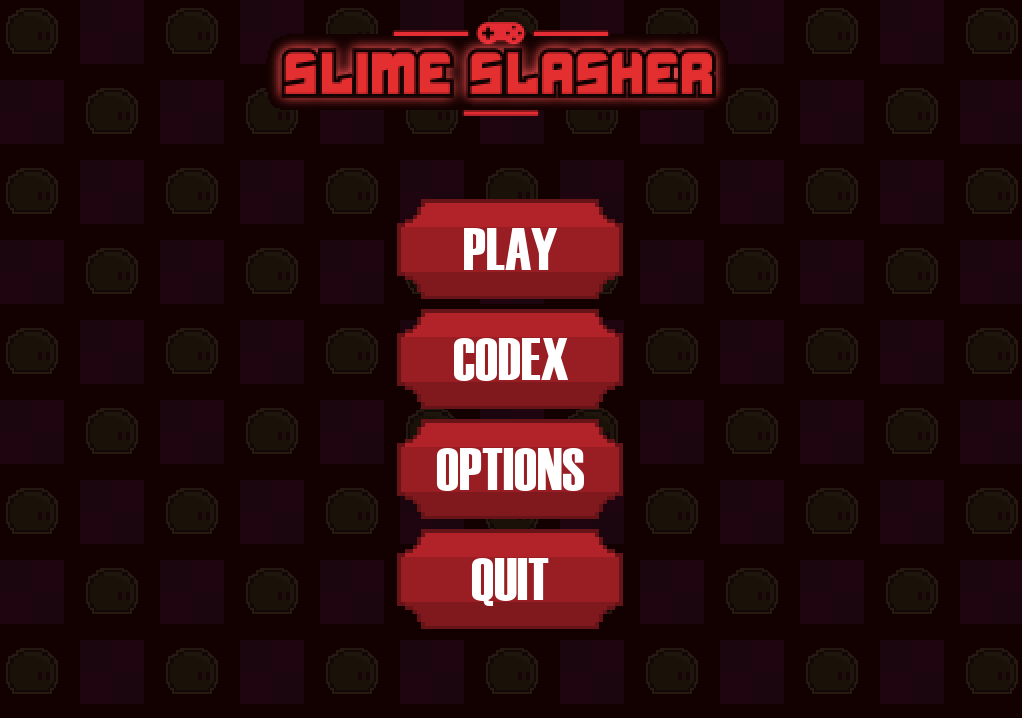
As the User Interface designer within my team, I plan to include the theme of good vs evil in the User Interface to visually create an evil essence to the overall look and style of the game. I can achieve this by choosing dark colours that resemble evil (like reds and purples), creating a visual atmosphere from the placement of UI objects (the scrolling background), and finally, the font and style of the text seen within the game.
Gameplay and Ideas
Game Name
We originally came up with the name of ‘Project: Penumbra,’ with Penumbra representing the edge or outline of a shadow. This concept symbolizes the balance between light and dark, which would be a crucial aspect of the game’s theme of good vs evil. However, we later realized that the title was not clear enough for our target audience. As a result, we decided to change the name to ‘Slime Slasher,’ which sounded more upbeat and light-hearted, and instead we chose ‘Project: Penumbra’ to be the tagline.
Game Genre
When it came to deciding the genre, our initial plan was to create a tower defence game, but we also wanted to incorporate elements of a platformer/RPG. This led us to the idea of creating a game that combined both genres, with players transitioning from a platformer to a tower defence section of the game. By blending these two genres, the game has a Unique Selling Point that would interest players who enjoy both tower defence and platformer games.
Gameplay
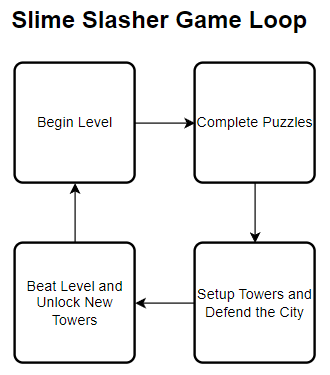
In the platforming section, the player needs to collect tokens by solving the puzzles. The tokens are used to buy towers and power ups for the tower defence section.
Before the next level becomes available, the player needs to defend an attack from the evil enemy slimes. They spawn in waves with each wave being more difficult than the last. The player cannot directly attack the slimes but can place towers on top of the walls of the level to shoot the enemies and prevent them from reaching the end of the path.
Target Audience
The Target Audience are the people who we want to target to get playing our game.
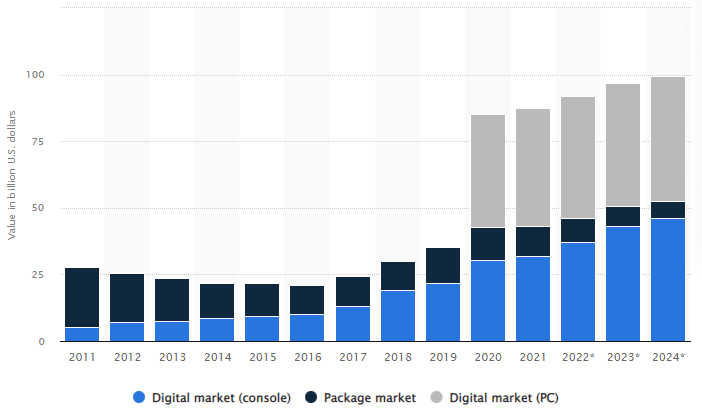
In 2021, total console gaming market sales amounted to 32 billion U.S. dollars, compared to 44.6 billion U.S. dollars generated by the worldwide PC gaming market. According to statista.com, PC gaming overall has a higher value than console gaming.
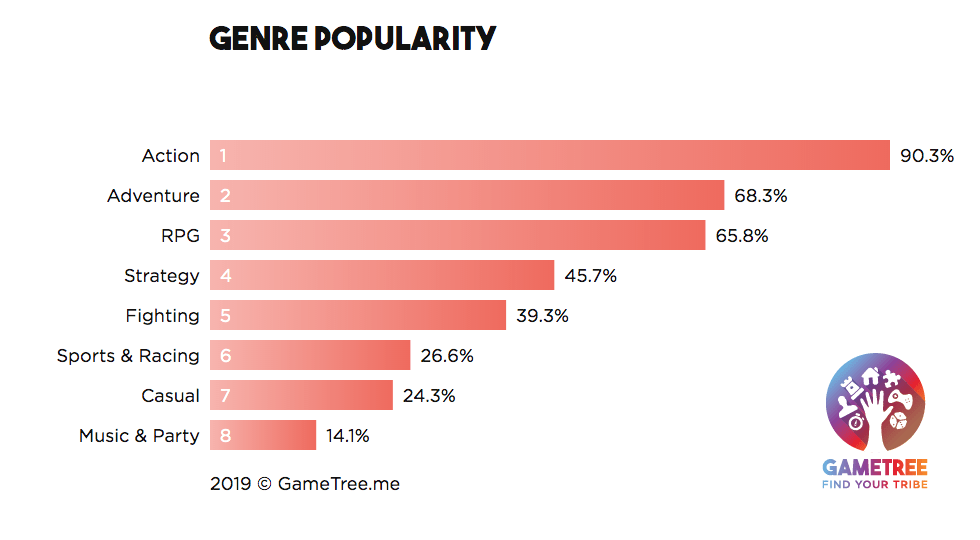
My team decided to make the genre of our game an RPG (roleplay game) with strategy and tower defence elements. We chose these genres because they are within the top four places on the genre popularity scale provided by Gametree.
RPGs offer players the opportunity to immerse themselves in a fictional world and take on the role of a character, allowing them to escape their reality and experience a different life. RPGs also provide a sense of progression and accomplishment, as players can level up their characters and gain new abilities, weapons, and armour.
Strategy games, on the other hand, provide a different kind of challenge, often requiring players to think critically and strategically to overcome obstacles and achieve victory. They offer a sense of control and decision-making, as players must make choices that can affect the outcome of the game.
Both RPG and strategy games also often have compelling storylines, interesting characters, and immersive gameplay, which can keep players engaged and invested in the game for hours on end. Additionally, these games often have online multiplayer modes, allowing players to connect and compete with others around the world, adding a social aspect to the gaming experience.
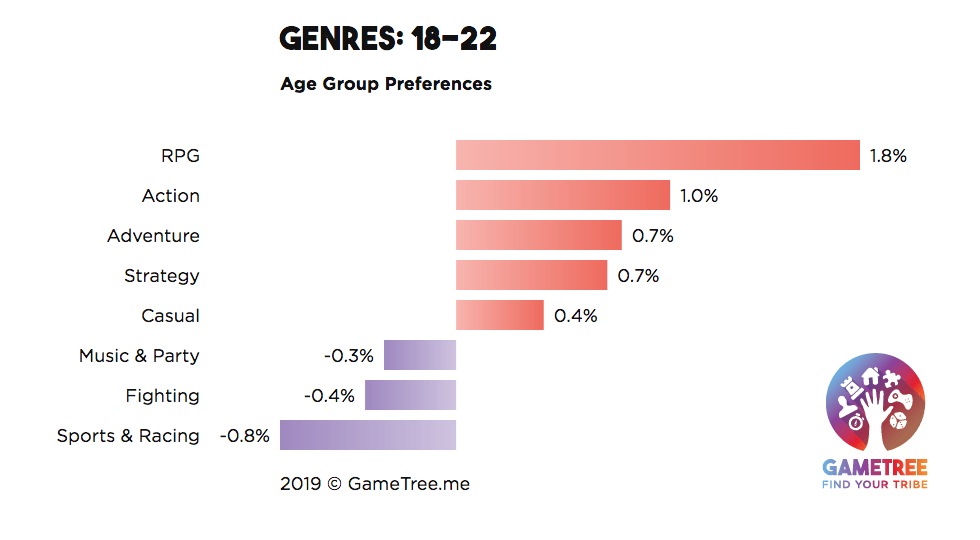
Our game is geared towards the demographic of teenagers and young adults, as the RPG and strategy genre is particularly popular among individuals aged 18-22. The age range of people interested in tower defence games can vary, but it typically includes individuals from their preteen years through adulthood.
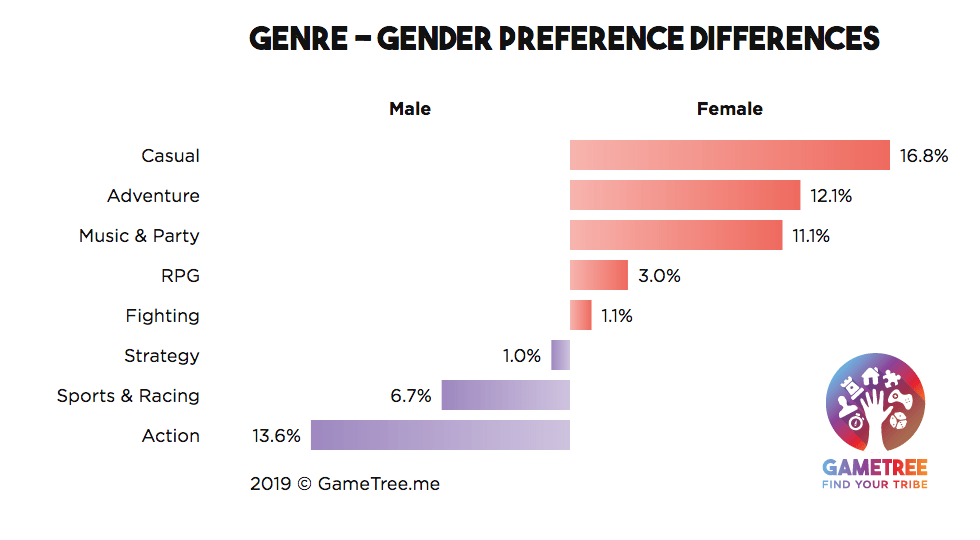
While our target audience includes a blend of both males and females, the preference slightly skews towards the female side, since RPG games are relatively more favoured by women. The strategy genre, however, remains a popular choice for both genders, alongside fighting games.
Game Research
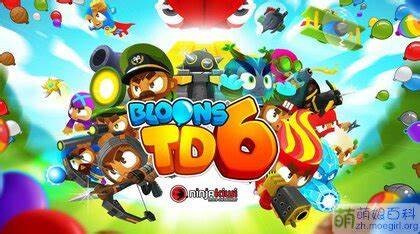
气球塔防6 – 萌娘百科 万物皆可萌的百科全书 by Unknown Author is licensed under CC BY-SA-NC
Our game draws inspiration from Bloons Tower Defence 6, a popular Tower Defence game series released in 2018. The goal of the game is to prevent bloons from reaching the end of the track by strategically placing weapons to pop them. Each popped bloon earns the player money which can be used to purchase more powerful weapons for the increasingly difficult levels.
While researching reviews for the game, we noticed that some reviewers found it challenging to understand the different combinations of bloons and weapons but appreciated the ease of jumping into the game. To address this, we will provide clear explanations and demonstrations of the unique abilities and combinations of weapons and enemies in our game. I am planning the implementation of a ‘Codex’ menu, like a built-in wiki within the menu of the game, for information about all the towers and enemies in the game, how they work, what makes them unique, and specific statistics for the nerds who like statistics. This will make it easier for players, including casual ones, to learn and enjoy the game.
Our game will take inspiration from BloonsTD6’s diverse range of bloons, including Red, Blue, Green, Yellow, Pink, Purple, Black, White, Zebra, Lead, Rainbow, Ceramic, Camo, Regrow, and Fortified Bloons. Each type has unique characteristics, such as speed, immunity to certain attacks, and ability to regenerate, which adds complexity and challenge to the gameplay.
Slime Slasher will feature a wide range of enemy types, inspired by Bloons Tower Defence, with varying characteristics such as speed, immunity to certain types of attacks, and ability to regenerate. By incorporating these diverse types of enemies, players will face new challenges and obstacles as they progress through the game, increasing the overall difficulty and requiring players to think strategically to succeed.
This level of complexity will not only enhance the overall experience and enjoyment of the game, but it will also provide players with a sense of mastery and accomplishment as they learn to navigate and overcome each new type of enemy. This will increase the replay value of the game, as players will want to return to it to improve their strategies and conquer new challenges.
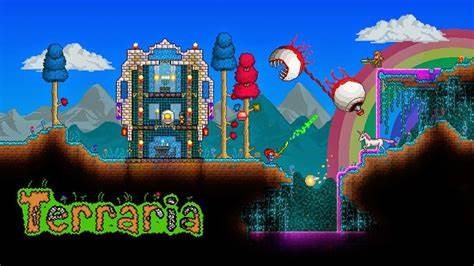
Terraria MOD APK+OBB V1.2.10333 ATUALIZADO ~ ANDROID4STORE by Unknown Author is licensed under CC BY
Another game we took inspiration from was ‘Terraria’ because of its iconic slime sprite. The slime in games is usually seen as a basic and weak enemy in most cases, but we decided to make all enemies in our game to be slimes due to its recognisably as an enemy and its replicable design as a base for more variants. This feature is not just subject to ‘Terraria,’ slimes can also be found in games like: The Legend of Zelda: Breath of The Wild, Minecraft, Slime Rancher, and Final Fantasy.
MDA Framework and Types of Fun
Mechanics
- The game is a 2D platformer with tower defence elements.
- Players collect tokens in the platformer section to buy items to use in the tower defence section.
- Players can customize their character’s appearance to express their own creativity.
- The game offers various levels that increase in difficulty to provide a sense of progression.
Dynamics
- Players must balance platforming skills with strategic decision-making in the tower defence sections.
- The player’s choices in the platformer section affect the options available in the tower defence section.
- Players are encouraged to experiment with new gameplay mechanics to discover new strategies.
- The game’s narrative provides motivation for the player to continue playing and progressing through the game.
Aesthetics (Types of Fun)
- Sensation: The game offers an immersive experience through memorable audio and visual effects. This enhances the player’s overall enjoyment of the game and creates a more engaging atmosphere.
- Fantasy: The game’s imaginary world allows players to escape reality and enter a new and exciting environment. This adds to the game’s appeal and can encourage players to spend more time in the game world.
- Narrative: A well-crafted story can drive players to keep coming back to the game. This can be achieved through an engaging plot, interesting characters, and a sense of progression throughout the game.
- Challenge: A game that offers a challenge can add replay-ability as players strive to master the game mechanics. This can create a sense of satisfaction for players as they progress and can encourage them to continue playing.
- Discovery: The game offers new gameplay mechanics for players to discover and learn how to use. This can create a sense of excitement and encourage players to experiment with the game’s mechanics.
- Expression: Players can express their own creativity through the game, such as creating a character that resembles their own avatar. This can add a personal touch to the game and create a stronger connection between the player and the game world.
- Submission: The game offers both fun and challenging levels to cater to the player’s preferences. This also provides a sense of progression as the levels become more difficult, giving players a greater challenge as they progress through the game.
Stimulus
Intellectual Property
Intellectual property (IP) refers to creations of human intelligence, such as inventions, literary and artistic works, designs, and symbols, names and images used for commercial and personal purposes.
IP is protected by law, which enable people to earn recognition or financial benefit from what they invent or create. This means that someone’s intellectual property cannot be directly copied or sold without the original person’s permission.
Original Content
The original content in Slime Slasher includes the asset designs made by the team for the purpose of using within the game and documentation. This includes the sprites, animations and tile sets.
Another part of original content is the code within the game, along with the methods and techniques used. This code was written entirely by the programmer of the team with no outside intellectual property copied from other sources.
Methods and Techniques
I want to use methods and techniques I have learnt with my previous experience in UI (User Interface) design and programming in this project. I will explain the process of using these methods and techniques, what makes them useful, and why they are better than other ways of accomplishing the same thing.
Nine Splice
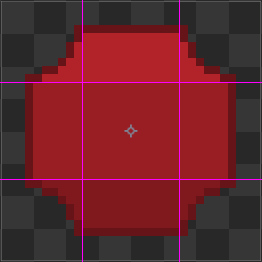
Nine Splicing is the technique of splicing a sprite into nine distinct sections and repeating the texture to allow for scalability of the sprite without any warping or stretching of the texture.
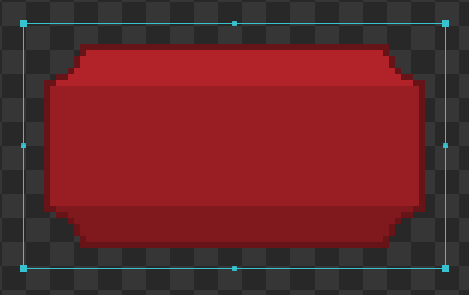
I plan to implement Nine Splicing for the button sprite to scale the buttons however needed.
One benefit of this technique is that one sprite can be used for all buttons, instead of many sprites with varying sizes. This keeps the UI manageable and increases performance as there is only one sprite to compile instead of many.
Another benefit is consistency. Keeping the pixelated theme consistent is important, and by applying this technique removes the chance for stretched or warped pixels which may disorient the user and create a negative experience.
Object-Oriented Programming
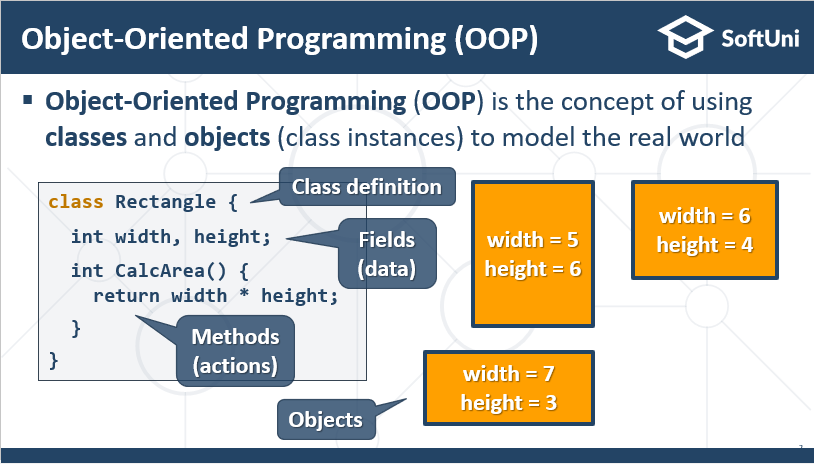
Object-Oriented Programming is the technique of creating an ‘object’ that has all the setup and logic prepared, then that object is replicated to have multiple instances with changes in characteristics. This improves performance and is easier to manage. This technique is seen in many industry-standard approaches for complex systems with repeated code.
I have used Object-Oriented Programming for other projects, especially for code that is going to be repeated, and I plan to utilise this for the user interface and objects of this project.
Interpolation
According to wikipedia.org, linear interpolation is defined as ‘a method of curve fitting using linear polynomials to construct new data points within the range of a discrete set of known data points,’ or in other words, a way to find one value that is between 2 other values.
Lerp (Linear Interpolation) can be used to create a smooth transition or translation of an object’s size, position, or colour blend to create a satisfying animation.
There are two separate ways to code linear interpolation; precise and imprecise.
The imprecise method will not always guarantee the expected value because of floating-point errors, these errors are caused by the lack of computer memory per bit of a binary number. This is the imprecise function for linear interpolation from wikipedia.org:
// Imprecise method, which does not guarantee v = v1 when t = 1
// due to floating-point arithmetic error.
// This method is monotonic. This form may be used when the hardware
// has a native fused multiply-add instruction.

float lerp(float v0, float v1, float t) {
  return v0 + t * (v1 - v0);
}
To fix the floating-point error, I can use a more precise method of achieving the same effect:
// Precise method, which guarantees v = v1 when t = 1.
// This method is monotonic only when v0 * v1 < 0.
// Lerping between same values might not produce the same value

float lerp(float v0, float v1, float t) {
    return (1 - t) * v0 + t * v1;
}
This new method is better, however when v0 and v1 are equal, the result ‘might not produce the same value.’ This may give a jittering or stuttering effect, especially when moving or translating an object, but this jittering effect is so minimal that it will be unnoticeable. If the effect is noticeable in-game, I could implement an early return in the lerp function when v0 and v1 are equal to minimise this effect. This is what the code would look like with this mechanism:
// prevent jittering effect, this is my solution and
// may not be the most efficient method, but it works.

float lerp(float v0, float v1, float t) {
    if (v0 == v1) return 1;
    return (1 - t) * v0 + t * v1;
}
I will use interpolation for smooth transitions and translations of UI objects and game objects in the game. This will be used for the starting animation and health bars for the enemies.
Asset List
In this list, I have documented some Assets that will need to be created for the pre-production of the game. Since my role in the team is programming and UI/UX designs, I have listed the code functions and UI (User Interface) elements needed in the pre-production.
| Index | Function or Object Name | Description |
| [1] | Player – Move() | The function responsible for the movement mechanics of the player, which allows them to move using the inputs from the keyboard. |
| [2] | Player – Attack() | The function responsible for the attacking mechanics of the player, which allows them to attack using the inputs from the keyboard. |
| [3] | Player – CheckCollisions() | The function responsible for detecting collisions between the player and other objects/sprites. |
| [4] | Enemy – Move() | The function responsible for the movement mechanics of the enemies, which allows them to move along the path defined by an array of (x, y) coordinates. |
| [5] | Enemy – FindNextPathPoint() | The function responsible for finding the position vector2 of the next path point along the path, this will be stored in a variable for easier referencing and efficiency. |
| [6] | Enemy – Attack() | The function responsible for the attacking mechanics of the enemies, which allows them to attack towers and the player. |
| [7] | UI – MainMenu | The object responsible for the setup and drawing of the User Interface for the main menu. |
| [x] | More will be added with further development | – |
| Index | UI Element Name | Description |
| [1] | Introduction Animation – Text | The text that displays during the introduction animation. This will display the game’s name and creators. |
| [2] | Background – Images and Colour | The images that will display for the infinitely scrolling background effect, and the background colour. |
| [3] | In-game – The Tower Inventory | This element will display all your currently unlocked towers and options, for example the upgrades and information available. From this menu, the player can drag and drop the towers onto the level. |
| [x] | More will be added with further development | – |
More will be added to the lists as production continues.
Programming the Introduction Animation
The first thing I wanted to create is the Introduction Animation. This animation begins at the start of the game and displays the game’s name and creators.
Create Event
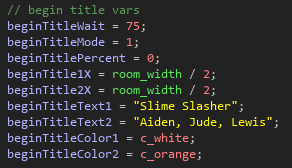
This code creates the setup variables which determine animation delay, percentage complete, text position and finally colour.
Draw Event
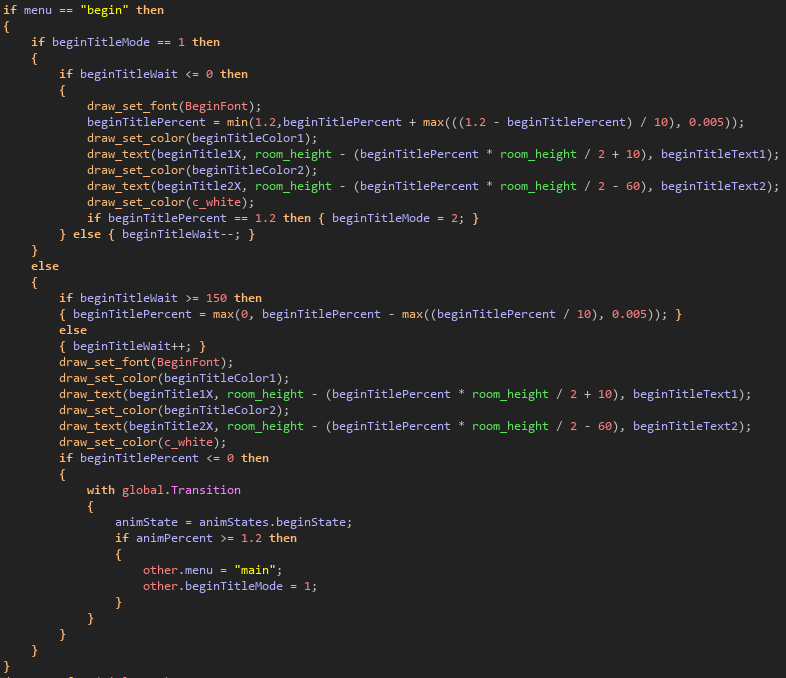
This code controls the position of the title during the animation and starts the transition between the ‘loading screen’ and main menu.
The first thing I did was deciding what kind of interpolation method I wanted to use for the title text. There are two distinct types of interpolation, including: linear interpolation and exponential interpolation.
The following is the linear interpolation equation:
y = y1 + (x – x1) * ((y2 – y1) / (x2 – x1))
y = linear interpolation value
x = independent variable
x1, y1 = values of the function at one point
x2, y2 = values of the function at another point
I recreated this equation in GML (Game Maker Language) with the built-in functions: ‘min’ and ‘max’ to create the interpolation effect.
This will make the text of the animation move smoothly along the linear interpolant (the line created by the start position and the end position when connected) given the interpolation value as a percentage of the animation duration.
Programming the Main Menu
The main menu is what the player interacts with at the start of the game. It is an array of menus and sub-menus accessible through buttons.
Create Event
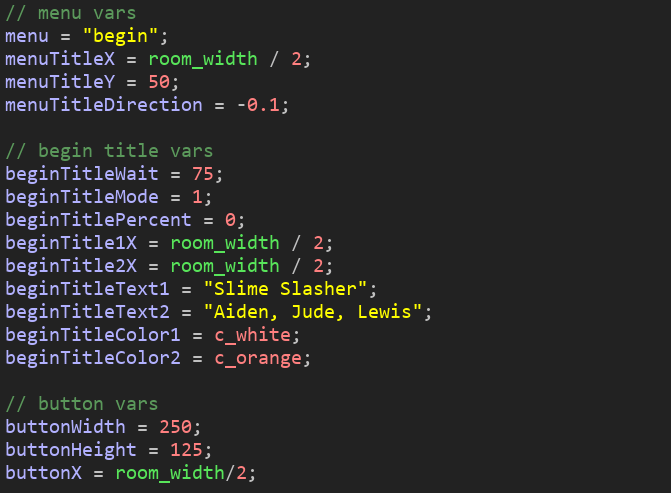
This code sets up the variables for the main menu. This includes the menu title, the animation text, and the button variables.
Draw Event
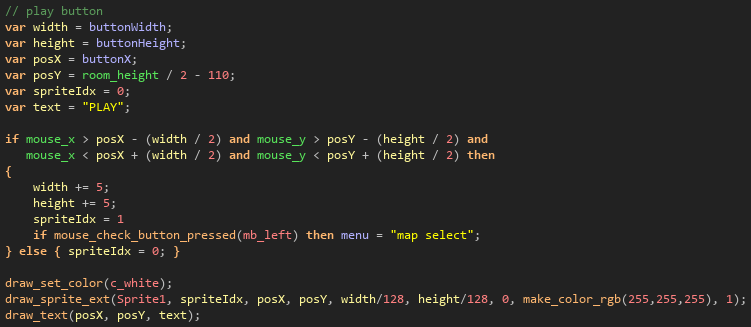
This code is a blueprint used for the logic, control and drawing of the buttons used in the UI. The first 6 lines of this code are the setup variables which define the width, height, position vector2, sprite index and text of the button.
The if-statement after that is responsible for detecting if the button is being hovered over, and controls what should happen if the button is pressed. In this example, the button will send the player to the map selection sub-menu.
The last part of this code is for drawing the button with the given parameters. The various variables that can be changed allow for extra customisation of these UI elements.
Programming the Scrolling Background
The scrolling background will be the background in the menus of the game.
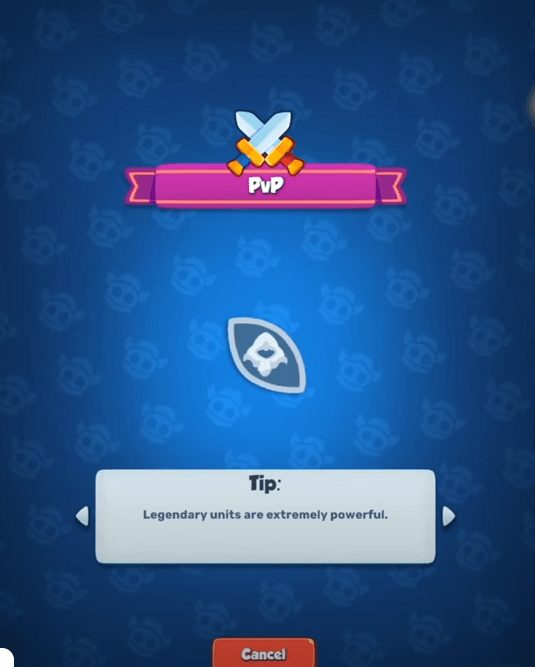
I took inspiration from Rush Royale, which is a tower defence merging game on mobile. The background for the loading screen looked interesting and quite customisable to fit into the game.
To add this into my game I needed to think about the colours, images, scroll direction and scroll speed.
Create Event

This is the setup variables for the scrolling background. This code includes the variables that control what primary and secondary images are used for the background, the image size and scale, the gap between images, and finally the start x and y coordinates of the images.
Draw Event
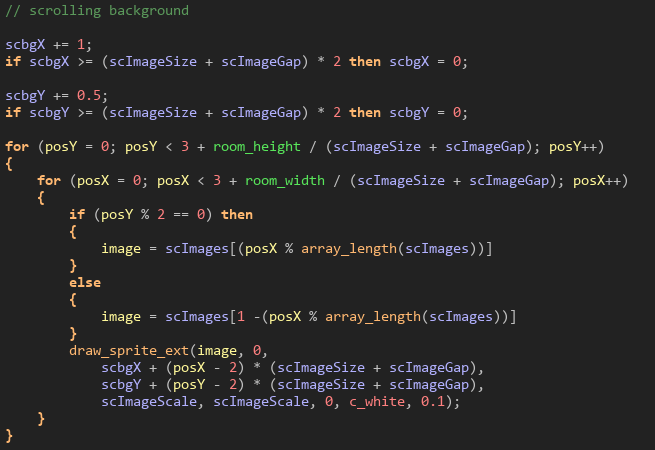
This code is for drawing the background in the game. The first four lines of this code are for moving the images and creating the perfect loop. I first increased the x position of the images by 1, then created an if statement which resets the x position back to 0 if x is greater than or equal to the image size plus the image gap. Then repeated this with the y coordinate which creates the effect of an infinite loop.
The next section of this code is for positioning and drawing the images. I created a double for-loop which iterates over the rows and columns of the grid of images, then I created an if statement determining what image to draw and stored it in a local variable.
This variable is used to draw the image to the screen, with the selected size, gap, scale, colour, and alpha value.
This is the result. You can see that the background moves downwards and to the right slowly over time.
Programming the Codex Menu
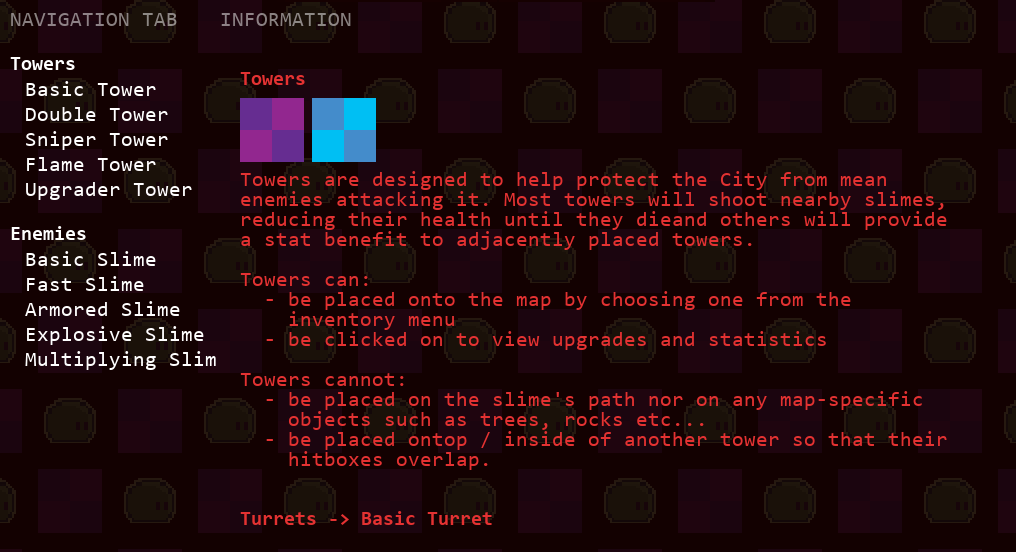
The codex is a built-in wiki for information about the towers and enemies in the game, how they work, what makes them unique, and specific statistics like damage, health, and recharge speeds.
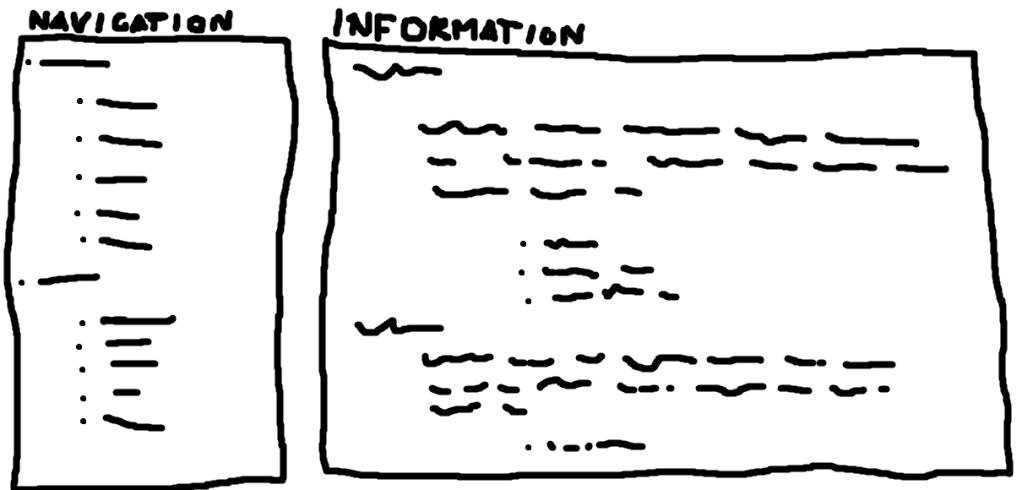
The layout of the codex will have:
- A navigation menu, with headings and subheading to organise the information and can be clicked on to skip to that section which allows easy navigation.
- An information menu, which will have all the information for that Tower or Slime under it. This menu will have a scroll function, so the player can scroll through the information like a web page
Create Event
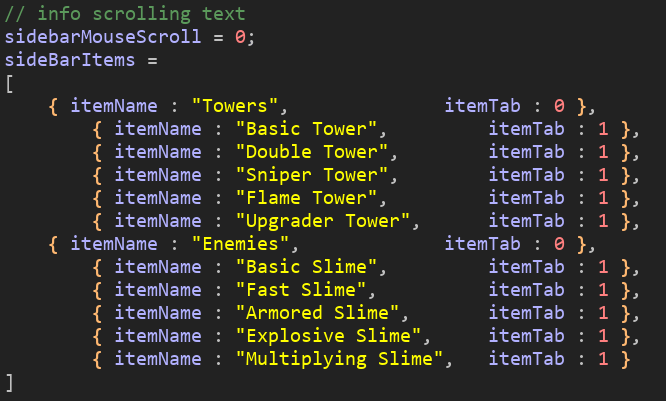
This code stores the headings and subheadings for the codex’s navigation menu. The side menu is for navigating the information menu, each heading and subheading can be clicked on to skip to that section.
Draw Event
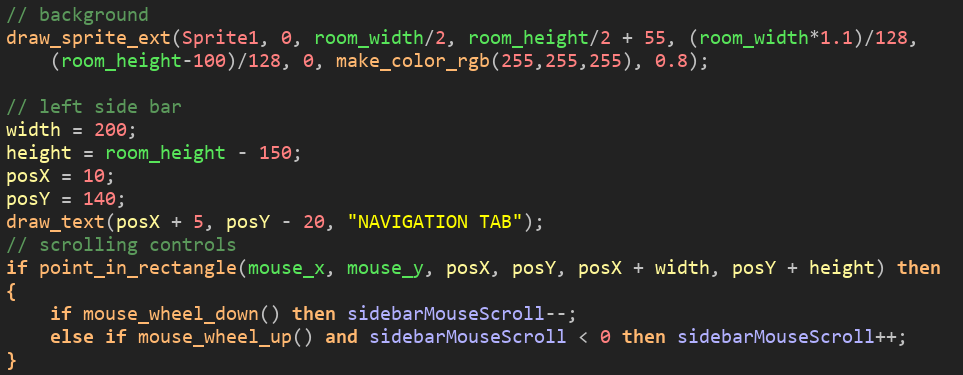
This code manages the setup variables and drawing of the navigation menu and controls the logic of the scrolling.
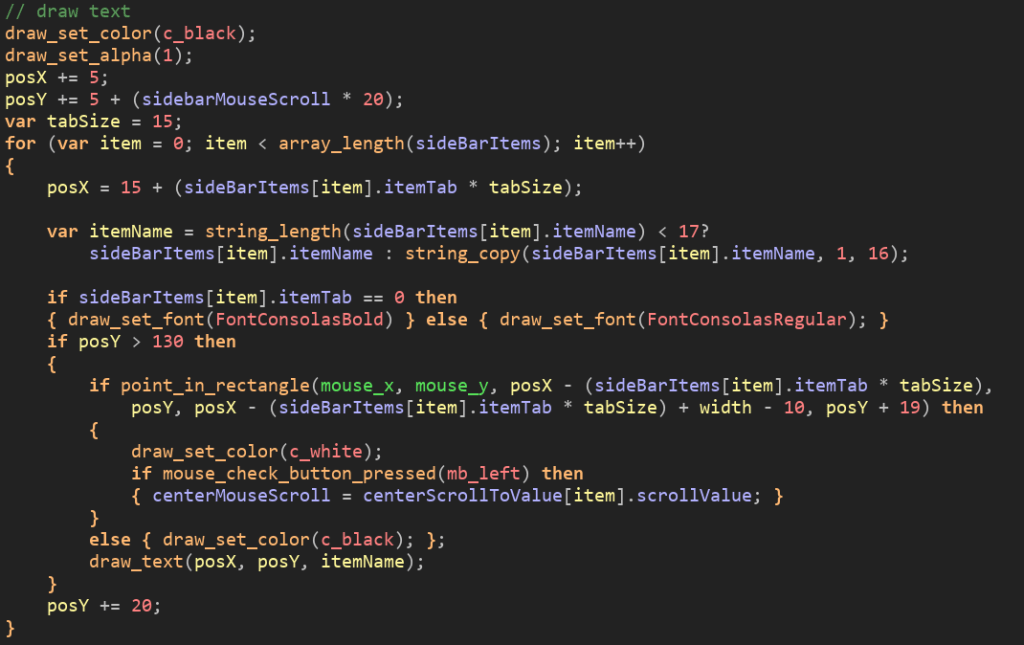
This code is responsible for positioning, aligning, and drawing the text onto the screen and the logic for clicking to go to that section.
Programming the Main Object
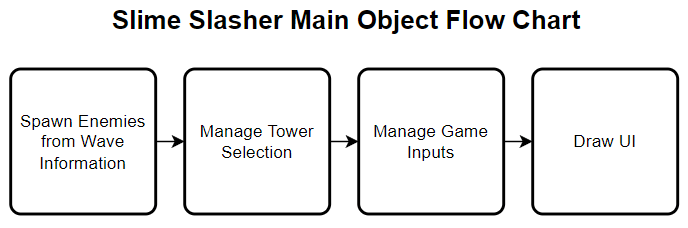
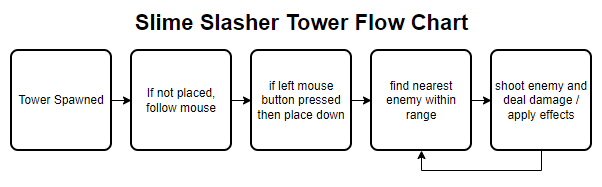
The main object controls the main functions of the game, such as enemy wave spawning and tower placement. This object also draws the in-game UI and manages the controls and logic of the game. This is the basic flow chart for the main object:
Create Event
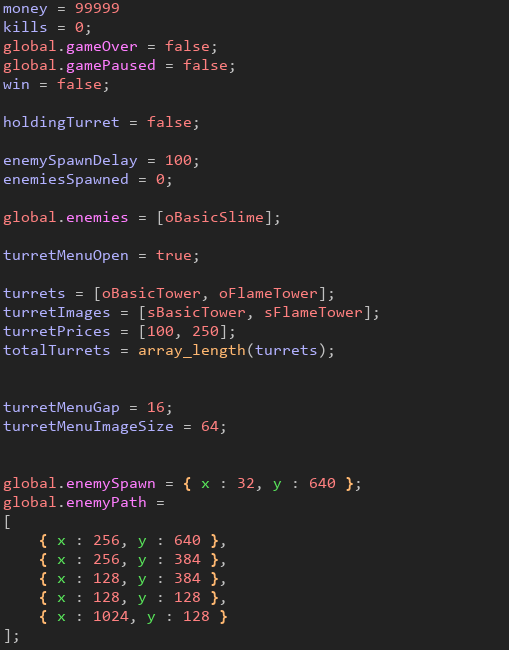
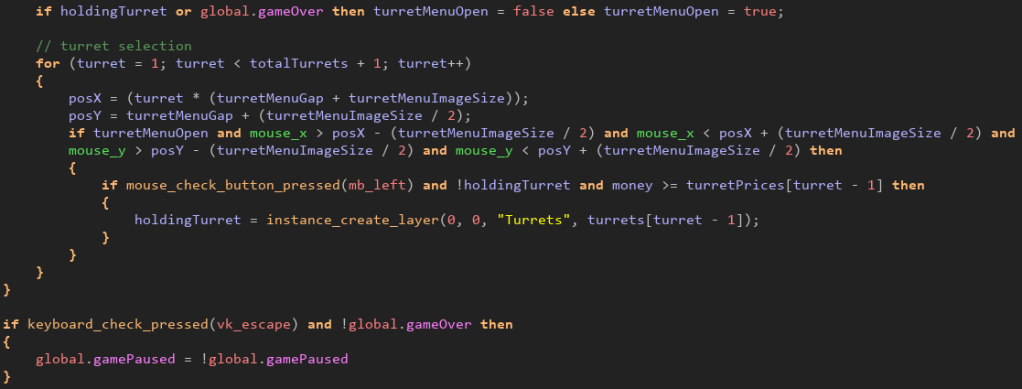
The create event sets up the local variables for the game, including money, kills, game over and game paused Booleans, if holding a tower, the enemy spawn delay, total enemies spawned, and finally the variables for the turret menu.
These variables can be accessed by any other object to detect if the game is over, or the turret menu is open.
Step Event
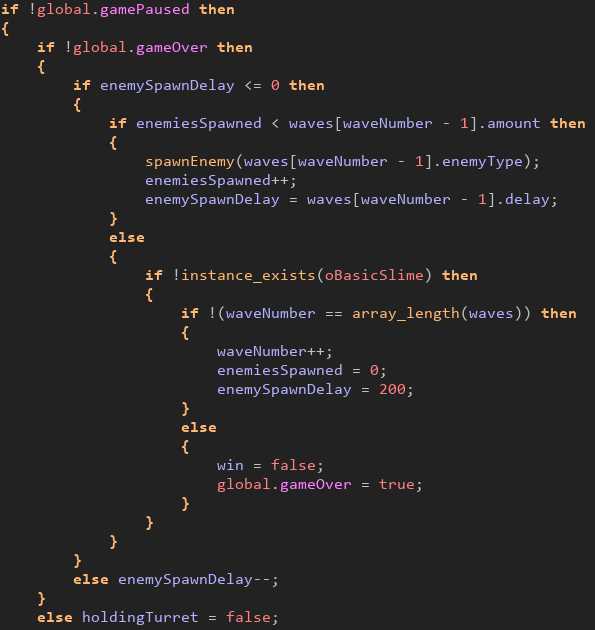
This section of code within the step event is for managing the enemy wave system
Programming the Slime Object
The slime object is the enemy of the game, it appears during the levels and slithers its way around the path and eventually to the end. Once the slime reaches the end, it will be released into the maze where the player is. The player needs to place towers beside the path to prevent the slimes from entering the maze. Towers are much more powerful and versatile than the player, so placing towers to kill the slimes is much more efficient, plus, they attack for you so why wouldn’t you?
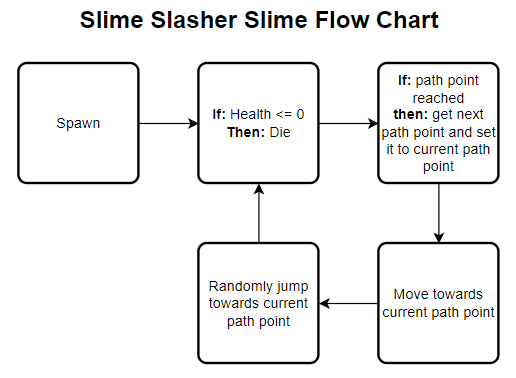
The slime flow chart below shows the process of the slime. These are the basic instructions that the slime will follow, ignoring customisable and visible processes, this just shows the logic alone.
Create Event
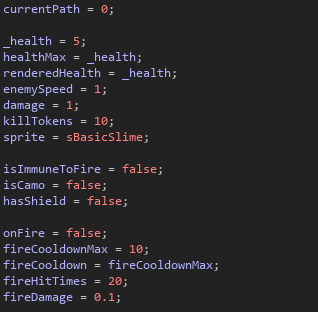
This event inside the slime object initialises the variables for the slime. This includes health, speed, damage, kill tokens, the sprite, and other Booleans used for Immunity to fire damage, has camouflaged and has shield.
Object Variables
- Sprite | This is the image used to display the slime.
Integer Variables
- Health | Stores the health of the slime, used to determine if the slime is alive or dead
- Speed | The movement speed of the slime.
- Damage | The damage the slime does to towers and the player when attacking.
- Current Path | The current path indexes (vector2 coordinate for the path point in the level) the slime is moving towards. This value is incremented when the point is reached – leading the slime to the next point and eventually reaching the end of the path.
- Fire Cooldown | The cooldown between damage being inflicted due to fire.
- Fire Hit Times | The number of times the slime has been damaged due to fire, this variable is used to allow for synchronization when lag occurs and calculates if the slime is no longer on fire.
- Fire Damage | The damage that is inflicted when the Fire Cooldown is or below zero.
Booleans
- On Fire | True if the slime is on fire.
- Has Shield | True if the slime has a shield.
- Has Camo | True if the slime is camouflaged.
- Is Immune to Fire | True id the slime is immune to fire.
Step Event

When the enemy reaches its current path point, then it increases it by one, and therefor begins travelling to the next point. This process repeats until there are no more points to go towards, at which point the slime has reached the end and moved into the maze for the player to deal with.

This first section of this code is responsible for damaging the slime over time and creating a text UI object displaying the damage being dealt to the slime by the fire.
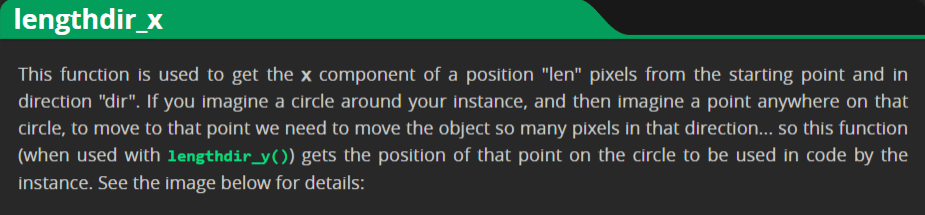
The next section creates particles around the slime to look like a shield and will increase the slimes health. This effect is created by randomising a distance and angle local variable, then creating a particle using the lengthdir_x() and lengthdir_y() built-in functions to map the distance and angle together using trigonometry to create a circle of particles around the slime. The shield doubles the slimes health and dissipates when the slime is at half health (the original health before shield health applied).
Programming the Tower Object
The tower object shoots slimes within its range and deals damage – eventually killing them. Towers can be bought from the Tower Menu located at the bottom-left when in editor mode and can be placed on tiles in the level.
Create Event
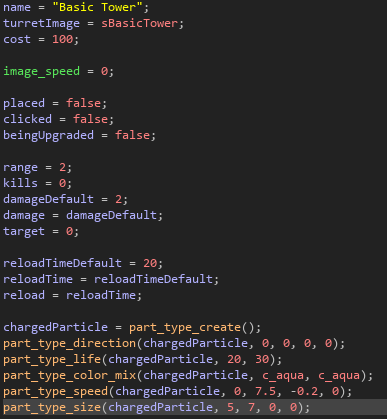
The create event initialises the variables for the Tower Object. All towers are parented to this object so that the code is inherited among all the towers, this makes editing the code for the Towers easy and is more efficient for performance.
This event creates the main local variables used in the other events for this object. It initialises the following variables:
Object Variables
- Image | This is the image that is displayed when the Tower Upgrade Menu is opened
- Target | This variable is a reference to the object index of the slime which the tower is currently targeting; used in the step event to shoot at the enemy slime and deal damage to it.
String Variables
- Name | This variable stores the name of the tower, for example ‘Basic Tower,’ and is displayed in the Tower Upgrade Menu to show the name of the currently selected tower.
Integer Variables
- Cost | This is the cost of the tower; it decreases the players money by this amount when a tower is bought. The player gets 80% of the cost of the tower back when it is sold, this was chosen to prevent the player placing and selling a tower constantly, moving it across the level, which makes for an interesting playstyle but is monotonous and unnecessary.
- Range | This stores the range of the tower in tiles. This value is multiplied by 64 to calculate the range the tower can shoot enemies within.
- Kills | Stores the amount of kills a tower has, increases when the tower shoots the enemy and reduces its health to or below zero.
- Reload Time | Stores the reload time for the tower when shooting
Booleans
- Placed | Is true when the tower is placed on a tile, false when the tower is being placed within the level.
- Clicked | Is true when the tower is clicked, this shows the Tower Upgrade Menu with statistics about the tower and has the upgrade and sell buttons.
- Being Upgraded | Is true when an upgrader tower is place adjacent to the tower, the upgrader tower add damage and reduces reload speed of the towers adjacent to it.
Step Event
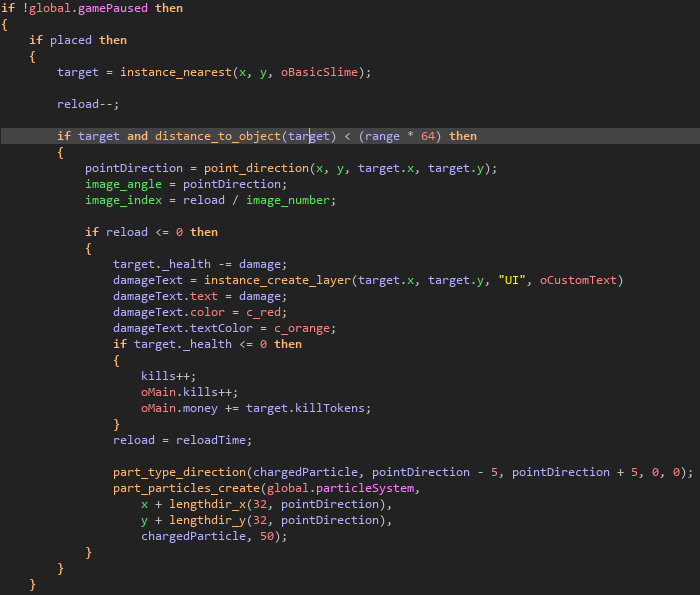
This section of code above is finding and damaging the slimes within the range of the tower.
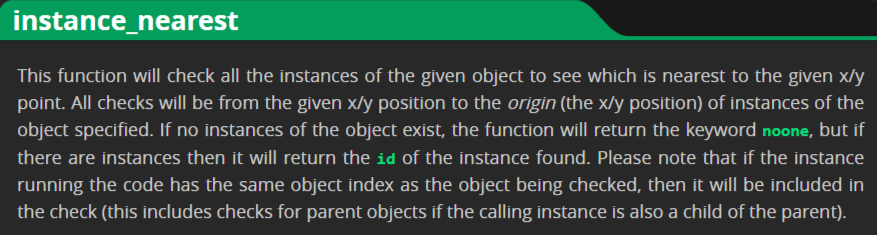
Firstly, I needed a way of getting the object index of the nearest slime to the tower, so I chose to use the instance_nearest() function which returns the index of the slime object.
GameMaker Manual (yoyogames.com) | instance_nearest()

After that, I needed a way to check if the target is within the towers range, so I used the distance_to_object() function to calculate the distance between the tower’s position and the slime’s position using Pythagoras’ theorem.
GameMaker Manual (yoyogames.com) | distance_to_object()

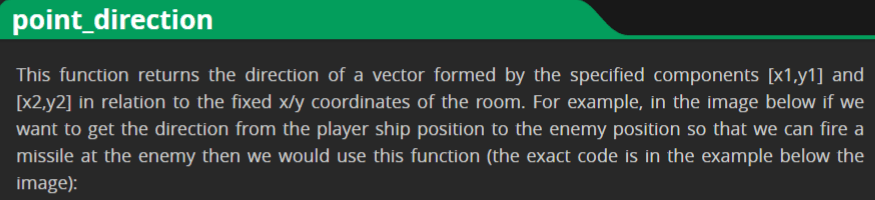
Then I created the logic for pointing the sprite towards the slime using the point_direction() function, which calculates the arctangent of the tower’s vector2 position and the slime’s vector2 position, I then used this to rotate the tower towards the slime.
GameMaker Manual (yoyogames.com) | point_direction()
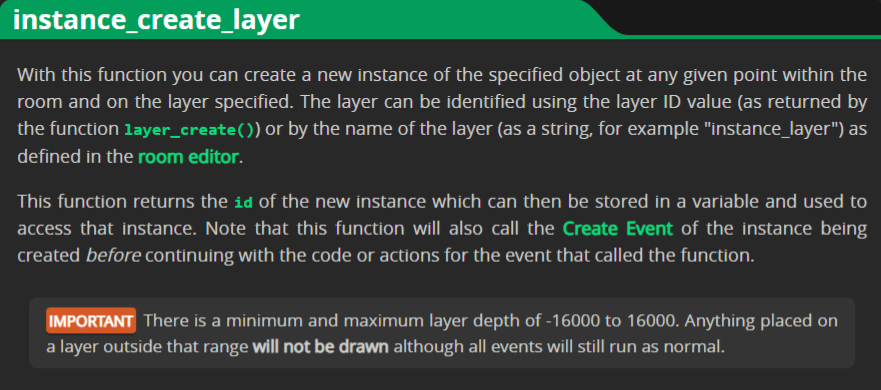
The next section creates the visual effects when the tower attacks the slime. I utilised the instance_create_layer() function to create a text UI object to display the damage that the tower is dealing to the slime. This text displays the damage number the tower inflicted to the slime and animates in an arc above the slime, falling due to its gravity, which creates a satisfying effect and visibly shows the player the effect of their towers.
GameMaker Manual (yoyogames.com) | instance_create_layer()
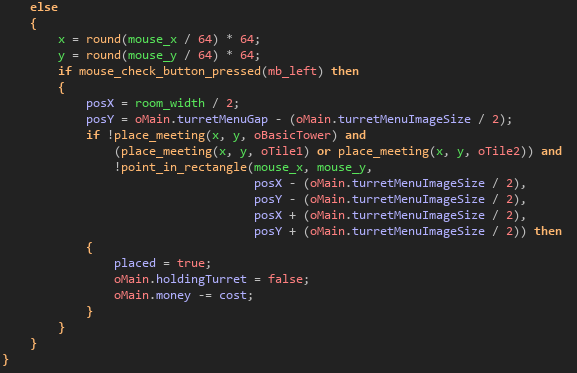
The last section of the step event is for controlling the placement logic. When a tower is selected in the Tower Menu, it spawns at the mouse’s position and can be placed by pressing the left mouse button. I used the place_meeting() function to return a collision between the tower’s position and the specified object – if there are no collisions between other towers, then the tower can be placed.
Draw Event

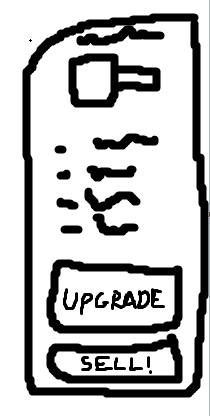


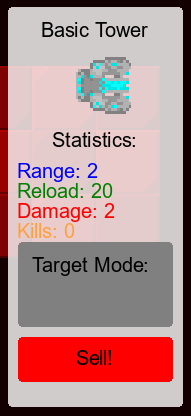
This is what the Tower Upgrade Menu looks like. It displays the range, reload time, damage and kills, the image and name, and upgrade and sell buttons.
Destroy Event

Programming the Particle System
The particle system is responsible for creating small ‘particles’ that are used for effects within the game, for example if a tower shoots or an enemy is killed, particles are created to make the desired effect.

- Firework Particle | This particle is used for the confetti / firework effect when the player beats a level.
- Enemy On-fire Particle | The particle that is creates on top of enemies that are on fire.
- Upgrade Particle | Creates a particle emitter on top of a currently upgraded tower.
- Upgrade Beam Particle | This particle is created when an offensive tower is placed next to an upgrader tower.
- Tower Destroy Particle | This particle is created when a tower is destroyed.
Game Maker’s particle system allows for full customisation of each particle in the system, allowing adjustments to the size, direction, life, colour, speed and more of each particle.
Conclusion
To conclude this document, I am very happy with the progress of this project. I have been assigned a team to manage and created the pre-production and production elements of the game, including the thoughts and processes within the documentation.
Harvard Reference List
App Store. (n.d.). Bloons TD 6. [online] Available at:
https://apps.apple.com/us/app/bloons-td-6/id1118115766.
App Store. (n.d.). Terraria. [online] Available at: https://apps.apple.com/us/app/terraria/id640364616.
Bloons Wiki. (n.d.). Bloons TD 6. [online] Available at: https://bloons.fandom.com/wiki/Bloons_TD_6.
Fandom.com. (2016). Terraria Wiki. [online] Available at: https://terraria.fandom.com/wiki/Terraria_Wiki.
Game Art 2D. (n.d.). Royalty Free 2D Game Assets. [online] Available at: https://www.gameart2d.com [Accessed 25 Apr. 2023].
neonabyss.fandom.com. (n.d.). Neon Abyss Wiki. [online] Available at: https://neonabyss.fandom.com/wiki/Neon_Abyss_Wiki.
Similar Web (2023). Similarweb.com – Digital World Market Intelligence Platform. [online] SimilarWeb.com. Available at: https://www.similarweb.com/.store.
steampowered.com. (n.d.). Neon Abyss on Steam. [online] Available at: https://store.steampowered.com/app/788100/Neon_Abyss/.
Wikipedia Contributors (2019). Terraria. [online] Wikipedia. Available at: https://en.wikipedia.org/wiki/Terraria.
Wikipedia. (2021). Bloons Tower Defence. [online] Available at: https://en.wikipedia.org/wiki/Bloons_Tower_Defense.
Wikipedia. (2022). Neon Abyss. [online] Available at: https://en.wikipedia.org/wiki/Neon_Abyss.
rushroyale.fandom.com. (n.d.). Rush Royale Wiki. [online] Available at: https://rushroyale.fandom.com/wiki/RushRoyale_Wiki [Accessed 1 May 2023].
play.google.com. (n.d.). Rush Royale: Tower Defence TD – Apps on Google Play. [online] Available at: https://play.google.com/store/apps/details?id=com.my.defense&hl=en_US [Accessed 1 May 2023].
Statista. (n.d.). Global console & PC gaming market value worldwide by format 2024. [online] Available at: https://www.statista.com/statistics/292460/video-game-consumer-market-value-worldwide-platform/#:~:text=In%202021%2C%20total%20console%20gaming [Accessed 28 Apr. 2023].
 Lewis' Games Development Portfolio